<?xml version="1.0" encoding="utf-8"?>
<feed xmlns="http://www.w3.org/2005/Atom">
    <id>https://vllm-sr.ai/zh-Hans/blog</id>
    <title>vLLM Semantic Router Blog</title>
    <updated>2026-07-09T00:00:00.000Z</updated>
    <generator>https://github.com/jpmonette/feed</generator>
    <link rel="alternate" href="https://vllm-sr.ai/zh-Hans/blog"/>
    <subtitle>vLLM Semantic Router Blog</subtitle>
    <icon>https://vllm-sr.ai/zh-Hans/img/vllm.png</icon>
    <entry>
        <title type="html"><![CDATA[Adding Cursor-Style Auto Model Selection to OpenCode with vLLM Semantic Router]]></title>
        <id>https://vllm-sr.ai/zh-Hans/blog/opencode-auto-mode</id>
        <link href="https://vllm-sr.ai/zh-Hans/blog/opencode-auto-mode"/>
        <updated>2026-07-09T00:00:00.000Z</updated>
        <summary type="html"><![CDATA[A practical guide to adding intelligent auto model selection to OpenCode or any OpenAI-compatible agent using vLLM Semantic Router and AgentGateway — one endpoint, one virtual model, and semantic routing across a mixed local-and-cloud fleet.]]></summary>
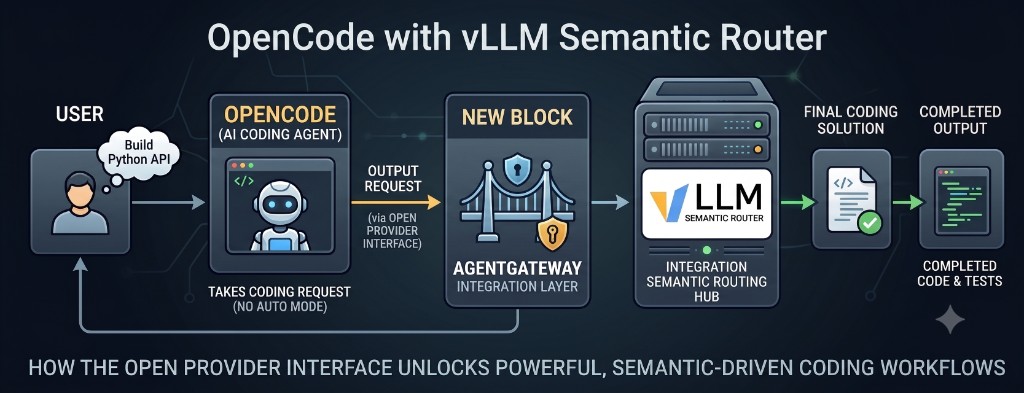
        <content type="html"><![CDATA[<div align="center"><p><img decoding="async" loading="lazy" alt="OpenCode with vLLM Semantic Router: open provider interface, AgentGateway integration layer, and semantic routing hub" src="https://vllm-sr.ai/zh-Hans/assets/images/opencode-auto-mode-hero-4f95020f36432c006f3cc687eea71241.png" width="1024" height="393" class="img_ev3q"></p></div>
<h2 class="anchor anchorTargetStickyNavbar_Vzrq" id="the-feature-everyone-wants-and-almost-nobody-has">The Feature Everyone Wants and Almost Nobody Has<a href="https://vllm-sr.ai/zh-Hans/blog/opencode-auto-mode#the-feature-everyone-wants-and-almost-nobody-has" class="hash-link" aria-label="The Feature Everyone Wants and Almost Nobody Has的直接链接" title="The Feature Everyone Wants and Almost Nobody Has的直接链接" translate="no">​</a></h2>
<p>Cursor's <strong>Auto</strong> mode is deceptively simple: the developer types, and the IDE chooses whether a prompt deserves a frontier model or something faster and cheaper. It is easy to stop noticing — until moving to an open tool where every request starts with a model dropdown.</p>
<p>That gap matters more than it sounds. Teams everywhere are standing up <strong>local and internal model serving</strong> — a fine-tuned coder on owned GPUs, a frontier API for hard problems, a fast cheap model for everything else. The models exist. The serving works. What is often missing is the <em>decision layer</em>: something that reads each request and sends it to the right backend automatically.</p>
<p><a href="https://opencode.ai/" target="_blank" rel="noopener noreferrer" class="">OpenCode</a> ships without a built-in Auto mode, but it does expose an open provider interface — enough to bolt intelligent routing on behind a single OpenAI-compatible endpoint.</p>
<p>This guide walks through building Auto mode for OpenCode (or any OpenAI-compatible client) with <a href="https://github.com/vllm-project/semantic-router" target="_blank" rel="noopener noreferrer" class="">vLLM Semantic Router</a> and <a href="https://github.com/agentgateway/agentgateway" target="_blank" rel="noopener noreferrer" class="">AgentGateway</a>: one endpoint, one model name, and an ML router choosing among the fleet per request. The configs below are complete; the failure modes are the ones that typically surface first in production setups.</p>
<iframe width="100%" height="400" src="https://www.youtube.com/embed/_BUGwgXTpag" title="Demo" frameborder="0" allow="accelerometer; autoplay; clipboard-write; encrypted-media; gyroscope; picture-in-picture; web-share"></iframe>
<p><em>[Demo video: three prompts from one OpenCode session, routed live to three different models]</em></p>
<hr>
<h2 class="anchor anchorTargetStickyNavbar_Vzrq" id="first-know-your-options-the-routing-algorithms-in-vllm-semantic-router">First, Know Your Options: The Routing Algorithms in vLLM Semantic Router<a href="https://vllm-sr.ai/zh-Hans/blog/opencode-auto-mode#first-know-your-options-the-routing-algorithms-in-vllm-semantic-router" class="hash-link" aria-label="First, Know Your Options: The Routing Algorithms in vLLM Semantic Router的直接链接" title="First, Know Your Options: The Routing Algorithms in vLLM Semantic Router的直接链接" translate="no">​</a></h2>
<p>"Auto mode" means different things to different teams. vLLM Semantic Router ships <strong>more than a dozen selection algorithms</strong>, each answering a different operational question:</p>
<table><thead><tr><th>Algorithm</th><th>What it optimizes</th><th>Reach for it when...</th></tr></thead><tbody><tr><td><code>router_dc</code></td><td>Prompt ↔ model-description similarity (dual-contrastive embeddings)</td><td>Models are <strong>specialists</strong> — a coder, a reasoner, a generalist — and the prompt's <em>intent</em> should decide. The closest analogue to Cursor's Auto.</td></tr><tr><td><code>multi_factor</code></td><td>Weighted quality / latency / cost / load score with SLO filters</td><td>Models are <strong>interchangeable</strong> (same capability, different deployments) and the goal is balancing budget and latency guardrails across a fleet.</td></tr><tr><td><code>latency_aware</code></td><td>Live TTFT/TPOT percentiles</td><td>Hard latency SLAs apply — user-facing chat where p95 time-to-first-token is the metric that pages on-call.</td></tr><tr><td><code>automix</code></td><td>Cost, via cascade + self-verification (POMDP, from the AutoMix paper)</td><td>Maximum savings with tolerated escalation: try the cheap model, verify its answer, escalate only on low confidence. Strong fit for batch/offline work.</td></tr><tr><td><code>elo</code></td><td>Feedback-driven ranking</td><td>User feedback (thumbs, regenerations) should continuously improve rankings in production.</td></tr><tr><td><code>knn</code> / <code>svm</code> / <code>mlp</code> / <code>kmeans</code></td><td>Learned routing from labeled examples</td><td>Historical data exists for "this prompt type → this model worked" and a trained policy is preferred over hand-written rules.</td></tr><tr><td><code>rl_driven</code></td><td>Long-run reward</td><td>A reward signal is defined and the router should optimize it over time.</td></tr><tr><td><code>hybrid</code></td><td>Intent + operational signals combined</td><td>Large fleets with both specialists <em>and</em> replicas, where "what is this prompt" and "which deployment is healthy" both matter.</td></tr><tr><td><code>static</code></td><td>Determinism</td><td>Compliance and predictability: category X always routes to model Y, auditable, no surprises.</td></tr></tbody></table>
<p>Decisions can also be gated by <strong>signal rules</strong> — classifiers for intent, PII, and jailbreak detection. "Anything containing PII stays on the on-prem model" is enforceable as routing policy, not just documentation. When the primary need is <em>governance</em> rather than <em>optimization</em>, signal rules are the right layer.</p>
<p><strong>Practical rule of thumb:</strong> interchangeable replicas → <code>multi_factor</code> or <code>latency_aware</code>. Specialist pools (local coder + frontier API) → prompt-aware routing with <code>router_dc</code>. The rest of this guide uses <code>router_dc</code>.</p>
<hr>
<h2 class="anchor anchorTargetStickyNavbar_Vzrq" id="the-design-one-virtual-model-called-mom">The Design: One Virtual Model Called MoM<a href="https://vllm-sr.ai/zh-Hans/blog/opencode-auto-mode#the-design-one-virtual-model-called-mom" class="hash-link" aria-label="The Design: One Virtual Model Called MoM的直接链接" title="The Design: One Virtual Model Called MoM的直接链接" translate="no">​</a></h2>
<p>The Semantic Router's core abstraction is a <strong>decision</strong>: a named bundle of candidate models, a selection algorithm, and a <em>virtual model name</em> the client calls. A typical Auto-mode setup exposes <code>MoM</code> — Mixture of Models:</p>
<div class="language-yaml codeBlockContainer_Ckt0 theme-code-block" style="--prism-color:#393A34;--prism-background-color:#f6f8fa"><div class="codeBlockContent_QJqH"><pre tabindex="0" class="prism-code language-yaml codeBlock_bY9V thin-scrollbar" style="color:#393A34;background-color:#f6f8fa"><code class="codeBlockLines_e6Vv"><span class="token-line" style="color:#393A34"><span class="token key atrule" style="color:#00a4db">decisions</span><span class="token punctuation" style="color:#393A34">:</span><span class="token plain"></span><br></span><span class="token-line" style="color:#393A34"><span class="token plain">  </span><span class="token punctuation" style="color:#393A34">-</span><span class="token plain"> </span><span class="token key atrule" style="color:#00a4db">name</span><span class="token punctuation" style="color:#393A34">:</span><span class="token plain"> MoM</span><br></span><span class="token-line" style="color:#393A34"><span class="token plain">    </span><span class="token key atrule" style="color:#00a4db">description</span><span class="token punctuation" style="color:#393A34">:</span><span class="token plain"> </span><span class="token string" style="color:#e3116c">"Mixture of Models router"</span><span class="token plain"></span><br></span><span class="token-line" style="color:#393A34"><span class="token plain">    </span><span class="token key atrule" style="color:#00a4db">priority</span><span class="token punctuation" style="color:#393A34">:</span><span class="token plain"> </span><span class="token number" style="color:#36acaa">100</span><span class="token plain"></span><br></span><span class="token-line" style="color:#393A34"><span class="token plain">    </span><span class="token key atrule" style="color:#00a4db">rules</span><span class="token punctuation" style="color:#393A34">:</span><span class="token plain"></span><br></span><span class="token-line" style="color:#393A34"><span class="token plain">      </span><span class="token key atrule" style="color:#00a4db">operator</span><span class="token punctuation" style="color:#393A34">:</span><span class="token plain"> AND        </span><span class="token comment" style="color:#999988;font-style:italic"># empty AND = catch-all (see gotcha #1 below!)</span><span class="token plain"></span><br></span><span class="token-line" style="color:#393A34"><span class="token plain">    </span><span class="token key atrule" style="color:#00a4db">modelRefs</span><span class="token punctuation" style="color:#393A34">:</span><span class="token plain"></span><br></span><span class="token-line" style="color:#393A34"><span class="token plain">      </span><span class="token punctuation" style="color:#393A34">-</span><span class="token plain"> </span><span class="token key atrule" style="color:#00a4db">model</span><span class="token punctuation" style="color:#393A34">:</span><span class="token plain"> qwen</span><span class="token punctuation" style="color:#393A34">-</span><span class="token plain">coder</span><br></span><span class="token-line" style="color:#393A34"><span class="token plain">      </span><span class="token punctuation" style="color:#393A34">-</span><span class="token plain"> </span><span class="token key atrule" style="color:#00a4db">model</span><span class="token punctuation" style="color:#393A34">:</span><span class="token plain"> gpt</span><span class="token punctuation" style="color:#393A34">-</span><span class="token plain">4o</span><br></span><span class="token-line" style="color:#393A34"><span class="token plain">      </span><span class="token punctuation" style="color:#393A34">-</span><span class="token plain"> </span><span class="token key atrule" style="color:#00a4db">model</span><span class="token punctuation" style="color:#393A34">:</span><span class="token plain"> gemini</span><span class="token punctuation" style="color:#393A34">-</span><span class="token plain">flash</span><br></span><span class="token-line" style="color:#393A34"><span class="token plain">    </span><span class="token key atrule" style="color:#00a4db">algorithm</span><span class="token punctuation" style="color:#393A34">:</span><span class="token plain"></span><br></span><span class="token-line" style="color:#393A34"><span class="token plain">      </span><span class="token key atrule" style="color:#00a4db">type</span><span class="token punctuation" style="color:#393A34">:</span><span class="token plain"> router_dc</span><br></span></code></pre></div></div>
<p>With <code>router_dc</code>, routing rules about prompt keywords are unnecessary. Instead, configure <strong>plain-English descriptions of what each model is good at</strong>:</p>
<div class="language-yaml codeBlockContainer_Ckt0 theme-code-block" style="--prism-color:#393A34;--prism-background-color:#f6f8fa"><div class="codeBlockContent_QJqH"><pre tabindex="0" class="prism-code language-yaml codeBlock_bY9V thin-scrollbar" style="color:#393A34;background-color:#f6f8fa"><code class="codeBlockLines_e6Vv"><span class="token-line" style="color:#393A34"><span class="token key atrule" style="color:#00a4db">modelCards</span><span class="token punctuation" style="color:#393A34">:</span><span class="token plain"></span><br></span><span class="token-line" style="color:#393A34"><span class="token plain">  </span><span class="token punctuation" style="color:#393A34">-</span><span class="token plain"> </span><span class="token key atrule" style="color:#00a4db">name</span><span class="token punctuation" style="color:#393A34">:</span><span class="token plain"> qwen</span><span class="token punctuation" style="color:#393A34">-</span><span class="token plain">coder</span><br></span><span class="token-line" style="color:#393A34"><span class="token plain">    </span><span class="token key atrule" style="color:#00a4db">description</span><span class="token punctuation" style="color:#393A34">:</span><span class="token plain"> </span><span class="token punctuation" style="color:#393A34">&gt;</span><span class="token scalar string" style="color:#e3116c"></span><br></span><span class="token-line" style="color:#393A34"><span class="token scalar string" style="color:#e3116c">      Specialized coding model optimized for programming tasks.</span><br></span><span class="token-line" style="color:#393A34"><span class="token scalar string" style="color:#e3116c">      Excellent at writing code, debugging, algorithms, ...</span><span class="token plain"></span><br></span><span class="token-line" style="color:#393A34"><span class="token plain" style="display:inline-block"></span><br></span><span class="token-line" style="color:#393A34"><span class="token plain">  </span><span class="token punctuation" style="color:#393A34">-</span><span class="token plain"> </span><span class="token key atrule" style="color:#00a4db">name</span><span class="token punctuation" style="color:#393A34">:</span><span class="token plain"> gpt</span><span class="token punctuation" style="color:#393A34">-</span><span class="token plain">4o</span><br></span><span class="token-line" style="color:#393A34"><span class="token plain">    </span><span class="token key atrule" style="color:#00a4db">description</span><span class="token punctuation" style="color:#393A34">:</span><span class="token plain"> </span><span class="token punctuation" style="color:#393A34">&gt;</span><span class="token scalar string" style="color:#e3116c"></span><br></span><span class="token-line" style="color:#393A34"><span class="token scalar string" style="color:#e3116c">      Frontier reasoning model with exceptional analytical capability.</span><br></span><span class="token-line" style="color:#393A34"><span class="token scalar string" style="color:#e3116c">      Best for complex multi-step reasoning, strategic analysis, ...</span><span class="token plain"></span><br></span><span class="token-line" style="color:#393A34"><span class="token plain" style="display:inline-block"></span><br></span><span class="token-line" style="color:#393A34"><span class="token plain">  </span><span class="token punctuation" style="color:#393A34">-</span><span class="token plain"> </span><span class="token key atrule" style="color:#00a4db">name</span><span class="token punctuation" style="color:#393A34">:</span><span class="token plain"> gemini</span><span class="token punctuation" style="color:#393A34">-</span><span class="token plain">flash</span><br></span><span class="token-line" style="color:#393A34"><span class="token plain">    </span><span class="token key atrule" style="color:#00a4db">description</span><span class="token punctuation" style="color:#393A34">:</span><span class="token plain"> </span><span class="token punctuation" style="color:#393A34">&gt;</span><span class="token scalar string" style="color:#e3116c"></span><br></span><span class="token-line" style="color:#393A34"><span class="token scalar string" style="color:#e3116c">      Fast general-purpose model. Ideal for simple factual questions,</span><br></span><span class="token-line" style="color:#393A34"><span class="token scalar string" style="color:#e3116c">      quick lookups, summarization, casual conversation, ...</span><br></span></code></pre></div></div>
<p>At request time, an embedded <strong>mmBERT</strong> model (CPU, ~130MB) embeds the incoming prompt and compares it to those descriptions by cosine similarity. Example routing logs:</p>
<div class="language-plaintext codeBlockContainer_Ckt0 theme-code-block" style="--prism-color:#393A34;--prism-background-color:#f6f8fa"><div class="codeBlockContent_QJqH"><pre tabindex="0" class="prism-code language-plaintext codeBlock_bY9V thin-scrollbar" style="color:#393A34;background-color:#f6f8fa"><code class="codeBlockLines_e6Vv"><span class="token-line" style="color:#393A34"><span class="token plain">[RouterDC]   qwen-coder:   similarity=0.9998   ← "Write me a Python function..."</span><br></span><span class="token-line" style="color:#393A34"><span class="token plain">[RouterDC]   gpt-4o:       similarity=1.0000   ← "Compare utilitarian and deontological ethics..."</span><br></span><span class="token-line" style="color:#393A34"><span class="token plain">[RouterDC]   gemini-flash: similarity=0.9939   ← "What is the capital of Japan?"</span><br></span></code></pre></div></div>
<p>Routing decision cost is typically <strong>1–18ms on CPU</strong>. The descriptions <em>are</em> the routing policy — adding a fourth model (a SQL specialist, a legal model) is a new model card, not new application code.</p>
<p>Why this pattern qualifies as true Auto mode:</p>
<ol>
<li class=""><strong>The client stays simple.</strong> OpenCode holds no routing logic and no upstream API keys. Swap models, retune descriptions, add candidates — the client config stays fixed.</li>
<li class=""><strong>Cost control is structural.</strong> In a coding agent, code-shaped traffic lands on the $0 local model; only prompts that genuinely need frontier reasoning incur frontier pricing.</li>
<li class=""><strong>It fails soft.</strong> With gateway policy <code>failureMode: failOpen</code>, a dead router process lets traffic fall through to a default route. Users see answers, not hard outages.</li>
</ol>
<hr>
<h2 class="anchor anchorTargetStickyNavbar_Vzrq" id="the-architecture">The Architecture<a href="https://vllm-sr.ai/zh-Hans/blog/opencode-auto-mode#the-architecture" class="hash-link" aria-label="The Architecture的直接链接" title="The Architecture的直接链接" translate="no">​</a></h2>
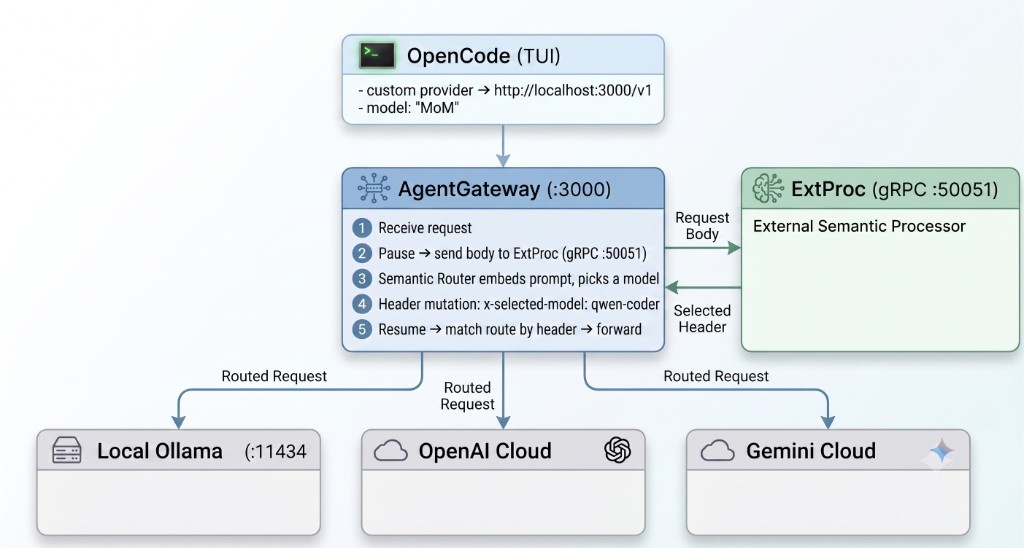
<div align="center"><p><img decoding="async" loading="lazy" alt="OpenCode Auto mode architecture: OpenCode TUI sends requests to AgentGateway, which pauses traffic for ExtProc semantic routing and forwards to Local Ollama, OpenAI Cloud, or Gemini Cloud" src="https://vllm-sr.ai/zh-Hans/assets/images/opencode-auto-mode-architecture-3a50bcf017bd6fe73729ce1a5341f613.png" width="1024" height="548" class="img_ev3q"></p></div>
<p>The Semantic Router runs as an <strong>Envoy ExtProc sidecar</strong> to AgentGateway — no extra proxy hop. The gateway pauses each request, streams the body to the router over gRPC, receives a header mutation, and resumes. Routes match on that header:</p>
<div class="language-yaml codeBlockContainer_Ckt0 theme-code-block" style="--prism-color:#393A34;--prism-background-color:#f6f8fa"><div class="codeBlockContent_QJqH"><pre tabindex="0" class="prism-code language-yaml codeBlock_bY9V thin-scrollbar" style="color:#393A34;background-color:#f6f8fa"><code class="codeBlockLines_e6Vv"><span class="token-line" style="color:#393A34"><span class="token key atrule" style="color:#00a4db">binds</span><span class="token punctuation" style="color:#393A34">:</span><span class="token plain"></span><br></span><span class="token-line" style="color:#393A34"><span class="token plain"></span><span class="token punctuation" style="color:#393A34">-</span><span class="token plain"> </span><span class="token key atrule" style="color:#00a4db">port</span><span class="token punctuation" style="color:#393A34">:</span><span class="token plain"> </span><span class="token number" style="color:#36acaa">3000</span><span class="token plain"></span><br></span><span class="token-line" style="color:#393A34"><span class="token plain">  </span><span class="token key atrule" style="color:#00a4db">listeners</span><span class="token punctuation" style="color:#393A34">:</span><span class="token plain"></span><br></span><span class="token-line" style="color:#393A34"><span class="token plain">  </span><span class="token punctuation" style="color:#393A34">-</span><span class="token plain"> </span><span class="token key atrule" style="color:#00a4db">routes</span><span class="token punctuation" style="color:#393A34">:</span><span class="token plain"></span><br></span><span class="token-line" style="color:#393A34"><span class="token plain">    </span><span class="token punctuation" style="color:#393A34">-</span><span class="token plain"> </span><span class="token key atrule" style="color:#00a4db">matches</span><span class="token punctuation" style="color:#393A34">:</span><span class="token plain"></span><br></span><span class="token-line" style="color:#393A34"><span class="token plain">      </span><span class="token punctuation" style="color:#393A34">-</span><span class="token plain"> </span><span class="token key atrule" style="color:#00a4db">headers</span><span class="token punctuation" style="color:#393A34">:</span><span class="token plain"></span><br></span><span class="token-line" style="color:#393A34"><span class="token plain">        </span><span class="token punctuation" style="color:#393A34">-</span><span class="token plain"> </span><span class="token key atrule" style="color:#00a4db">name</span><span class="token punctuation" style="color:#393A34">:</span><span class="token plain"> x</span><span class="token punctuation" style="color:#393A34">-</span><span class="token plain">selected</span><span class="token punctuation" style="color:#393A34">-</span><span class="token plain">model</span><br></span><span class="token-line" style="color:#393A34"><span class="token plain">          </span><span class="token key atrule" style="color:#00a4db">value</span><span class="token punctuation" style="color:#393A34">:</span><span class="token plain"></span><br></span><span class="token-line" style="color:#393A34"><span class="token plain">            </span><span class="token key atrule" style="color:#00a4db">exact</span><span class="token punctuation" style="color:#393A34">:</span><span class="token plain"> qwen</span><span class="token punctuation" style="color:#393A34">-</span><span class="token plain">coder</span><br></span><span class="token-line" style="color:#393A34"><span class="token plain">      </span><span class="token key atrule" style="color:#00a4db">backends</span><span class="token punctuation" style="color:#393A34">:</span><span class="token plain"></span><br></span><span class="token-line" style="color:#393A34"><span class="token plain">      </span><span class="token punctuation" style="color:#393A34">-</span><span class="token plain"> </span><span class="token key atrule" style="color:#00a4db">ai</span><span class="token punctuation" style="color:#393A34">:</span><span class="token plain"></span><br></span><span class="token-line" style="color:#393A34"><span class="token plain">          </span><span class="token key atrule" style="color:#00a4db">provider</span><span class="token punctuation" style="color:#393A34">:</span><span class="token plain"></span><br></span><span class="token-line" style="color:#393A34"><span class="token plain">            </span><span class="token key atrule" style="color:#00a4db">openAI</span><span class="token punctuation" style="color:#393A34">:</span><span class="token plain"> </span><span class="token punctuation" style="color:#393A34">{</span><span class="token punctuation" style="color:#393A34">}</span><span class="token plain"></span><br></span><span class="token-line" style="color:#393A34"><span class="token plain">          </span><span class="token key atrule" style="color:#00a4db">name</span><span class="token punctuation" style="color:#393A34">:</span><span class="token plain"> ollama</span><br></span><span class="token-line" style="color:#393A34"><span class="token plain">          </span><span class="token key atrule" style="color:#00a4db">hostOverride</span><span class="token punctuation" style="color:#393A34">:</span><span class="token plain"> localhost</span><span class="token punctuation" style="color:#393A34">:</span><span class="token number" style="color:#36acaa">11434</span><span class="token plain"></span><br></span><span class="token-line" style="color:#393A34"><span class="token plain">    </span><span class="token comment" style="color:#999988;font-style:italic"># ... gpt-4o → OpenAI (with backendAuth),</span><span class="token plain"></span><br></span><span class="token-line" style="color:#393A34"><span class="token plain">    </span><span class="token comment" style="color:#999988;font-style:italic">#     gemini-flash → Gemini (with backendAuth),</span><span class="token plain"></span><br></span><span class="token-line" style="color:#393A34"><span class="token plain">    </span><span class="token comment" style="color:#999988;font-style:italic">#     plus a failOpen fallback route</span><br></span></code></pre></div></div>
<p>A critical security split: <strong>the router never holds API keys.</strong> It classifies and sets a header; AgentGateway owns <code>backendAuth</code> and injects credentials per upstream. The component making ML decisions on untrusted input should hold zero secrets — especially when the endpoint serves a team rather than a single laptop.</p>
<hr>
<h2 class="anchor anchorTargetStickyNavbar_Vzrq" id="wiring-opencode-the-whole-integration-is-one-config-block">Wiring OpenCode: The Whole Integration Is One Config Block<a href="https://vllm-sr.ai/zh-Hans/blog/opencode-auto-mode#wiring-opencode-the-whole-integration-is-one-config-block" class="hash-link" aria-label="Wiring OpenCode: The Whole Integration Is One Config Block的直接链接" title="Wiring OpenCode: The Whole Integration Is One Config Block的直接链接" translate="no">​</a></h2>
<p>OpenCode accepts any OpenAI-compatible endpoint as a custom provider. In <code>~/.config/opencode/opencode.jsonc</code>:</p>
<div class="language-jsonc codeBlockContainer_Ckt0 theme-code-block" style="--prism-color:#393A34;--prism-background-color:#f6f8fa"><div class="codeBlockContent_QJqH"><pre tabindex="0" class="prism-code language-jsonc codeBlock_bY9V thin-scrollbar" style="color:#393A34;background-color:#f6f8fa"><code class="codeBlockLines_e6Vv"><span class="token-line" style="color:#393A34"><span class="token plain">{</span><br></span><span class="token-line" style="color:#393A34"><span class="token plain">  "provider": {</span><br></span><span class="token-line" style="color:#393A34"><span class="token plain">    "auto_sr": {</span><br></span><span class="token-line" style="color:#393A34"><span class="token plain">      "name": "Auto (Semantic Router)",</span><br></span><span class="token-line" style="color:#393A34"><span class="token plain">      "npm": "@ai-sdk/openai-compatible",</span><br></span><span class="token-line" style="color:#393A34"><span class="token plain">      "options": {</span><br></span><span class="token-line" style="color:#393A34"><span class="token plain">        "baseURL": "http://localhost:3000/v1"</span><br></span><span class="token-line" style="color:#393A34"><span class="token plain">      },</span><br></span><span class="token-line" style="color:#393A34"><span class="token plain">      "models": {</span><br></span><span class="token-line" style="color:#393A34"><span class="token plain">        "MoM": {</span><br></span><span class="token-line" style="color:#393A34"><span class="token plain">          "name": "MoM",</span><br></span><span class="token-line" style="color:#393A34"><span class="token plain">          "limit": { "context": 32768, "output": 8192 }</span><br></span><span class="token-line" style="color:#393A34"><span class="token plain">        }</span><br></span><span class="token-line" style="color:#393A34"><span class="token plain">      }</span><br></span><span class="token-line" style="color:#393A34"><span class="token plain">    }</span><br></span><span class="token-line" style="color:#393A34"><span class="token plain">  }</span><br></span><span class="token-line" style="color:#393A34"><span class="token plain">}</span><br></span></code></pre></div></div>
<p>The Semantic Router intercepts <code>/v1/models</code> and <strong>advertises the virtual model</strong>, so OpenCode's discovery finds <code>MoM</code> as if it were a real backend. Select the provider, pick <code>MoM</code>, and every prompt is classified server-side before it reaches an upstream LLM.</p>
<p>For observability, AgentGateway ships a built-in UI (build with <code>--features ui</code>, served at <code>:15000/ui</code>) and can persist every request to SQLite with cost attribution:</p>
<div class="language-yaml codeBlockContainer_Ckt0 theme-code-block" style="--prism-color:#393A34;--prism-background-color:#f6f8fa"><div class="codeBlockContent_QJqH"><pre tabindex="0" class="prism-code language-yaml codeBlock_bY9V thin-scrollbar" style="color:#393A34;background-color:#f6f8fa"><code class="codeBlockLines_e6Vv"><span class="token-line" style="color:#393A34"><span class="token key atrule" style="color:#00a4db">config</span><span class="token punctuation" style="color:#393A34">:</span><span class="token plain"></span><br></span><span class="token-line" style="color:#393A34"><span class="token plain">  </span><span class="token key atrule" style="color:#00a4db">modelCatalog</span><span class="token punctuation" style="color:#393A34">:</span><span class="token plain"></span><br></span><span class="token-line" style="color:#393A34"><span class="token plain">  </span><span class="token punctuation" style="color:#393A34">-</span><span class="token plain"> </span><span class="token key atrule" style="color:#00a4db">file</span><span class="token punctuation" style="color:#393A34">:</span><span class="token plain"> base</span><span class="token punctuation" style="color:#393A34">-</span><span class="token plain">costs.json</span><br></span><span class="token-line" style="color:#393A34"><span class="token plain">  </span><span class="token key atrule" style="color:#00a4db">database</span><span class="token punctuation" style="color:#393A34">:</span><span class="token plain"></span><br></span><span class="token-line" style="color:#393A34"><span class="token plain">    </span><span class="token key atrule" style="color:#00a4db">url</span><span class="token punctuation" style="color:#393A34">:</span><span class="token plain"> sqlite</span><span class="token punctuation" style="color:#393A34">:</span><span class="token plain">//agentgateway.db</span><br></span></code></pre></div></div>
<p>Enable request persistence early — it pays off the first time routing behavior needs debugging.</p>
<hr>
<h2 class="anchor anchorTargetStickyNavbar_Vzrq" id="common-pitfalls">Common Pitfalls<a href="https://vllm-sr.ai/zh-Hans/blog/opencode-auto-mode#common-pitfalls" class="hash-link" aria-label="Common Pitfalls的直接链接" title="Common Pitfalls的直接链接" translate="no">​</a></h2>
<p>Four issues show up repeatedly when wiring this stack. Each applies broadly beyond OpenCode.</p>
<h3 class="anchor anchorTargetStickyNavbar_Vzrq" id="pitfall-1-the-catch-all-rule-that-matches-nothing">Pitfall 1: The catch-all rule that matches nothing<a href="https://vllm-sr.ai/zh-Hans/blog/opencode-auto-mode#pitfall-1-the-catch-all-rule-that-matches-nothing" class="hash-link" aria-label="Pitfall 1: The catch-all rule that matches nothing的直接链接" title="Pitfall 1: The catch-all rule that matches nothing的直接链接" translate="no">​</a></h3>
<p>Older examples use <code>rules: {}</code> as "match everything." On current <code>main</code>, an empty rules block evaluates as an OR over zero conditions — which matches <strong>nothing</strong>. Requests silently fall back to the default model: no errors, plausible answers, zero actual routing. The tell in logs is <code>"decision":""</code>.</p>
<p>The documented catch-all is an empty <strong>AND</strong>:</p>
<div class="language-yaml codeBlockContainer_Ckt0 theme-code-block" style="--prism-color:#393A34;--prism-background-color:#f6f8fa"><div class="codeBlockContent_QJqH"><pre tabindex="0" class="prism-code language-yaml codeBlock_bY9V thin-scrollbar" style="color:#393A34;background-color:#f6f8fa"><code class="codeBlockLines_e6Vv"><span class="token-line" style="color:#393A34"><span class="token key atrule" style="color:#00a4db">rules</span><span class="token punctuation" style="color:#393A34">:</span><span class="token plain"></span><br></span><span class="token-line" style="color:#393A34"><span class="token plain">  </span><span class="token key atrule" style="color:#00a4db">operator</span><span class="token punctuation" style="color:#393A34">:</span><span class="token plain"> AND</span><br></span></code></pre></div></div>
<p>If the router "works" but never routes, verify the decision matches at all before tuning the algorithm.</p>
<h3 class="anchor anchorTargetStickyNavbar_Vzrq" id="pitfall-2-choosing-an-algorithm-that-ignores-the-prompt">Pitfall 2: Choosing an algorithm that ignores the prompt<a href="https://vllm-sr.ai/zh-Hans/blog/opencode-auto-mode#pitfall-2-choosing-an-algorithm-that-ignores-the-prompt" class="hash-link" aria-label="Pitfall 2: Choosing an algorithm that ignores the prompt的直接链接" title="Pitfall 2: Choosing an algorithm that ignores the prompt的直接链接" translate="no">​</a></h3>
<p><code>multi_factor</code> scores configured quality, pricing, and live latency signals. It is a fleet-balancing algorithm; <strong>the prompt never enters the equation.</strong> Without quality or pricing data configured, every factor is neutral and traffic sticks on the first candidate indefinitely.</p>
<p>For specialist pools (coder + reasoner + generalist), use <code>router_dc</code>. Reserve <code>multi_factor</code> for interchangeable replicas where cost, latency, and load are the primary tradeoffs.</p>
<h3 class="anchor anchorTargetStickyNavbar_Vzrq" id="pitfall-3-a-virtual-model-inherits-its-weakest-backends-limits">Pitfall 3: A virtual model inherits its weakest backend's limits<a href="https://vllm-sr.ai/zh-Hans/blog/opencode-auto-mode#pitfall-3-a-virtual-model-inherits-its-weakest-backends-limits" class="hash-link" aria-label="Pitfall 3: A virtual model inherits its weakest backend's limits的直接链接" title="Pitfall 3: A virtual model inherits its weakest backend's limits的直接链接" translate="no">​</a></h3>
<p>A typical first failure after routing to a cloud model:</p>
<div class="language-plaintext codeBlockContainer_Ckt0 theme-code-block" style="--prism-color:#393A34;--prism-background-color:#f6f8fa"><div class="codeBlockContent_QJqH"><pre tabindex="0" class="prism-code language-plaintext codeBlock_bY9V thin-scrollbar" style="color:#393A34;background-color:#f6f8fa"><code class="codeBlockLines_e6Vv"><span class="token-line" style="color:#393A34"><span class="token plain">max_tokens is too large: 32000. This model supports at most 16384</span><br></span><span class="token-line" style="color:#393A34"><span class="token plain">completion tokens, whereas you provided 32000.</span><br></span></code></pre></div></div>
<p>OpenCode cannot see individual backends behind <code>MoM</code>, so it may request a generous token budget. The virtual model's advertised limits must be the <strong>intersection</strong> across all candidates — smallest context window, safest output ceiling:</p>
<div class="language-jsonc codeBlockContainer_Ckt0 theme-code-block" style="--prism-color:#393A34;--prism-background-color:#f6f8fa"><div class="codeBlockContent_QJqH"><pre tabindex="0" class="prism-code language-jsonc codeBlock_bY9V thin-scrollbar" style="color:#393A34;background-color:#f6f8fa"><code class="codeBlockLines_e6Vv"><span class="token-line" style="color:#393A34"><span class="token plain">"limit": { "context": 32768, "output": 8192 }</span><br></span></code></pre></div></div>
<p>The same intersection rule applies to tool calling, vision, and every other capability flag. Configure for the least capable backend, not the average one.</p>
<h3 class="anchor anchorTargetStickyNavbar_Vzrq" id="pitfall-4-agentic-clients--small-local-models--malformed-tool-json">Pitfall 4: Agentic clients + small local models = malformed tool JSON<a href="https://vllm-sr.ai/zh-Hans/blog/opencode-auto-mode#pitfall-4-agentic-clients--small-local-models--malformed-tool-json" class="hash-link" aria-label="Pitfall 4: Agentic clients + small local models = malformed tool JSON的直接链接" title="Pitfall 4: Agentic clients + small local models = malformed tool JSON的直接链接" translate="no">​</a></h3>
<p>OpenCode is an <em>agent</em>: every request carries a large system prompt and a tool catalog (<code>write</code>, <code>edit</code>, <code>webfetch</code>, ...). Frontier models return structured tool calls. Smaller local models often emit a broken <em>imitation</em> as plain text:</p>
<div class="language-plaintext codeBlockContainer_Ckt0 theme-code-block" style="--prism-color:#393A34;--prism-background-color:#f6f8fa"><div class="codeBlockContent_QJqH"><pre tabindex="0" class="prism-code language-plaintext codeBlock_bY9V thin-scrollbar" style="color:#393A34;background-color:#f6f8fa"><code class="codeBlockLines_e6Vv"><span class="token-line" style="color:#393A34"><span class="token plain">&gt; what is python language</span><br></span><span class="token-line" style="color:#393A34"><span class="token plain" style="display:inline-block"></span><br></span><span class="token-line" style="color:#393A34"><span class="token plain">{"name":"write","arguments":{"content":"Python is a high-level,</span><br></span><span class="token-line" style="color:#393A34"><span class="token plain">interpreted programming language...","filePath":"python_language.md"}}</span><br></span></code></pre></div></div>
<p>OpenCode replays history on every request, so malformed JSON from earlier turns becomes part of the context and the session self-reinforces the wrong format. Teams running compact local models alongside agentic clients should expect some variant of this behavior.</p>
<p><strong>Diagnosis requires payload capture.</strong> AgentGateway can log the full messages array:</p>
<div class="language-yaml codeBlockContainer_Ckt0 theme-code-block" style="--prism-color:#393A34;--prism-background-color:#f6f8fa"><div class="codeBlockContent_QJqH"><pre tabindex="0" class="prism-code language-yaml codeBlock_bY9V thin-scrollbar" style="color:#393A34;background-color:#f6f8fa"><code class="codeBlockLines_e6Vv"><span class="token-line" style="color:#393A34"><span class="token key atrule" style="color:#00a4db">frontendPolicies</span><span class="token punctuation" style="color:#393A34">:</span><span class="token plain"></span><br></span><span class="token-line" style="color:#393A34"><span class="token plain">  </span><span class="token key atrule" style="color:#00a4db">http</span><span class="token punctuation" style="color:#393A34">:</span><span class="token plain"></span><br></span><span class="token-line" style="color:#393A34"><span class="token plain">    </span><span class="token key atrule" style="color:#00a4db">accessLog</span><span class="token punctuation" style="color:#393A34">:</span><span class="token plain"></span><br></span><span class="token-line" style="color:#393A34"><span class="token plain">      </span><span class="token key atrule" style="color:#00a4db">database</span><span class="token punctuation" style="color:#393A34">:</span><span class="token plain"></span><br></span><span class="token-line" style="color:#393A34"><span class="token plain">        </span><span class="token key atrule" style="color:#00a4db">add</span><span class="token punctuation" style="color:#393A34">:</span><span class="token plain"></span><br></span><span class="token-line" style="color:#393A34"><span class="token plain">          </span><span class="token key atrule" style="color:#00a4db">gen_ai.prompt</span><span class="token punctuation" style="color:#393A34">:</span><span class="token plain"> llm.prompt</span><br></span><span class="token-line" style="color:#393A34"><span class="token plain">          </span><span class="token key atrule" style="color:#00a4db">gen_ai.completion</span><span class="token punctuation" style="color:#393A34">:</span><span class="token plain"> </span><span class="token string" style="color:#e3116c">'llm.completion.map(c, {"role":"assistant", "content": c})'</span><br></span></code></pre></div></div>
<p>A single SQL query against the access log reveals the exact prompt the model received — agent preamble, poisoned history, and all. Debugging LLM pipelines without payload capture is guesswork.</p>
<p><strong>Mitigation:</strong> define a custom OpenCode agent whose prompt <strong>replaces</strong> the built-in agentic system prompt:</p>
<div class="language-jsonc codeBlockContainer_Ckt0 theme-code-block" style="--prism-color:#393A34;--prism-background-color:#f6f8fa"><div class="codeBlockContent_QJqH"><pre tabindex="0" class="prism-code language-jsonc codeBlock_bY9V thin-scrollbar" style="color:#393A34;background-color:#f6f8fa"><code class="codeBlockLines_e6Vv"><span class="token-line" style="color:#393A34"><span class="token plain">"agent": {</span><br></span><span class="token-line" style="color:#393A34"><span class="token plain">  "chat": {</span><br></span><span class="token-line" style="color:#393A34"><span class="token plain">    "description": "Plain chat through the semantic router",</span><br></span><span class="token-line" style="color:#393A34"><span class="token plain">    "mode": "primary",</span><br></span><span class="token-line" style="color:#393A34"><span class="token plain">    "model": "auto_sr/MoM",</span><br></span><span class="token-line" style="color:#393A34"><span class="token plain">    "prompt": "You are a helpful assistant. Answer directly and concisely in clean markdown. Use fenced code blocks for any code. Never output JSON tool calls.",</span><br></span><span class="token-line" style="color:#393A34"><span class="token plain">    "permission": { "edit": "deny", "bash": "deny", "webfetch": "deny" }</span><br></span><span class="token-line" style="color:#393A34"><span class="token plain">  }</span><br></span><span class="token-line" style="color:#393A34"><span class="token plain">}</span><br></span></code></pre></div></div>
<p>Also set <code>"tool_call": false</code> on the model entry. Switch to the <code>chat</code> agent in the OpenCode TUI (<strong>Tab</strong>), start a fresh session (poisoned history does not self-heal), and models in the pool respond in clean markdown. Keep the default <code>build</code> agent for full agentic work with backends that handle tool calls reliably.</p>
<hr>
<h2 class="anchor anchorTargetStickyNavbar_Vzrq" id="expected-results">Expected Results<a href="https://vllm-sr.ai/zh-Hans/blog/opencode-auto-mode#expected-results" class="hash-link" aria-label="Expected Results的直接链接" title="Expected Results的直接链接" translate="no">​</a></h2>
<p>Three prompts, one OpenCode session, one provider, one model name:</p>
<table><thead><tr><th>Prompt</th><th>Auto-routed to</th><th>Where it ran</th><th>Cost</th></tr></thead><tbody><tr><td>"Write me a Python function to compute fibonacci numbers using memoization"</td><td><code>qwen2.5-coder</code></td><td>Local Ollama</td><td>$0</td></tr><tr><td>"Compare utilitarian and deontological ethics for AI decision making..."</td><td><code>gpt-4o</code></td><td>OpenAI</td><td>~$0.03</td></tr><tr><td>"What is the capital of Japan?"</td><td><code>gemini-2.5-flash</code></td><td>Google</td><td>~$0.001</td></tr></tbody></table>
<p>Routing overhead stays in the <strong>1–18ms</strong> range on CPU. The gateway UI surfaces per-hop tokens and cost; the SQLite log retains the payload trail for post-incident review.</p>
<p>The outcome that matters: no model dropdown, no accidental frontier spend on trivial prompts, and no routing logic in the client — only English model descriptions and an embedding model that routes on semantic fit.</p>
<hr>
<h2 class="anchor anchorTargetStickyNavbar_Vzrq" id="takeaways">Takeaways<a href="https://vllm-sr.ai/zh-Hans/blog/opencode-auto-mode#takeaways" class="hash-link" aria-label="Takeaways的直接链接" title="Takeaways的直接链接" translate="no">​</a></h2>
<ul>
<li class=""><strong>Auto mode is a gateway feature, not a client feature.</strong> Build it once behind an OpenAI-compatible endpoint and every compatible tool inherits it.</li>
<li class=""><strong>Match the algorithm to the business need.</strong> Specialist models → <code>router_dc</code>. Interchangeable replicas → <code>multi_factor</code> / <code>latency_aware</code>. Maximum savings with escalation → <code>automix</code>. Governance → signal rules (PII, jailbreak).</li>
<li class=""><strong>A virtual model inherits the weakest backend's limits.</strong> Context, output, tool calling — intersection, not average.</li>
<li class=""><strong>Payload logging is non-negotiable.</strong> Silent misroutes and poisoned agent sessions are invisible without the actual bytes on the wire.</li>
<li class=""><strong>Keep keys out of the router.</strong> The component reading untrusted prompts should hold zero secrets; let the gateway own auth.</li>
</ul>
<p>Teams standing up internal model serving and wanting Cursor-style Auto mode can get there with two YAML files and a JSON block, using <a href="https://github.com/agentgateway/agentgateway" target="_blank" rel="noopener noreferrer" class="">AgentGateway</a> and <a href="https://github.com/vllm-project/semantic-router" target="_blank" rel="noopener noreferrer" class="">vLLM Semantic Router</a>.</p>
<h2 class="anchor anchorTargetStickyNavbar_Vzrq" id="get-started">Get Started<a href="https://vllm-sr.ai/zh-Hans/blog/opencode-auto-mode#get-started" class="hash-link" aria-label="Get Started的直接链接" title="Get Started的直接链接" translate="no">​</a></h2>
<ul>
<li class=""><a class="" href="https://vllm-sr.ai/zh-Hans/docs/installation/k8s/agentgateway">Install with agentgateway</a> — Kubernetes integration guide</li>
<li class=""><a class="" href="https://vllm-sr.ai/zh-Hans/docs/tutorials/algorithm/selection/router-dc">Router DC selection algorithm</a> — prompt-to-model-description routing</li>
<li class=""><a class="" href="https://vllm-sr.ai/zh-Hans/blog/agentgateway-semantic-brain-homelab">Giving AgentGateway a Semantic Brain</a> — homelab walkthrough with ExtProc routing</li>
<li class=""><a class="" href="https://vllm-sr.ai/zh-Hans/docs/installation/ollama">Ollama local setup</a> — run local models behind the gateway</li>
</ul>
<hr>
<p><em>Published for <a href="https://github.com/vllm-project/semantic-router/issues/2424" target="_blank" rel="noopener noreferrer" class="">issue #2424</a>. Have a community story about Semantic Router? Open a blog issue and the team will help get it published.</em></p>]]></content>
        <author>
            <name>Anup Sharma</name>
            <uri>https://www.linkedin.com/in/anup-sharma1</uri>
        </author>
        <author>
            <name>Aayush Saini</name>
            <uri>https://github.com/AayushSaini101</uri>
        </author>
        <author>
            <name>Shivji Kumar Jha</name>
            <uri>https://github.com/ShivjiKumarJha</uri>
        </author>
        <category label="opencode" term="opencode"/>
        <category label="routing" term="routing"/>
        <category label="agentgateway" term="agentgateway"/>
        <category label="mixture-of-models" term="mixture-of-models"/>
        <category label="tutorial" term="tutorial"/>
        <category label="community" term="community"/>
        <category label="vllm" term="vllm"/>
        <category label="semantic-router" term="semantic-router"/>
    </entry>
    <entry>
        <title type="html"><![CDATA[Giving AgentGateway a Semantic Brain with vLLM Semantic Router]]></title>
        <id>https://vllm-sr.ai/zh-Hans/blog/agentgateway-semantic-brain-homelab</id>
        <link href="https://vllm-sr.ai/zh-Hans/blog/agentgateway-semantic-brain-homelab"/>
        <updated>2026-06-28T00:00:00.000Z</updated>
        <summary type="html"><![CDATA[Replace keyword-based model routing with vLLM Semantic Router and AgentGateway ExtProc — two YAML files, 1ms routing, and fewer misroutes across local and cloud backends.]]></summary>
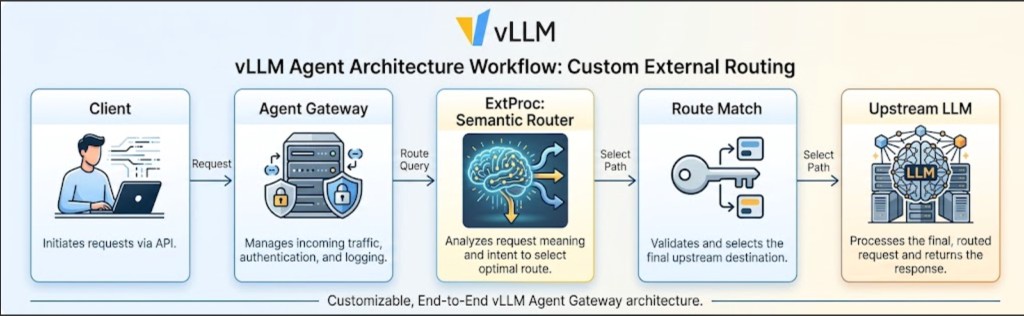
        <content type="html"><![CDATA[<div align="center"><p><img decoding="async" loading="lazy" alt="vLLM Agent Architecture Workflow: Custom Semantic Routing with AgentGateway and Semantic Router" src="https://vllm-sr.ai/zh-Hans/assets/images/hero-9281e7942fbac658628a40ab4e81402c.png" width="1024" height="316" class="img_ev3q"></p></div>
<p>Agent systems that span multiple models — a local endpoint for coding, a frontier cloud model for deep reasoning, and a fast general-purpose model for everyday tasks — all face the same routing question: <strong>how should each request be directed to the right backend?</strong></p>
<p>Many deployments start with a lightweight Python proxy or keyword matcher in front of the gateway. That approach works at small scale, but misroutes grow quickly as traffic, languages, and task types diversify. This post shows how <strong>vLLM Semantic Router</strong> running as an <strong>Envoy ExtProc sidecar</strong> inside <a href="https://agentgateway.dev/" target="_blank" rel="noopener noreferrer" class="">AgentGateway</a> replaces that pattern with semantic, config-driven routing.</p>
<h2 class="anchor anchorTargetStickyNavbar_Vzrq" id="the-problem-keyword-routing-does-not-scale">The Problem: Keyword Routing Does Not Scale<a href="https://vllm-sr.ai/zh-Hans/blog/agentgateway-semantic-brain-homelab#the-problem-keyword-routing-does-not-scale" class="hash-link" aria-label="The Problem: Keyword Routing Does Not Scale的直接链接" title="The Problem: Keyword Routing Does Not Scale的直接链接" translate="no">​</a></h2>
<p>A typical multi-model agent gateway fronts three backends:</p>
<table><thead><tr><th>Backend</th><th>Model</th><th>Role</th></tr></thead><tbody><tr><td>Local Ollama</td><td><code>qwen2.5-coder:7b</code></td><td>Coding and technical work</td></tr><tr><td>OpenAI</td><td><code>gpt-4o</code></td><td>Deep reasoning</td></tr><tr><td>Google</td><td><code>gemini-2.5-flash</code></td><td>Fast general tasks</td></tr></tbody></table>
<p>The routing layer was a simple keyword matcher:</p>
<div class="language-python codeBlockContainer_Ckt0 theme-code-block" style="--prism-color:#393A34;--prism-background-color:#f6f8fa"><div class="codeBlockContent_QJqH"><pre tabindex="0" class="prism-code language-python codeBlock_bY9V thin-scrollbar" style="color:#393A34;background-color:#f6f8fa"><code class="codeBlockLines_e6Vv"><span class="token-line" style="color:#393A34"><span class="token comment" style="color:#999988;font-style:italic"># router.py — keyword-based routing</span><span class="token plain"></span><br></span><span class="token-line" style="color:#393A34"><span class="token plain">coding_keywords </span><span class="token operator" style="color:#393A34">=</span><span class="token plain"> </span><span class="token punctuation" style="color:#393A34">[</span><span class="token string" style="color:#e3116c">"code"</span><span class="token punctuation" style="color:#393A34">,</span><span class="token plain"> </span><span class="token string" style="color:#e3116c">"python"</span><span class="token punctuation" style="color:#393A34">,</span><span class="token plain"> </span><span class="token string" style="color:#e3116c">"javascript"</span><span class="token punctuation" style="color:#393A34">,</span><span class="token plain"> </span><span class="token string" style="color:#e3116c">"bash"</span><span class="token punctuation" style="color:#393A34">,</span><span class="token plain"> </span><span class="token string" style="color:#e3116c">"script"</span><span class="token punctuation" style="color:#393A34">,</span><span class="token plain"></span><br></span><span class="token-line" style="color:#393A34"><span class="token plain">                   </span><span class="token string" style="color:#e3116c">"function"</span><span class="token punctuation" style="color:#393A34">,</span><span class="token plain"> </span><span class="token string" style="color:#e3116c">"bug"</span><span class="token punctuation" style="color:#393A34">,</span><span class="token plain"> </span><span class="token string" style="color:#e3116c">"error"</span><span class="token punctuation" style="color:#393A34">,</span><span class="token plain"> </span><span class="token string" style="color:#e3116c">"html"</span><span class="token punctuation" style="color:#393A34">,</span><span class="token plain"> </span><span class="token string" style="color:#e3116c">"css"</span><span class="token punctuation" style="color:#393A34">]</span><span class="token plain"></span><br></span><span class="token-line" style="color:#393A34"><span class="token plain">reasoning_keywords </span><span class="token operator" style="color:#393A34">=</span><span class="token plain"> </span><span class="token punctuation" style="color:#393A34">[</span><span class="token string" style="color:#e3116c">"think"</span><span class="token punctuation" style="color:#393A34">,</span><span class="token plain"> </span><span class="token string" style="color:#e3116c">"analyze"</span><span class="token punctuation" style="color:#393A34">,</span><span class="token plain"> </span><span class="token string" style="color:#e3116c">"explain in detail"</span><span class="token punctuation" style="color:#393A34">,</span><span class="token plain"></span><br></span><span class="token-line" style="color:#393A34"><span class="token plain">                      </span><span class="token string" style="color:#e3116c">"reasoning"</span><span class="token punctuation" style="color:#393A34">,</span><span class="token plain"> </span><span class="token string" style="color:#e3116c">"logic"</span><span class="token punctuation" style="color:#393A34">,</span><span class="token plain"> </span><span class="token string" style="color:#e3116c">"deduce"</span><span class="token punctuation" style="color:#393A34">]</span><span class="token plain"></span><br></span><span class="token-line" style="color:#393A34"><span class="token plain" style="display:inline-block"></span><br></span><span class="token-line" style="color:#393A34"><span class="token plain"></span><span class="token keyword" style="color:#00009f">if</span><span class="token plain"> </span><span class="token builtin">any</span><span class="token punctuation" style="color:#393A34">(</span><span class="token plain">k </span><span class="token keyword" style="color:#00009f">in</span><span class="token plain"> prompt_lower </span><span class="token keyword" style="color:#00009f">for</span><span class="token plain"> k </span><span class="token keyword" style="color:#00009f">in</span><span class="token plain"> coding_keywords</span><span class="token punctuation" style="color:#393A34">)</span><span class="token punctuation" style="color:#393A34">:</span><span class="token plain"></span><br></span><span class="token-line" style="color:#393A34"><span class="token plain">    intent </span><span class="token operator" style="color:#393A34">=</span><span class="token plain"> </span><span class="token string" style="color:#e3116c">"coding"</span><span class="token plain"></span><br></span><span class="token-line" style="color:#393A34"><span class="token plain"></span><span class="token keyword" style="color:#00009f">elif</span><span class="token plain"> </span><span class="token builtin">len</span><span class="token punctuation" style="color:#393A34">(</span><span class="token plain">prompt</span><span class="token punctuation" style="color:#393A34">)</span><span class="token plain"> </span><span class="token operator" style="color:#393A34">&gt;</span><span class="token plain"> </span><span class="token number" style="color:#36acaa">400</span><span class="token plain"> </span><span class="token keyword" style="color:#00009f">or</span><span class="token plain"> </span><span class="token builtin">any</span><span class="token punctuation" style="color:#393A34">(</span><span class="token plain">k </span><span class="token keyword" style="color:#00009f">in</span><span class="token plain"> prompt_lower </span><span class="token keyword" style="color:#00009f">for</span><span class="token plain"> k </span><span class="token keyword" style="color:#00009f">in</span><span class="token plain"> reasoning_keywords</span><span class="token punctuation" style="color:#393A34">)</span><span class="token punctuation" style="color:#393A34">:</span><span class="token plain"></span><br></span><span class="token-line" style="color:#393A34"><span class="token plain">    intent </span><span class="token operator" style="color:#393A34">=</span><span class="token plain"> </span><span class="token string" style="color:#e3116c">"reasoning"</span><span class="token plain"></span><br></span><span class="token-line" style="color:#393A34"><span class="token plain"></span><span class="token keyword" style="color:#00009f">else</span><span class="token punctuation" style="color:#393A34">:</span><span class="token plain"></span><br></span><span class="token-line" style="color:#393A34"><span class="token plain">    intent </span><span class="token operator" style="color:#393A34">=</span><span class="token plain"> </span><span class="token string" style="color:#e3116c">"simple"</span><br></span></code></pre></div></div>
<p>After two weeks of sustained traffic, the rough numbers looked like this:</p>
<table><thead><tr><th>Metric</th><th>With Python Router</th></tr></thead><tbody><tr><td>Misrouted requests (spot-checked)</td><td>~18%</td></tr><tr><td>Monthly estimated API cost</td><td>~$24</td></tr><tr><td>Routing latency (Python proxy hop)</td><td>~45ms</td></tr><tr><td>Keyword list maintenance</td><td>Manual, weekly tweaks</td></tr></tbody></table>
<p>Eighteen percent misroutes is not just wasted spend — it produces worse answers. Scheduled agent jobs that sent "summarize this week's calendar and suggest optimizations" to the 7B local model instead of Gemini or GPT-4o returned noticeably weaker output. Mixed-language prompts and unanticipated domains silently fell through to the wrong lane.</p>
<p>The architecture needed a routing layer that <strong>understood</strong> the prompt, not just scanned it for keywords.</p>
<h2 class="anchor anchorTargetStickyNavbar_Vzrq" id="enter-vllm-semantic-router--agentgateway">Enter vLLM Semantic Router + AgentGateway<a href="https://vllm-sr.ai/zh-Hans/blog/agentgateway-semantic-brain-homelab#enter-vllm-semantic-router--agentgateway" class="hash-link" aria-label="Enter vLLM Semantic Router + AgentGateway的直接链接" title="Enter vLLM Semantic Router + AgentGateway的直接链接" translate="no">​</a></h2>
<p>AgentGateway maintainers Keith Mattix and John Howard helped shape first-class ExtProc integration with vLLM Semantic Router. The resulting architecture is straightforward.</p>
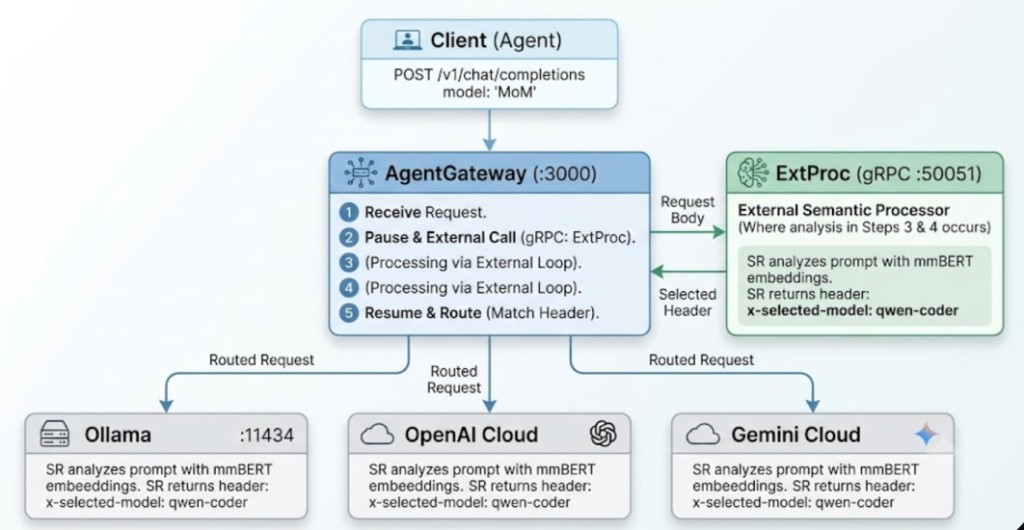
<p>Instead of a Python reverse proxy sitting in front of the gateway, Semantic Router runs as an <strong>Envoy ExtProc sidecar</strong>. AgentGateway pauses the request, sends the HTTP body to the SR gRPC endpoint, receives a header mutation (<code>x-selected-model: qwen-coder</code>), and resumes routing. Zero proxy hops. Zero Python processes. Just gRPC-native intelligence inside the gateway's own request lifecycle.</p>
<p>Semantic Router uses an embedded <strong>mmBERT</strong> model (a 2D Matryoshka embedding model, ~130MB) to classify every prompt and compare it against <strong>model descriptions defined in YAML</strong>. No keyword lists. No regex. Actual embeddings.</p>
<div align="center"><p><img decoding="async" loading="lazy" alt="AgentGateway request flow with vLLM Semantic Router ExtProc sidecar and multi-backend routing" src="https://vllm-sr.ai/zh-Hans/assets/images/architecture-flow-aebc4578d90af286bc772f1de43812b6.png" width="1024" height="530" class="img_ev3q"></p></div>
<p>For Kubernetes deployments, the same pattern is documented in the <a class="" href="https://vllm-sr.ai/zh-Hans/docs/installation/k8s/agentgateway">Install with agentgateway</a> guide.</p>
<h2 class="anchor anchorTargetStickyNavbar_Vzrq" id="the-setup-two-yaml-files-no-code">The Setup: Two YAML Files, No Code<a href="https://vllm-sr.ai/zh-Hans/blog/agentgateway-semantic-brain-homelab#the-setup-two-yaml-files-no-code" class="hash-link" aria-label="The Setup: Two YAML Files, No Code的直接链接" title="The Setup: Two YAML Files, No Code的直接链接" translate="no">​</a></h2>
<p>The full integration is defined in two config files.</p>
<h3 class="anchor anchorTargetStickyNavbar_Vzrq" id="1-semantic-router-config-configyaml">1. Semantic Router config (<code>config.yaml</code>)<a href="https://vllm-sr.ai/zh-Hans/blog/agentgateway-semantic-brain-homelab#1-semantic-router-config-configyaml" class="hash-link" aria-label="1-semantic-router-config-configyaml的直接链接" title="1-semantic-router-config-configyaml的直接链接" translate="no">​</a></h3>
<p>This tells Semantic Router about the models and how to route between them:</p>
<div class="language-yaml codeBlockContainer_Ckt0 theme-code-block" style="--prism-color:#393A34;--prism-background-color:#f6f8fa"><div class="codeBlockContent_QJqH"><pre tabindex="0" class="prism-code language-yaml codeBlock_bY9V thin-scrollbar" style="color:#393A34;background-color:#f6f8fa"><code class="codeBlockLines_e6Vv"><span class="token-line" style="color:#393A34"><span class="token key atrule" style="color:#00a4db">version</span><span class="token punctuation" style="color:#393A34">:</span><span class="token plain"> v0.3</span><br></span><span class="token-line" style="color:#393A34"><span class="token plain" style="display:inline-block"></span><br></span><span class="token-line" style="color:#393A34"><span class="token plain"></span><span class="token key atrule" style="color:#00a4db">providers</span><span class="token punctuation" style="color:#393A34">:</span><span class="token plain"></span><br></span><span class="token-line" style="color:#393A34"><span class="token plain">  </span><span class="token key atrule" style="color:#00a4db">defaults</span><span class="token punctuation" style="color:#393A34">:</span><span class="token plain"></span><br></span><span class="token-line" style="color:#393A34"><span class="token plain">    </span><span class="token key atrule" style="color:#00a4db">default_model</span><span class="token punctuation" style="color:#393A34">:</span><span class="token plain"> qwen</span><span class="token punctuation" style="color:#393A34">-</span><span class="token plain">coder</span><br></span><span class="token-line" style="color:#393A34"><span class="token plain">  </span><span class="token key atrule" style="color:#00a4db">models</span><span class="token punctuation" style="color:#393A34">:</span><span class="token plain"></span><br></span><span class="token-line" style="color:#393A34"><span class="token plain">    </span><span class="token punctuation" style="color:#393A34">-</span><span class="token plain"> </span><span class="token key atrule" style="color:#00a4db">name</span><span class="token punctuation" style="color:#393A34">:</span><span class="token plain"> qwen</span><span class="token punctuation" style="color:#393A34">-</span><span class="token plain">coder</span><br></span><span class="token-line" style="color:#393A34"><span class="token plain">      </span><span class="token key atrule" style="color:#00a4db">provider_model_id</span><span class="token punctuation" style="color:#393A34">:</span><span class="token plain"> qwen2.5</span><span class="token punctuation" style="color:#393A34">-</span><span class="token plain">coder</span><span class="token punctuation" style="color:#393A34">:</span><span class="token plain">7b</span><br></span><span class="token-line" style="color:#393A34"><span class="token plain">      </span><span class="token key atrule" style="color:#00a4db">api_format</span><span class="token punctuation" style="color:#393A34">:</span><span class="token plain"> openai</span><br></span><span class="token-line" style="color:#393A34"><span class="token plain">      </span><span class="token key atrule" style="color:#00a4db">backend_refs</span><span class="token punctuation" style="color:#393A34">:</span><span class="token plain"></span><br></span><span class="token-line" style="color:#393A34"><span class="token plain">        </span><span class="token punctuation" style="color:#393A34">-</span><span class="token plain"> </span><span class="token key atrule" style="color:#00a4db">name</span><span class="token punctuation" style="color:#393A34">:</span><span class="token plain"> local</span><span class="token punctuation" style="color:#393A34">-</span><span class="token plain">ollama</span><br></span><span class="token-line" style="color:#393A34"><span class="token plain">          </span><span class="token key atrule" style="color:#00a4db">endpoint</span><span class="token punctuation" style="color:#393A34">:</span><span class="token plain"> host.docker.internal</span><span class="token punctuation" style="color:#393A34">:</span><span class="token number" style="color:#36acaa">11434</span><span class="token plain"></span><br></span><span class="token-line" style="color:#393A34"><span class="token plain">          </span><span class="token key atrule" style="color:#00a4db">protocol</span><span class="token punctuation" style="color:#393A34">:</span><span class="token plain"> http</span><br></span><span class="token-line" style="color:#393A34"><span class="token plain" style="display:inline-block"></span><br></span><span class="token-line" style="color:#393A34"><span class="token plain">    </span><span class="token punctuation" style="color:#393A34">-</span><span class="token plain"> </span><span class="token key atrule" style="color:#00a4db">name</span><span class="token punctuation" style="color:#393A34">:</span><span class="token plain"> gpt</span><span class="token punctuation" style="color:#393A34">-</span><span class="token plain">4o</span><br></span><span class="token-line" style="color:#393A34"><span class="token plain">      </span><span class="token key atrule" style="color:#00a4db">provider_model_id</span><span class="token punctuation" style="color:#393A34">:</span><span class="token plain"> gpt</span><span class="token punctuation" style="color:#393A34">-</span><span class="token plain">4o</span><br></span><span class="token-line" style="color:#393A34"><span class="token plain">      </span><span class="token key atrule" style="color:#00a4db">api_format</span><span class="token punctuation" style="color:#393A34">:</span><span class="token plain"> openai</span><br></span><span class="token-line" style="color:#393A34"><span class="token plain">      </span><span class="token key atrule" style="color:#00a4db">backend_refs</span><span class="token punctuation" style="color:#393A34">:</span><span class="token plain"></span><br></span><span class="token-line" style="color:#393A34"><span class="token plain">        </span><span class="token punctuation" style="color:#393A34">-</span><span class="token plain"> </span><span class="token key atrule" style="color:#00a4db">name</span><span class="token punctuation" style="color:#393A34">:</span><span class="token plain"> openai</span><span class="token punctuation" style="color:#393A34">-</span><span class="token plain">cloud</span><br></span><span class="token-line" style="color:#393A34"><span class="token plain">          </span><span class="token key atrule" style="color:#00a4db">base_url</span><span class="token punctuation" style="color:#393A34">:</span><span class="token plain"> https</span><span class="token punctuation" style="color:#393A34">:</span><span class="token plain">//api.openai.com/v1</span><br></span><span class="token-line" style="color:#393A34"><span class="token plain" style="display:inline-block"></span><br></span><span class="token-line" style="color:#393A34"><span class="token plain">    </span><span class="token punctuation" style="color:#393A34">-</span><span class="token plain"> </span><span class="token key atrule" style="color:#00a4db">name</span><span class="token punctuation" style="color:#393A34">:</span><span class="token plain"> gemini</span><span class="token punctuation" style="color:#393A34">-</span><span class="token plain">flash</span><br></span><span class="token-line" style="color:#393A34"><span class="token plain">      </span><span class="token key atrule" style="color:#00a4db">provider_model_id</span><span class="token punctuation" style="color:#393A34">:</span><span class="token plain"> gemini</span><span class="token punctuation" style="color:#393A34">-</span><span class="token plain">2.5</span><span class="token punctuation" style="color:#393A34">-</span><span class="token plain">flash</span><br></span><span class="token-line" style="color:#393A34"><span class="token plain">      </span><span class="token key atrule" style="color:#00a4db">api_format</span><span class="token punctuation" style="color:#393A34">:</span><span class="token plain"> openai</span><br></span><span class="token-line" style="color:#393A34"><span class="token plain">      </span><span class="token key atrule" style="color:#00a4db">backend_refs</span><span class="token punctuation" style="color:#393A34">:</span><span class="token plain"></span><br></span><span class="token-line" style="color:#393A34"><span class="token plain">        </span><span class="token punctuation" style="color:#393A34">-</span><span class="token plain"> </span><span class="token key atrule" style="color:#00a4db">name</span><span class="token punctuation" style="color:#393A34">:</span><span class="token plain"> gemini</span><span class="token punctuation" style="color:#393A34">-</span><span class="token plain">cloud</span><br></span><span class="token-line" style="color:#393A34"><span class="token plain">          </span><span class="token key atrule" style="color:#00a4db">base_url</span><span class="token punctuation" style="color:#393A34">:</span><span class="token plain"> https</span><span class="token punctuation" style="color:#393A34">:</span><span class="token plain">//generativelanguage.googleapis.com/v1beta/openai</span><br></span><span class="token-line" style="color:#393A34"><span class="token plain" style="display:inline-block"></span><br></span><span class="token-line" style="color:#393A34"><span class="token plain"></span><span class="token key atrule" style="color:#00a4db">routing</span><span class="token punctuation" style="color:#393A34">:</span><span class="token plain"></span><br></span><span class="token-line" style="color:#393A34"><span class="token plain">  </span><span class="token key atrule" style="color:#00a4db">modelCards</span><span class="token punctuation" style="color:#393A34">:</span><span class="token plain"></span><br></span><span class="token-line" style="color:#393A34"><span class="token plain">    </span><span class="token punctuation" style="color:#393A34">-</span><span class="token plain"> </span><span class="token key atrule" style="color:#00a4db">name</span><span class="token punctuation" style="color:#393A34">:</span><span class="token plain"> qwen</span><span class="token punctuation" style="color:#393A34">-</span><span class="token plain">coder</span><br></span><span class="token-line" style="color:#393A34"><span class="token plain">      </span><span class="token key atrule" style="color:#00a4db">param_size</span><span class="token punctuation" style="color:#393A34">:</span><span class="token plain"> 7B</span><br></span><span class="token-line" style="color:#393A34"><span class="token plain">      </span><span class="token key atrule" style="color:#00a4db">context_window_size</span><span class="token punctuation" style="color:#393A34">:</span><span class="token plain"> </span><span class="token number" style="color:#36acaa">32768</span><span class="token plain"></span><br></span><span class="token-line" style="color:#393A34"><span class="token plain">      </span><span class="token key atrule" style="color:#00a4db">description</span><span class="token punctuation" style="color:#393A34">:</span><span class="token plain"> </span><span class="token punctuation" style="color:#393A34">&gt;</span><span class="token scalar string" style="color:#e3116c"></span><br></span><span class="token-line" style="color:#393A34"><span class="token scalar string" style="color:#e3116c">        Specialized coding model optimized for programming tasks.</span><br></span><span class="token-line" style="color:#393A34"><span class="token scalar string" style="color:#e3116c">        Excellent at writing code, debugging, algorithms, data structures,</span><br></span><span class="token-line" style="color:#393A34"><span class="token scalar string" style="color:#e3116c">        code review, refactoring, and technical implementation in Python,</span><br></span><span class="token-line" style="color:#393A34"><span class="token scalar string" style="color:#e3116c">        Rust, JavaScript, Go. Best for code generation, fixing bugs,</span><br></span><span class="token-line" style="color:#393A34"><span class="token scalar string" style="color:#e3116c">        writing tests, and technical programming Q&amp;A.</span><span class="token plain"></span><br></span><span class="token-line" style="color:#393A34"><span class="token plain" style="display:inline-block"></span><br></span><span class="token-line" style="color:#393A34"><span class="token plain">    </span><span class="token punctuation" style="color:#393A34">-</span><span class="token plain"> </span><span class="token key atrule" style="color:#00a4db">name</span><span class="token punctuation" style="color:#393A34">:</span><span class="token plain"> gpt</span><span class="token punctuation" style="color:#393A34">-</span><span class="token plain">4o</span><br></span><span class="token-line" style="color:#393A34"><span class="token plain">      </span><span class="token key atrule" style="color:#00a4db">param_size</span><span class="token punctuation" style="color:#393A34">:</span><span class="token plain"> 200B+</span><br></span><span class="token-line" style="color:#393A34"><span class="token plain">      </span><span class="token key atrule" style="color:#00a4db">context_window_size</span><span class="token punctuation" style="color:#393A34">:</span><span class="token plain"> </span><span class="token number" style="color:#36acaa">128000</span><span class="token plain"></span><br></span><span class="token-line" style="color:#393A34"><span class="token plain">      </span><span class="token key atrule" style="color:#00a4db">description</span><span class="token punctuation" style="color:#393A34">:</span><span class="token plain"> </span><span class="token punctuation" style="color:#393A34">&gt;</span><span class="token scalar string" style="color:#e3116c"></span><br></span><span class="token-line" style="color:#393A34"><span class="token scalar string" style="color:#e3116c">        Frontier reasoning model with exceptional analytical capability.</span><br></span><span class="token-line" style="color:#393A34"><span class="token scalar string" style="color:#e3116c">        Best for complex multi-step reasoning, strategic analysis,</span><br></span><span class="token-line" style="color:#393A34"><span class="token scalar string" style="color:#e3116c">        comparing trade-offs, writing long-form essays, nuanced</span><br></span><span class="token-line" style="color:#393A34"><span class="token scalar string" style="color:#e3116c">        explanations, math proofs, scientific reasoning.</span><span class="token plain"></span><br></span><span class="token-line" style="color:#393A34"><span class="token plain" style="display:inline-block"></span><br></span><span class="token-line" style="color:#393A34"><span class="token plain">    </span><span class="token punctuation" style="color:#393A34">-</span><span class="token plain"> </span><span class="token key atrule" style="color:#00a4db">name</span><span class="token punctuation" style="color:#393A34">:</span><span class="token plain"> gemini</span><span class="token punctuation" style="color:#393A34">-</span><span class="token plain">flash</span><br></span><span class="token-line" style="color:#393A34"><span class="token plain">      </span><span class="token key atrule" style="color:#00a4db">param_size</span><span class="token punctuation" style="color:#393A34">:</span><span class="token plain"> ~100B</span><br></span><span class="token-line" style="color:#393A34"><span class="token plain">      </span><span class="token key atrule" style="color:#00a4db">context_window_size</span><span class="token punctuation" style="color:#393A34">:</span><span class="token plain"> </span><span class="token number" style="color:#36acaa">1000000</span><span class="token plain"></span><br></span><span class="token-line" style="color:#393A34"><span class="token plain">      </span><span class="token key atrule" style="color:#00a4db">description</span><span class="token punctuation" style="color:#393A34">:</span><span class="token plain"> </span><span class="token punctuation" style="color:#393A34">&gt;</span><span class="token scalar string" style="color:#e3116c"></span><br></span><span class="token-line" style="color:#393A34"><span class="token scalar string" style="color:#e3116c">        Fast general-purpose model. Ideal for simple factual questions,</span><br></span><span class="token-line" style="color:#393A34"><span class="token scalar string" style="color:#e3116c">        quick lookups, summarization, casual conversation, translations,</span><br></span><span class="token-line" style="color:#393A34"><span class="token scalar string" style="color:#e3116c">        everyday tasks, and when speed matters more than depth.</span><span class="token plain"></span><br></span><span class="token-line" style="color:#393A34"><span class="token plain" style="display:inline-block"></span><br></span><span class="token-line" style="color:#393A34"><span class="token plain">  </span><span class="token key atrule" style="color:#00a4db">decisions</span><span class="token punctuation" style="color:#393A34">:</span><span class="token plain"></span><br></span><span class="token-line" style="color:#393A34"><span class="token plain">    </span><span class="token punctuation" style="color:#393A34">-</span><span class="token plain"> </span><span class="token key atrule" style="color:#00a4db">name</span><span class="token punctuation" style="color:#393A34">:</span><span class="token plain"> MoM</span><br></span><span class="token-line" style="color:#393A34"><span class="token plain">      </span><span class="token key atrule" style="color:#00a4db">description</span><span class="token punctuation" style="color:#393A34">:</span><span class="token plain"> </span><span class="token string" style="color:#e3116c">"Mixture of Models router"</span><span class="token plain"></span><br></span><span class="token-line" style="color:#393A34"><span class="token plain">      </span><span class="token key atrule" style="color:#00a4db">priority</span><span class="token punctuation" style="color:#393A34">:</span><span class="token plain"> </span><span class="token number" style="color:#36acaa">100</span><span class="token plain"></span><br></span><span class="token-line" style="color:#393A34"><span class="token plain">      </span><span class="token key atrule" style="color:#00a4db">rules</span><span class="token punctuation" style="color:#393A34">:</span><span class="token plain"> </span><span class="token punctuation" style="color:#393A34">{</span><span class="token punctuation" style="color:#393A34">}</span><span class="token plain"></span><br></span><span class="token-line" style="color:#393A34"><span class="token plain">      </span><span class="token key atrule" style="color:#00a4db">modelRefs</span><span class="token punctuation" style="color:#393A34">:</span><span class="token plain"></span><br></span><span class="token-line" style="color:#393A34"><span class="token plain">        </span><span class="token punctuation" style="color:#393A34">-</span><span class="token plain"> </span><span class="token key atrule" style="color:#00a4db">model</span><span class="token punctuation" style="color:#393A34">:</span><span class="token plain"> qwen</span><span class="token punctuation" style="color:#393A34">-</span><span class="token plain">coder</span><br></span><span class="token-line" style="color:#393A34"><span class="token plain">        </span><span class="token punctuation" style="color:#393A34">-</span><span class="token plain"> </span><span class="token key atrule" style="color:#00a4db">model</span><span class="token punctuation" style="color:#393A34">:</span><span class="token plain"> gpt</span><span class="token punctuation" style="color:#393A34">-</span><span class="token plain">4o</span><br></span><span class="token-line" style="color:#393A34"><span class="token plain">        </span><span class="token punctuation" style="color:#393A34">-</span><span class="token plain"> </span><span class="token key atrule" style="color:#00a4db">model</span><span class="token punctuation" style="color:#393A34">:</span><span class="token plain"> gemini</span><span class="token punctuation" style="color:#393A34">-</span><span class="token plain">flash</span><br></span><span class="token-line" style="color:#393A34"><span class="token plain">      </span><span class="token key atrule" style="color:#00a4db">algorithm</span><span class="token punctuation" style="color:#393A34">:</span><span class="token plain"></span><br></span><span class="token-line" style="color:#393A34"><span class="token plain">        </span><span class="token key atrule" style="color:#00a4db">type</span><span class="token punctuation" style="color:#393A34">:</span><span class="token plain"> multi_factor</span><br></span><span class="token-line" style="color:#393A34"><span class="token plain">        </span><span class="token key atrule" style="color:#00a4db">multi_factor</span><span class="token punctuation" style="color:#393A34">:</span><span class="token plain"></span><br></span><span class="token-line" style="color:#393A34"><span class="token plain">          </span><span class="token key atrule" style="color:#00a4db">weights</span><span class="token punctuation" style="color:#393A34">:</span><span class="token plain"></span><br></span><span class="token-line" style="color:#393A34"><span class="token plain">            </span><span class="token key atrule" style="color:#00a4db">quality</span><span class="token punctuation" style="color:#393A34">:</span><span class="token plain"> </span><span class="token number" style="color:#36acaa">0.1</span><span class="token plain"></span><br></span><span class="token-line" style="color:#393A34"><span class="token plain">            </span><span class="token key atrule" style="color:#00a4db">latency</span><span class="token punctuation" style="color:#393A34">:</span><span class="token plain"> </span><span class="token number" style="color:#36acaa">0.4</span><span class="token plain"></span><br></span><span class="token-line" style="color:#393A34"><span class="token plain">            </span><span class="token key atrule" style="color:#00a4db">cost</span><span class="token punctuation" style="color:#393A34">:</span><span class="token plain"> </span><span class="token number" style="color:#36acaa">0.5</span><span class="token plain"></span><br></span><span class="token-line" style="color:#393A34"><span class="token plain">          </span><span class="token key atrule" style="color:#00a4db">slo</span><span class="token punctuation" style="color:#393A34">:</span><span class="token plain"></span><br></span><span class="token-line" style="color:#393A34"><span class="token plain">            </span><span class="token key atrule" style="color:#00a4db">max_cost_per_1m</span><span class="token punctuation" style="color:#393A34">:</span><span class="token plain"> </span><span class="token number" style="color:#36acaa">0.5</span><br></span></code></pre></div></div>
<p>The key insight: each model is described in natural language, and Semantic Router uses those descriptions as semantic anchors. When a new prompt arrives, the router embeds it and compares it against these descriptions using cosine similarity. The closest match wins.</p>
<h3 class="anchor anchorTargetStickyNavbar_Vzrq" id="2-agentgateway-config-agentgateway_configyaml">2. AgentGateway config (<code>agentgateway_config.yaml</code>)<a href="https://vllm-sr.ai/zh-Hans/blog/agentgateway-semantic-brain-homelab#2-agentgateway-config-agentgateway_configyaml" class="hash-link" aria-label="2-agentgateway-config-agentgateway_configyaml的直接链接" title="2-agentgateway-config-agentgateway_configyaml的直接链接" translate="no">​</a></h3>
<p>This tells AgentGateway to call Semantic Router as an ExtProc sidecar and route based on the header it sets:</p>
<div class="language-yaml codeBlockContainer_Ckt0 theme-code-block" style="--prism-color:#393A34;--prism-background-color:#f6f8fa"><div class="codeBlockContent_QJqH"><pre tabindex="0" class="prism-code language-yaml codeBlock_bY9V thin-scrollbar" style="color:#393A34;background-color:#f6f8fa"><code class="codeBlockLines_e6Vv"><span class="token-line" style="color:#393A34"><span class="token key atrule" style="color:#00a4db">policies</span><span class="token punctuation" style="color:#393A34">:</span><span class="token plain"></span><br></span><span class="token-line" style="color:#393A34"><span class="token plain"></span><span class="token punctuation" style="color:#393A34">-</span><span class="token plain"> </span><span class="token key atrule" style="color:#00a4db">name</span><span class="token punctuation" style="color:#393A34">:</span><span class="token plain"></span><br></span><span class="token-line" style="color:#393A34"><span class="token plain">    </span><span class="token key atrule" style="color:#00a4db">name</span><span class="token punctuation" style="color:#393A34">:</span><span class="token plain"> semantic</span><span class="token punctuation" style="color:#393A34">-</span><span class="token plain">router</span><br></span><span class="token-line" style="color:#393A34"><span class="token plain">    </span><span class="token key atrule" style="color:#00a4db">namespace</span><span class="token punctuation" style="color:#393A34">:</span><span class="token plain"> default</span><br></span><span class="token-line" style="color:#393A34"><span class="token plain">  </span><span class="token key atrule" style="color:#00a4db">target</span><span class="token punctuation" style="color:#393A34">:</span><span class="token plain"></span><br></span><span class="token-line" style="color:#393A34"><span class="token plain">    </span><span class="token key atrule" style="color:#00a4db">gateway</span><span class="token punctuation" style="color:#393A34">:</span><span class="token plain"></span><br></span><span class="token-line" style="color:#393A34"><span class="token plain">      </span><span class="token key atrule" style="color:#00a4db">gatewayName</span><span class="token punctuation" style="color:#393A34">:</span><span class="token plain"> default</span><br></span><span class="token-line" style="color:#393A34"><span class="token plain">  </span><span class="token key atrule" style="color:#00a4db">phase</span><span class="token punctuation" style="color:#393A34">:</span><span class="token plain"> gateway</span><br></span><span class="token-line" style="color:#393A34"><span class="token plain">  </span><span class="token key atrule" style="color:#00a4db">policy</span><span class="token punctuation" style="color:#393A34">:</span><span class="token plain"></span><br></span><span class="token-line" style="color:#393A34"><span class="token plain">    </span><span class="token key atrule" style="color:#00a4db">extProc</span><span class="token punctuation" style="color:#393A34">:</span><span class="token plain"></span><br></span><span class="token-line" style="color:#393A34"><span class="token plain">      </span><span class="token key atrule" style="color:#00a4db">host</span><span class="token punctuation" style="color:#393A34">:</span><span class="token plain"> </span><span class="token string" style="color:#e3116c">"127.0.0.1:50051"</span><span class="token plain"></span><br></span><span class="token-line" style="color:#393A34"><span class="token plain">      </span><span class="token key atrule" style="color:#00a4db">processingOptions</span><span class="token punctuation" style="color:#393A34">:</span><span class="token plain"></span><br></span><span class="token-line" style="color:#393A34"><span class="token plain">        </span><span class="token key atrule" style="color:#00a4db">requestBodyMode</span><span class="token punctuation" style="color:#393A34">:</span><span class="token plain"> buffered</span><br></span><span class="token-line" style="color:#393A34"><span class="token plain">        </span><span class="token key atrule" style="color:#00a4db">responseBodyMode</span><span class="token punctuation" style="color:#393A34">:</span><span class="token plain"> none</span><br></span><span class="token-line" style="color:#393A34"><span class="token plain">        </span><span class="token key atrule" style="color:#00a4db">requestHeaderMode</span><span class="token punctuation" style="color:#393A34">:</span><span class="token plain"> send</span><br></span><span class="token-line" style="color:#393A34"><span class="token plain">      </span><span class="token key atrule" style="color:#00a4db">failureMode</span><span class="token punctuation" style="color:#393A34">:</span><span class="token plain"> failOpen</span><br></span><span class="token-line" style="color:#393A34"><span class="token plain" style="display:inline-block"></span><br></span><span class="token-line" style="color:#393A34"><span class="token plain"></span><span class="token key atrule" style="color:#00a4db">binds</span><span class="token punctuation" style="color:#393A34">:</span><span class="token plain"></span><br></span><span class="token-line" style="color:#393A34"><span class="token plain"></span><span class="token punctuation" style="color:#393A34">-</span><span class="token plain"> </span><span class="token key atrule" style="color:#00a4db">port</span><span class="token punctuation" style="color:#393A34">:</span><span class="token plain"> </span><span class="token number" style="color:#36acaa">3000</span><span class="token plain"></span><br></span><span class="token-line" style="color:#393A34"><span class="token plain">  </span><span class="token key atrule" style="color:#00a4db">listeners</span><span class="token punctuation" style="color:#393A34">:</span><span class="token plain"></span><br></span><span class="token-line" style="color:#393A34"><span class="token plain">  </span><span class="token punctuation" style="color:#393A34">-</span><span class="token plain"> </span><span class="token key atrule" style="color:#00a4db">routes</span><span class="token punctuation" style="color:#393A34">:</span><span class="token plain"></span><br></span><span class="token-line" style="color:#393A34"><span class="token plain">    </span><span class="token punctuation" style="color:#393A34">-</span><span class="token plain"> </span><span class="token key atrule" style="color:#00a4db">matches</span><span class="token punctuation" style="color:#393A34">:</span><span class="token plain"></span><br></span><span class="token-line" style="color:#393A34"><span class="token plain">      </span><span class="token punctuation" style="color:#393A34">-</span><span class="token plain"> </span><span class="token key atrule" style="color:#00a4db">headers</span><span class="token punctuation" style="color:#393A34">:</span><span class="token plain"></span><br></span><span class="token-line" style="color:#393A34"><span class="token plain">        </span><span class="token punctuation" style="color:#393A34">-</span><span class="token plain"> </span><span class="token key atrule" style="color:#00a4db">name</span><span class="token punctuation" style="color:#393A34">:</span><span class="token plain"> </span><span class="token string" style="color:#e3116c">"x-selected-model"</span><span class="token plain"></span><br></span><span class="token-line" style="color:#393A34"><span class="token plain">          </span><span class="token key atrule" style="color:#00a4db">value</span><span class="token punctuation" style="color:#393A34">:</span><span class="token plain"></span><br></span><span class="token-line" style="color:#393A34"><span class="token plain">            </span><span class="token key atrule" style="color:#00a4db">exact</span><span class="token punctuation" style="color:#393A34">:</span><span class="token plain"> </span><span class="token string" style="color:#e3116c">"qwen-coder"</span><span class="token plain"></span><br></span><span class="token-line" style="color:#393A34"><span class="token plain">      </span><span class="token key atrule" style="color:#00a4db">backends</span><span class="token punctuation" style="color:#393A34">:</span><span class="token plain"></span><br></span><span class="token-line" style="color:#393A34"><span class="token plain">      </span><span class="token punctuation" style="color:#393A34">-</span><span class="token plain"> </span><span class="token key atrule" style="color:#00a4db">ai</span><span class="token punctuation" style="color:#393A34">:</span><span class="token plain"></span><br></span><span class="token-line" style="color:#393A34"><span class="token plain">          </span><span class="token key atrule" style="color:#00a4db">provider</span><span class="token punctuation" style="color:#393A34">:</span><span class="token plain"></span><br></span><span class="token-line" style="color:#393A34"><span class="token plain">            </span><span class="token key atrule" style="color:#00a4db">openAI</span><span class="token punctuation" style="color:#393A34">:</span><span class="token plain"> </span><span class="token punctuation" style="color:#393A34">{</span><span class="token punctuation" style="color:#393A34">}</span><span class="token plain"></span><br></span><span class="token-line" style="color:#393A34"><span class="token plain">          </span><span class="token key atrule" style="color:#00a4db">name</span><span class="token punctuation" style="color:#393A34">:</span><span class="token plain"> ollama</span><br></span><span class="token-line" style="color:#393A34"><span class="token plain">          </span><span class="token key atrule" style="color:#00a4db">hostOverride</span><span class="token punctuation" style="color:#393A34">:</span><span class="token plain"> </span><span class="token string" style="color:#e3116c">"localhost:11434"</span><span class="token plain"></span><br></span><span class="token-line" style="color:#393A34"><span class="token plain" style="display:inline-block"></span><br></span><span class="token-line" style="color:#393A34"><span class="token plain">    </span><span class="token punctuation" style="color:#393A34">-</span><span class="token plain"> </span><span class="token key atrule" style="color:#00a4db">matches</span><span class="token punctuation" style="color:#393A34">:</span><span class="token plain"></span><br></span><span class="token-line" style="color:#393A34"><span class="token plain">      </span><span class="token punctuation" style="color:#393A34">-</span><span class="token plain"> </span><span class="token key atrule" style="color:#00a4db">headers</span><span class="token punctuation" style="color:#393A34">:</span><span class="token plain"></span><br></span><span class="token-line" style="color:#393A34"><span class="token plain">        </span><span class="token punctuation" style="color:#393A34">-</span><span class="token plain"> </span><span class="token key atrule" style="color:#00a4db">name</span><span class="token punctuation" style="color:#393A34">:</span><span class="token plain"> </span><span class="token string" style="color:#e3116c">"x-selected-model"</span><span class="token plain"></span><br></span><span class="token-line" style="color:#393A34"><span class="token plain">          </span><span class="token key atrule" style="color:#00a4db">value</span><span class="token punctuation" style="color:#393A34">:</span><span class="token plain"></span><br></span><span class="token-line" style="color:#393A34"><span class="token plain">            </span><span class="token key atrule" style="color:#00a4db">exact</span><span class="token punctuation" style="color:#393A34">:</span><span class="token plain"> </span><span class="token string" style="color:#e3116c">"gpt-4o"</span><span class="token plain"></span><br></span><span class="token-line" style="color:#393A34"><span class="token plain">      </span><span class="token key atrule" style="color:#00a4db">backends</span><span class="token punctuation" style="color:#393A34">:</span><span class="token plain"></span><br></span><span class="token-line" style="color:#393A34"><span class="token plain">      </span><span class="token punctuation" style="color:#393A34">-</span><span class="token plain"> </span><span class="token key atrule" style="color:#00a4db">ai</span><span class="token punctuation" style="color:#393A34">:</span><span class="token plain"></span><br></span><span class="token-line" style="color:#393A34"><span class="token plain">          </span><span class="token key atrule" style="color:#00a4db">provider</span><span class="token punctuation" style="color:#393A34">:</span><span class="token plain"></span><br></span><span class="token-line" style="color:#393A34"><span class="token plain">            </span><span class="token key atrule" style="color:#00a4db">openAI</span><span class="token punctuation" style="color:#393A34">:</span><span class="token plain"> </span><span class="token punctuation" style="color:#393A34">{</span><span class="token punctuation" style="color:#393A34">}</span><span class="token plain"></span><br></span><span class="token-line" style="color:#393A34"><span class="token plain">          </span><span class="token key atrule" style="color:#00a4db">name</span><span class="token punctuation" style="color:#393A34">:</span><span class="token plain"> openai</span><br></span><span class="token-line" style="color:#393A34"><span class="token plain">        </span><span class="token key atrule" style="color:#00a4db">policies</span><span class="token punctuation" style="color:#393A34">:</span><span class="token plain"></span><br></span><span class="token-line" style="color:#393A34"><span class="token plain">          </span><span class="token key atrule" style="color:#00a4db">backendAuth</span><span class="token punctuation" style="color:#393A34">:</span><span class="token plain"></span><br></span><span class="token-line" style="color:#393A34"><span class="token plain">            </span><span class="token key atrule" style="color:#00a4db">key</span><span class="token punctuation" style="color:#393A34">:</span><span class="token plain"> $OPENAI_API_KEY</span><br></span><span class="token-line" style="color:#393A34"><span class="token plain" style="display:inline-block"></span><br></span><span class="token-line" style="color:#393A34"><span class="token plain">    </span><span class="token punctuation" style="color:#393A34">-</span><span class="token plain"> </span><span class="token key atrule" style="color:#00a4db">matches</span><span class="token punctuation" style="color:#393A34">:</span><span class="token plain"></span><br></span><span class="token-line" style="color:#393A34"><span class="token plain">      </span><span class="token punctuation" style="color:#393A34">-</span><span class="token plain"> </span><span class="token key atrule" style="color:#00a4db">headers</span><span class="token punctuation" style="color:#393A34">:</span><span class="token plain"></span><br></span><span class="token-line" style="color:#393A34"><span class="token plain">        </span><span class="token punctuation" style="color:#393A34">-</span><span class="token plain"> </span><span class="token key atrule" style="color:#00a4db">name</span><span class="token punctuation" style="color:#393A34">:</span><span class="token plain"> </span><span class="token string" style="color:#e3116c">"x-selected-model"</span><span class="token plain"></span><br></span><span class="token-line" style="color:#393A34"><span class="token plain">          </span><span class="token key atrule" style="color:#00a4db">value</span><span class="token punctuation" style="color:#393A34">:</span><span class="token plain"></span><br></span><span class="token-line" style="color:#393A34"><span class="token plain">            </span><span class="token key atrule" style="color:#00a4db">exact</span><span class="token punctuation" style="color:#393A34">:</span><span class="token plain"> </span><span class="token string" style="color:#e3116c">"gemini-flash"</span><span class="token plain"></span><br></span><span class="token-line" style="color:#393A34"><span class="token plain">      </span><span class="token key atrule" style="color:#00a4db">backends</span><span class="token punctuation" style="color:#393A34">:</span><span class="token plain"></span><br></span><span class="token-line" style="color:#393A34"><span class="token plain">      </span><span class="token punctuation" style="color:#393A34">-</span><span class="token plain"> </span><span class="token key atrule" style="color:#00a4db">ai</span><span class="token punctuation" style="color:#393A34">:</span><span class="token plain"></span><br></span><span class="token-line" style="color:#393A34"><span class="token plain">          </span><span class="token key atrule" style="color:#00a4db">provider</span><span class="token punctuation" style="color:#393A34">:</span><span class="token plain"></span><br></span><span class="token-line" style="color:#393A34"><span class="token plain">            </span><span class="token key atrule" style="color:#00a4db">gemini</span><span class="token punctuation" style="color:#393A34">:</span><span class="token plain"> </span><span class="token punctuation" style="color:#393A34">{</span><span class="token punctuation" style="color:#393A34">}</span><span class="token plain"></span><br></span><span class="token-line" style="color:#393A34"><span class="token plain">          </span><span class="token key atrule" style="color:#00a4db">name</span><span class="token punctuation" style="color:#393A34">:</span><span class="token plain"> gemini</span><br></span><span class="token-line" style="color:#393A34"><span class="token plain">        </span><span class="token key atrule" style="color:#00a4db">policies</span><span class="token punctuation" style="color:#393A34">:</span><span class="token plain"></span><br></span><span class="token-line" style="color:#393A34"><span class="token plain">          </span><span class="token key atrule" style="color:#00a4db">backendAuth</span><span class="token punctuation" style="color:#393A34">:</span><span class="token plain"></span><br></span><span class="token-line" style="color:#393A34"><span class="token plain">            </span><span class="token key atrule" style="color:#00a4db">key</span><span class="token punctuation" style="color:#393A34">:</span><span class="token plain"> $GEMINI_API_KEY</span><br></span><span class="token-line" style="color:#393A34"><span class="token plain" style="display:inline-block"></span><br></span><span class="token-line" style="color:#393A34"><span class="token plain">    </span><span class="token punctuation" style="color:#393A34">-</span><span class="token plain"> </span><span class="token key atrule" style="color:#00a4db">backends</span><span class="token punctuation" style="color:#393A34">:</span><span class="token plain"></span><br></span><span class="token-line" style="color:#393A34"><span class="token plain">      </span><span class="token punctuation" style="color:#393A34">-</span><span class="token plain"> </span><span class="token key atrule" style="color:#00a4db">ai</span><span class="token punctuation" style="color:#393A34">:</span><span class="token plain"></span><br></span><span class="token-line" style="color:#393A34"><span class="token plain">          </span><span class="token key atrule" style="color:#00a4db">provider</span><span class="token punctuation" style="color:#393A34">:</span><span class="token plain"></span><br></span><span class="token-line" style="color:#393A34"><span class="token plain">            </span><span class="token key atrule" style="color:#00a4db">gemini</span><span class="token punctuation" style="color:#393A34">:</span><span class="token plain"> </span><span class="token punctuation" style="color:#393A34">{</span><span class="token punctuation" style="color:#393A34">}</span><span class="token plain"></span><br></span><span class="token-line" style="color:#393A34"><span class="token plain">          </span><span class="token key atrule" style="color:#00a4db">name</span><span class="token punctuation" style="color:#393A34">:</span><span class="token plain"> gemini</span><span class="token punctuation" style="color:#393A34">-</span><span class="token plain">default</span><br></span><span class="token-line" style="color:#393A34"><span class="token plain">        </span><span class="token key atrule" style="color:#00a4db">policies</span><span class="token punctuation" style="color:#393A34">:</span><span class="token plain"></span><br></span><span class="token-line" style="color:#393A34"><span class="token plain">          </span><span class="token key atrule" style="color:#00a4db">backendAuth</span><span class="token punctuation" style="color:#393A34">:</span><span class="token plain"></span><br></span><span class="token-line" style="color:#393A34"><span class="token plain">            </span><span class="token key atrule" style="color:#00a4db">key</span><span class="token punctuation" style="color:#393A34">:</span><span class="token plain"> $GEMINI_API_KEY</span><br></span></code></pre></div></div>
<p>Notice the separation of concerns: <strong>Semantic Router never touches API keys</strong>. It classifies the prompt and mutates a header. AgentGateway owns downstream auth. That is exactly how production gateways are designed — routing intelligence decoupled from security posture.</p>
<p>The <code>failureMode: failOpen</code> setting means if the SR container crashes or restarts, AgentGateway falls through to the default Gemini route. During SR container restarts, client requests still get answered without interruption.</p>
<h2 class="anchor anchorTargetStickyNavbar_Vzrq" id="arm64-on-apple-silicon-two-bugs-two-prs">ARM64 on Apple Silicon: Two Bugs, Two PRs<a href="https://vllm-sr.ai/zh-Hans/blog/agentgateway-semantic-brain-homelab#arm64-on-apple-silicon-two-bugs-two-prs" class="hash-link" aria-label="ARM64 on Apple Silicon: Two Bugs, Two PRs的直接链接" title="ARM64 on Apple Silicon: Two Bugs, Two PRs的直接链接" translate="no">​</a></h2>
<p>On ARM64 hosts (including Apple Silicon), the SR container may start while embeddings remain unavailable:</p>
<div class="language-json codeBlockContainer_Ckt0 theme-code-block" style="--prism-color:#393A34;--prism-background-color:#f6f8fa"><div class="codeBlockContent_QJqH"><pre tabindex="0" class="prism-code language-json codeBlock_bY9V thin-scrollbar" style="color:#393A34;background-color:#f6f8fa"><code class="codeBlockLines_e6Vv"><span class="token-line" style="color:#393A34"><span class="token punctuation" style="color:#393A34">{</span><span class="token plain"></span><br></span><span class="token-line" style="color:#393A34"><span class="token plain">  </span><span class="token property" style="color:#36acaa">"msg"</span><span class="token operator" style="color:#393A34">:</span><span class="token plain"> </span><span class="token string" style="color:#e3116c">"embedding_models_init_completed"</span><span class="token punctuation" style="color:#393A34">,</span><span class="token plain"></span><br></span><span class="token-line" style="color:#393A34"><span class="token plain">  </span><span class="token property" style="color:#36acaa">"embedding_ready"</span><span class="token operator" style="color:#393A34">:</span><span class="token plain"> </span><span class="token boolean" style="color:#36acaa">false</span><span class="token punctuation" style="color:#393A34">,</span><span class="token plain"></span><br></span><span class="token-line" style="color:#393A34"><span class="token plain">  </span><span class="token property" style="color:#36acaa">"tools_ready"</span><span class="token operator" style="color:#393A34">:</span><span class="token plain"> </span><span class="token boolean" style="color:#36acaa">false</span><span class="token plain"></span><br></span><span class="token-line" style="color:#393A34"><span class="token plain"></span><span class="token punctuation" style="color:#393A34">}</span><br></span></code></pre></div></div>
<p>The mmBERT model loaded but the embedding runtime never became ready. Every routing attempt logged:</p>
<div class="language-text codeBlockContainer_Ckt0 theme-code-block" style="--prism-color:#393A34;--prism-background-color:#f6f8fa"><div class="codeBlockContent_QJqH"><pre tabindex="0" class="prism-code language-text codeBlock_bY9V thin-scrollbar" style="color:#393A34;background-color:#f6f8fa"><code class="codeBlockLines_e6Vv"><span class="token-line" style="color:#393A34"><span class="token plain">Failed to embed model qwen-coder: failed to generate batched embedding (status: -1)</span><br></span></code></pre></div></div>
<h3 class="anchor anchorTargetStickyNavbar_Vzrq" id="bug-1-wrong-ffi-dispatch-2172">Bug #1: Wrong FFI dispatch (<a href="https://github.com/vllm-project/semantic-router/issues/2172" target="_blank" rel="noopener noreferrer" class="">#2172</a>)<a href="https://vllm-sr.ai/zh-Hans/blog/agentgateway-semantic-brain-homelab#bug-1-wrong-ffi-dispatch-2172" class="hash-link" aria-label="bug-1-wrong-ffi-dispatch-2172的直接链接" title="bug-1-wrong-ffi-dispatch-2172的直接链接" translate="no">​</a></h3>
<p>The Go router was calling <code>candle_binding.GetEmbeddingBatched()</code> for all model types — but the Rust FFI backend only supports batched embeddings for <code>qwen3</code> architectures. For <code>mmbert</code> (the default), it returned <code>status: -1</code>.</p>
<p>The fix in <a href="https://github.com/vllm-project/semantic-router/pull/2192" target="_blank" rel="noopener noreferrer" class="">PR #2192</a> adds a dispatch check:</p>
<div class="language-go codeBlockContainer_Ckt0 theme-code-block" style="--prism-color:#393A34;--prism-background-color:#f6f8fa"><div class="codeBlockContent_QJqH"><pre tabindex="0" class="prism-code language-go codeBlock_bY9V thin-scrollbar" style="color:#393A34;background-color:#f6f8fa"><code class="codeBlockLines_e6Vv"><span class="token-line" style="color:#393A34"><span class="token comment" style="color:#999988;font-style:italic">// Only qwen3 supports the batched FFI. Others use single-text FFI.</span><span class="token plain"></span><br></span><span class="token-line" style="color:#393A34"><span class="token plain"></span><span class="token keyword" style="color:#00009f">func</span><span class="token plain"> </span><span class="token function" style="color:#d73a49">candleEmbeddingSupportsBatched</span><span class="token punctuation" style="color:#393A34">(</span><span class="token plain">modelType </span><span class="token builtin">string</span><span class="token punctuation" style="color:#393A34">)</span><span class="token plain"> </span><span class="token builtin">bool</span><span class="token plain"> </span><span class="token punctuation" style="color:#393A34">{</span><span class="token plain"></span><br></span><span class="token-line" style="color:#393A34"><span class="token plain">    </span><span class="token keyword" style="color:#00009f">return</span><span class="token plain"> modelType </span><span class="token operator" style="color:#393A34">==</span><span class="token plain"> </span><span class="token string" style="color:#e3116c">"qwen3"</span><span class="token plain"></span><br></span><span class="token-line" style="color:#393A34"><span class="token plain"></span><span class="token punctuation" style="color:#393A34">}</span><br></span></code></pre></div></div>
<p>For non-qwen3 models, it gracefully falls back to <code>GetEmbeddingWithModelType()</code>, which works on ARM64.</p>
<h3 class="anchor anchorTargetStickyNavbar_Vzrq" id="bug-2-missing-model-files-on-first-boot-2173">Bug #2: Missing model files on first boot (<a href="https://github.com/vllm-project/semantic-router/issues/2173" target="_blank" rel="noopener noreferrer" class="">#2173</a>)<a href="https://vllm-sr.ai/zh-Hans/blog/agentgateway-semantic-brain-homelab#bug-2-missing-model-files-on-first-boot-2173" class="hash-link" aria-label="bug-2-missing-model-files-on-first-boot-2173的直接链接" title="bug-2-missing-model-files-on-first-boot-2173的直接链接" translate="no">​</a></h3>
<p>On first boot, when the SR container downloaded mmBERT model files from HuggingFace, several required files (like <code>tokenizer.json</code> and <code>config.json</code>) were not being fetched. Fixed in <a href="https://github.com/vllm-project/semantic-router/pull/2195" target="_blank" rel="noopener noreferrer" class="">PR #2195</a>.</p>
<p>Both issues were triaged and fixed within days by the vLLM Semantic Router team — particularly <a href="https://github.com/WUKUNTAI-0211" target="_blank" rel="noopener noreferrer" class="">@WUKUNTAI-0211</a> for the FFI dispatch fix and <a href="https://github.com/theohsiung" target="_blank" rel="noopener noreferrer" class="">@theohsiung</a> for the file completeness fix. On ARM64/Apple Silicon, pull the latest <code>main</code> and routing works as expected.</p>
<h2 class="anchor anchorTargetStickyNavbar_Vzrq" id="proof-real-routing-logs">Proof: Real Routing Logs<a href="https://vllm-sr.ai/zh-Hans/blog/agentgateway-semantic-brain-homelab#proof-real-routing-logs" class="hash-link" aria-label="Proof: Real Routing Logs的直接链接" title="Proof: Real Routing Logs的直接链接" translate="no">​</a></h2>
<p>Send a coding prompt:</p>
<div class="language-bash codeBlockContainer_Ckt0 theme-code-block" style="--prism-color:#393A34;--prism-background-color:#f6f8fa"><div class="codeBlockContent_QJqH"><pre tabindex="0" class="prism-code language-bash codeBlock_bY9V thin-scrollbar" style="color:#393A34;background-color:#f6f8fa"><code class="codeBlockLines_e6Vv"><span class="token-line" style="color:#393A34"><span class="token function" style="color:#d73a49">curl</span><span class="token plain"> http://localhost:3000/v1/chat/completions </span><span class="token punctuation" style="color:#393A34">\</span><span class="token plain"></span><br></span><span class="token-line" style="color:#393A34"><span class="token plain">  </span><span class="token parameter variable" style="color:#36acaa">-H</span><span class="token plain"> </span><span class="token string" style="color:#e3116c">"Content-Type: application/json"</span><span class="token plain"> </span><span class="token punctuation" style="color:#393A34">\</span><span class="token plain"></span><br></span><span class="token-line" style="color:#393A34"><span class="token plain">  </span><span class="token parameter variable" style="color:#36acaa">-d</span><span class="token plain"> </span><span class="token string" style="color:#e3116c">'{</span><br></span><span class="token-line" style="color:#393A34"><span class="token string" style="color:#e3116c">    "model": "MoM",</span><br></span><span class="token-line" style="color:#393A34"><span class="token string" style="color:#e3116c">    "messages": [</span><br></span><span class="token-line" style="color:#393A34"><span class="token string" style="color:#e3116c">      {"role": "user", "content": "Write me a Python function to compute fibonacci numbers using memoization"}</span><br></span><span class="token-line" style="color:#393A34"><span class="token string" style="color:#e3116c">    ]</span><br></span><span class="token-line" style="color:#393A34"><span class="token string" style="color:#e3116c">  }'</span><br></span></code></pre></div></div>
<p><strong>Step 1 — Semantic Router classifies the prompt (1ms):</strong></p>
<div class="language-json codeBlockContainer_Ckt0 theme-code-block" style="--prism-color:#393A34;--prism-background-color:#f6f8fa"><div class="codeBlockContent_QJqH"><pre tabindex="0" class="prism-code language-json codeBlock_bY9V thin-scrollbar" style="color:#393A34;background-color:#f6f8fa"><code class="codeBlockLines_e6Vv"><span class="token-line" style="color:#393A34"><span class="token punctuation" style="color:#393A34">{</span><span class="token plain"></span><br></span><span class="token-line" style="color:#393A34"><span class="token plain">  </span><span class="token property" style="color:#36acaa">"msg"</span><span class="token operator" style="color:#393A34">:</span><span class="token plain"> </span><span class="token string" style="color:#e3116c">"routing_decision"</span><span class="token punctuation" style="color:#393A34">,</span><span class="token plain"></span><br></span><span class="token-line" style="color:#393A34"><span class="token plain">  </span><span class="token property" style="color:#36acaa">"original_model"</span><span class="token operator" style="color:#393A34">:</span><span class="token plain"> </span><span class="token string" style="color:#e3116c">"MoM"</span><span class="token punctuation" style="color:#393A34">,</span><span class="token plain"></span><br></span><span class="token-line" style="color:#393A34"><span class="token plain">  </span><span class="token property" style="color:#36acaa">"selected_model"</span><span class="token operator" style="color:#393A34">:</span><span class="token plain"> </span><span class="token string" style="color:#e3116c">"qwen-coder"</span><span class="token punctuation" style="color:#393A34">,</span><span class="token plain"></span><br></span><span class="token-line" style="color:#393A34"><span class="token plain">  </span><span class="token property" style="color:#36acaa">"reason_code"</span><span class="token operator" style="color:#393A34">:</span><span class="token plain"> </span><span class="token string" style="color:#e3116c">"auto_routing"</span><span class="token punctuation" style="color:#393A34">,</span><span class="token plain"></span><br></span><span class="token-line" style="color:#393A34"><span class="token plain">  </span><span class="token property" style="color:#36acaa">"routing_latency_ms"</span><span class="token operator" style="color:#393A34">:</span><span class="token plain"> </span><span class="token number" style="color:#36acaa">1</span><span class="token punctuation" style="color:#393A34">,</span><span class="token plain"></span><br></span><span class="token-line" style="color:#393A34"><span class="token plain">  </span><span class="token property" style="color:#36acaa">"component"</span><span class="token operator" style="color:#393A34">:</span><span class="token plain"> </span><span class="token string" style="color:#e3116c">"extproc"</span><span class="token plain"></span><br></span><span class="token-line" style="color:#393A34"><span class="token plain"></span><span class="token punctuation" style="color:#393A34">}</span><br></span></code></pre></div></div>
<p><strong>Step 2 — AgentGateway routes to Ollama:</strong></p>
<div class="language-text codeBlockContainer_Ckt0 theme-code-block" style="--prism-color:#393A34;--prism-background-color:#f6f8fa"><div class="codeBlockContent_QJqH"><pre tabindex="0" class="prism-code language-text codeBlock_bY9V thin-scrollbar" style="color:#393A34;background-color:#f6f8fa"><code class="codeBlockLines_e6Vv"><span class="token-line" style="color:#393A34"><span class="token plain">info  request</span><br></span><span class="token-line" style="color:#393A34"><span class="token plain">  gateway=default/default</span><br></span><span class="token-line" style="color:#393A34"><span class="token plain">  route=default/route0</span><br></span><span class="token-line" style="color:#393A34"><span class="token plain">  endpoint=localhost:11434</span><br></span><span class="token-line" style="color:#393A34"><span class="token plain">  http.status=200</span><br></span><span class="token-line" style="color:#393A34"><span class="token plain">  gen_ai.request.model=qwen2.5-coder:7b</span><br></span><span class="token-line" style="color:#393A34"><span class="token plain">  gen_ai.response.model=qwen2.5-coder:7b</span><br></span><span class="token-line" style="color:#393A34"><span class="token plain">  gen_ai.usage.input_tokens=41</span><br></span><span class="token-line" style="color:#393A34"><span class="token plain">  gen_ai.usage.output_tokens=366</span><br></span><span class="token-line" style="color:#393A34"><span class="token plain">  duration=22537ms</span><br></span></code></pre></div></div>
<p>One millisecond of routing overhead. The rest is upstream generation time.</p>
<p>On container boot, the full pipeline appears in the logs:</p>
<div class="language-json codeBlockContainer_Ckt0 theme-code-block" style="--prism-color:#393A34;--prism-background-color:#f6f8fa"><div class="codeBlockContent_QJqH"><pre tabindex="0" class="prism-code language-json codeBlock_bY9V thin-scrollbar" style="color:#393A34;background-color:#f6f8fa"><code class="codeBlockLines_e6Vv"><span class="token-line" style="color:#393A34"><span class="token punctuation" style="color:#393A34">{</span><span class="token property" style="color:#36acaa">"msg"</span><span class="token operator" style="color:#393A34">:</span><span class="token string" style="color:#e3116c">"embedding_models_init_started"</span><span class="token punctuation" style="color:#393A34">,</span><span class="token property" style="color:#36acaa">"mmbert_configured"</span><span class="token operator" style="color:#393A34">:</span><span class="token boolean" style="color:#36acaa">true</span><span class="token punctuation" style="color:#393A34">,</span><span class="token property" style="color:#36acaa">"use_cpu"</span><span class="token operator" style="color:#393A34">:</span><span class="token boolean" style="color:#36acaa">true</span><span class="token punctuation" style="color:#393A34">}</span><span class="token plain"></span><br></span><span class="token-line" style="color:#393A34"><span class="token plain"></span><span class="token punctuation" style="color:#393A34">{</span><span class="token property" style="color:#36acaa">"msg"</span><span class="token operator" style="color:#393A34">:</span><span class="token string" style="color:#e3116c">"embedding_models_initialized"</span><span class="token punctuation" style="color:#393A34">,</span><span class="token property" style="color:#36acaa">"use_batched"</span><span class="token operator" style="color:#393A34">:</span><span class="token boolean" style="color:#36acaa">false</span><span class="token punctuation" style="color:#393A34">}</span><span class="token plain"></span><br></span><span class="token-line" style="color:#393A34"><span class="token plain"></span><span class="token punctuation" style="color:#393A34">{</span><span class="token property" style="color:#36acaa">"msg"</span><span class="token operator" style="color:#393A34">:</span><span class="token string" style="color:#e3116c">"selection_factory_initialized"</span><span class="token punctuation" style="color:#393A34">,</span><span class="token property" style="color:#36acaa">"selector_count"</span><span class="token operator" style="color:#393A34">:</span><span class="token number" style="color:#36acaa">14</span><span class="token punctuation" style="color:#393A34">}</span><span class="token plain"></span><br></span><span class="token-line" style="color:#393A34"><span class="token plain"></span><span class="token punctuation" style="color:#393A34">{</span><span class="token property" style="color:#36acaa">"msg"</span><span class="token operator" style="color:#393A34">:</span><span class="token string" style="color:#e3116c">"startup_complete"</span><span class="token punctuation" style="color:#393A34">,</span><span class="token property" style="color:#36acaa">"embedding_ready"</span><span class="token operator" style="color:#393A34">:</span><span class="token boolean" style="color:#36acaa">true</span><span class="token punctuation" style="color:#393A34">,</span><span class="token property" style="color:#36acaa">"sem_cache_enabled"</span><span class="token operator" style="color:#393A34">:</span><span class="token boolean" style="color:#36acaa">true</span><span class="token punctuation" style="color:#393A34">,</span><span class="token plain"></span><br></span><span class="token-line" style="color:#393A34"><span class="token plain"> </span><span class="token property" style="color:#36acaa">"model_selection"</span><span class="token operator" style="color:#393A34">:</span><span class="token boolean" style="color:#36acaa">true</span><span class="token punctuation" style="color:#393A34">,</span><span class="token property" style="color:#36acaa">"extproc_port"</span><span class="token operator" style="color:#393A34">:</span><span class="token number" style="color:#36acaa">50051</span><span class="token punctuation" style="color:#393A34">,</span><span class="token property" style="color:#36acaa">"decisions"</span><span class="token operator" style="color:#393A34">:</span><span class="token string" style="color:#e3116c">"MoM"</span><span class="token punctuation" style="color:#393A34">}</span><br></span></code></pre></div></div>
<p>Fourteen selection algorithms are registered out of the box — multi-factor, ELO, RL-driven, hybrid, latency-aware, session-aware, KNN, SVM, K-means, and more. The reference configuration uses <code>multi_factor</code> with cost-heavy weighting, but switching algorithms is a single YAML change.</p>
<h2 class="anchor anchorTargetStickyNavbar_Vzrq" id="measured-results">Measured Results<a href="https://vllm-sr.ai/zh-Hans/blog/agentgateway-semantic-brain-homelab#measured-results" class="hash-link" aria-label="Measured Results的直接链接" title="Measured Results的直接链接" translate="no">​</a></h2>
<table><thead><tr><th>Metric</th><th>Python Router</th><th>vLLM Semantic Router</th></tr></thead><tbody><tr><td>Misrouted requests</td><td>~18%</td><td>~3% (subjective spot-checks)</td></tr><tr><td>Routing latency</td><td>~45ms (HTTP proxy)</td><td>1–3ms (gRPC ExtProc)</td></tr><tr><td>Monthly estimated API cost</td><td>~$24</td><td>~$14</td></tr><tr><td>Maintenance effort</td><td>Weekly keyword updates</td><td>Zero (model descriptions are stable)</td></tr><tr><td>Failover behavior</td><td>Manual restart</td><td>Automatic <code>failOpen</code> to Gemini</td></tr><tr><td>Language support</td><td>English keywords only</td><td>Multi-language (embedding-based)</td></tr><tr><td>Config</td><td>100 lines of Python</td><td>2 YAML files</td></tr></tbody></table>
<p>The cost savings come from fewer misroutes. When "explain the async/await pattern in Rust" correctly goes to local Ollama instead of GPT-4o, that is a $0.003 request instead of $0.03. Across hundreds of daily agent requests, the difference adds up quickly.</p>
<h2 class="anchor anchorTargetStickyNavbar_Vzrq" id="why-agent-builders-should-care">Why Agent Builders Should Care<a href="https://vllm-sr.ai/zh-Hans/blog/agentgateway-semantic-brain-homelab#why-agent-builders-should-care" class="hash-link" aria-label="Why Agent Builders Should Care的直接链接" title="Why Agent Builders Should Care的直接链接" translate="no">​</a></h2>
<p>Whether the deployment runs on a single host or a production fleet in Kubernetes, agents benefit from a routing layer that understands prompts:</p>
<ol>
<li class="">
<p><strong>Cost control is the primary agent problem.</strong> Agents generate a lot of requests. Without intelligent routing, every request goes to the most expensive model. Semantic Router's <code>multi_factor</code> algorithm explicitly weighs cost, latency, and quality.</p>
</li>
<li class="">
<p><strong>Keyword routing does not scale.</strong> The moment an agent handles a domain that was not anticipated, keyword-based routing silently fails.</p>
</li>
<li class="">
<p><strong>AgentGateway + Semantic Router is production-grade.</strong> AgentGateway is a Gateway API data plane built in Rust. Semantic Router is an Envoy ExtProc server written in Go and Rust, backed by the vLLM project. This is the same architecture used in Kubernetes clusters with dozens of models.</p>
</li>
<li class="">
<p><strong>Zero code maintenance.</strong> Once model descriptions are written, the routing config stays stable. Semantic Router learns from the descriptions, not from rules that require ongoing updates.</p>
</li>
</ol>
<h2 class="anchor anchorTargetStickyNavbar_Vzrq" id="whats-next">What's Next<a href="https://vllm-sr.ai/zh-Hans/blog/agentgateway-semantic-brain-homelab#whats-next" class="hash-link" aria-label="What's Next的直接链接" title="What's Next的直接链接" translate="no">​</a></h2>
<p>Common follow-on work for this architecture includes:</p>
<ul>
<li class=""><strong>Observability</strong> — wiring Jaeger and Prometheus to trace every request from client → AgentGateway → Semantic Router → upstream LLM. AgentGateway already emits OpenTelemetry-compatible spans.</li>
<li class=""><strong>More models</strong> — adding specialized models (medical, legal) with just a new model card in YAML. Semantic Router figures out when to use them.</li>
</ul>
<p>AgentGateway plus vLLM Semantic Router turns a keyword-based proxy into an ML-powered routing plane — with the same ExtProc pattern usable from a single-node setup to a multi-model Kubernetes deployment.</p>
<h2 class="anchor anchorTargetStickyNavbar_Vzrq" id="get-started">Get Started<a href="https://vllm-sr.ai/zh-Hans/blog/agentgateway-semantic-brain-homelab#get-started" class="hash-link" aria-label="Get Started的直接链接" title="Get Started的直接链接" translate="no">​</a></h2>
<ul>
<li class=""><a class="" href="https://vllm-sr.ai/zh-Hans/docs/installation/k8s/agentgateway">Install with agentgateway</a> — Kubernetes integration guide</li>
<li class=""><a class="" href="https://vllm-sr.ai/zh-Hans/docs/installation/k8s/gateway-api-inference-extension">Gateway API Inference Extension with agentgateway</a> — route to InferencePools with header-based selection</li>
<li class=""><a class="" href="https://vllm-sr.ai/zh-Hans/docs/tutorials/algorithm/selection/multi-factor">Multi-factor selection algorithm</a> — cost, latency, and quality weighting</li>
<li class=""><a href="https://dev.to/anup_sharma_86fa94612fe3c/giving-agentgateway-a-semantic-brain-with-vllm-semantic-router-inside-my-homelab-542f" target="_blank" rel="noopener noreferrer" class="">Community write-up on DEV</a> — extended narrative by Anup Sharma</li>
</ul>
<hr>
<p><em>Have a community story about Semantic Router? Open an issue like <a href="https://github.com/vllm-project/semantic-router/issues/2257" target="_blank" rel="noopener noreferrer" class="">#2257</a> and the team will help get it published.</em></p>]]></content>
        <author>
            <name>Aayush Saini</name>
            <uri>https://github.com/AayushSaini101</uri>
        </author>
        <author>
            <name>Anup Sharma</name>
            <uri>https://www.linkedin.com/in/anup-sharma1</uri>
        </author>
        <category label="agentgateway" term="agentgateway"/>
        <category label="routing" term="routing"/>
        <category label="extproc" term="extproc"/>
        <category label="community" term="community"/>
        <category label="vllm" term="vllm"/>
        <category label="semantic-router" term="semantic-router"/>
        <category label="agents" term="agents"/>
    </entry>
    <entry>
        <title type="html"><![CDATA[Agentic Routing on AMD ROCm]]></title>
        <id>https://vllm-sr.ai/zh-Hans/blog/agentic-intelligent-routing-amd-rocm</id>
        <link href="https://vllm-sr.ai/zh-Hans/blog/agentic-intelligent-routing-amd-rocm"/>
        <updated>2026-06-18T00:00:00.000Z</updated>
        <summary type="html"><![CDATA[Deploy vLLM Semantic Router on AMD ROCm with an agentic routing recipe, Router Learning, dashboard inspection, Inferoa integration, and prefix-cache-aware validation.]]></summary>
        <content type="html"><![CDATA[<p>Most agent systems start with a simple idea: call <code>model: auto</code> and let the
inference layer pick the right model. That is useful, but it is not enough for
long-running agents.</p>
<p>A coding agent can begin with architecture work, call tools, receive short tool
outputs, continue with "fix that", then ask a privacy-sensitive question in the
same user session. The latest message may look simple, but the route cannot be
chosen from the latest message alone. The router also has to know whether this
is a safe moment to switch models.</p>
<p>This guide shows how to deploy that pattern on AMD ROCm with vLLM Semantic
Router. You will start one ROCm vLLM backend, serve the agentic routing recipe,
open the dashboard, validate the OpenAI-compatible API, and use Inferoa to
experience route decisions and Router Learning behavior from an agent client.</p>
<p align="center"><img src="https://vllm-sr.ai/img/agentic-intelligent-routing-amd-rocm/hero.png" alt="Agent session routed through router memory to model paths" width="94%"><br><em>Agentic routing is not only choosing a model. It is choosing when to keep one.</em></p>
<p>The reference recipe is
<a href="https://github.com/vllm-project/semantic-router/blob/main/deploy/recipes/agentic-saars.yaml" target="_blank" rel="noopener noreferrer" class="">deploy/recipes/agentic-saars.yaml</a>.
It is designed to be runnable on a single MI300X-class AMD ROCm host while
exercising the same routing shape you would use with a heterogeneous fleet.</p>
<h2 class="anchor anchorTargetStickyNavbar_Vzrq" id="what-you-will-deploy">What You Will Deploy<a href="https://vllm-sr.ai/zh-Hans/blog/agentic-intelligent-routing-amd-rocm#what-you-will-deploy" class="hash-link" aria-label="What You Will Deploy的直接链接" title="What You Will Deploy的直接链接" translate="no">​</a></h2>
<p>This guide follows the same deployment style as the earlier AMD Developer Cloud
walkthrough: start the ROCm backend first, then run vLLM Semantic Router in
front of it.</p>
<table><thead><tr><th>Component</th><th>Endpoint</th><th>Purpose</th></tr></thead><tbody><tr><td>ROCm vLLM backend</td><td><code>http://&lt;host&gt;:8090/v1</code></td><td>Serves <code>Qwen/Qwen3.6-35B-A3B</code> and exposes the logical model aliases used by the recipe.</td></tr><tr><td>Envoy router API</td><td><code>http://&lt;host&gt;:8899/v1</code></td><td>OpenAI-compatible endpoint for agents and SDKs.</td></tr><tr><td>Router dashboard</td><td><code>http://&lt;host&gt;:8700</code></td><td>Imports the recipe, shows replay, topology, playground, and route inspection.</td></tr><tr><td>Recipe</td><td><a href="https://github.com/vllm-project/semantic-router/blob/main/deploy/recipes/agentic-saars.yaml" target="_blank" rel="noopener noreferrer" class=""><code>deploy/recipes/agentic-saars.yaml</code></a></td><td>Encodes simple, complex, privacy, domain, and agentic Router Learning policy.</td></tr><tr><td>Inferoa</td><td><a href="https://github.com/agentic-in/inferoa" target="_blank" rel="noopener noreferrer" class="">github.com/agentic-in/inferoa</a></td><td>Optional agent client with native vLLM-SR route, learning, cache, and token visibility.</td></tr></tbody></table>
<p>The fastest remote development setup is to expose the API and dashboard ports
directly from the AMD host. If those ports are not open, use an SSH tunnel from
your local machine:</p>
<div class="language-bash codeBlockContainer_Ckt0 theme-code-block" style="--prism-color:#393A34;--prism-background-color:#f6f8fa"><div class="codeBlockContent_QJqH"><pre tabindex="0" class="prism-code language-bash codeBlock_bY9V thin-scrollbar" style="color:#393A34;background-color:#f6f8fa"><code class="codeBlockLines_e6Vv"><span class="token-line" style="color:#393A34"><span class="token function" style="color:#d73a49">ssh</span><span class="token plain"> </span><span class="token parameter variable" style="color:#36acaa">-L</span><span class="token plain"> </span><span class="token number" style="color:#36acaa">8899</span><span class="token plain">:localhost:8899 </span><span class="token parameter variable" style="color:#36acaa">-L</span><span class="token plain"> </span><span class="token number" style="color:#36acaa">8700</span><span class="token plain">:localhost:8700 root@</span><span class="token operator" style="color:#393A34">&lt;</span><span class="token plain">host</span><span class="token operator" style="color:#393A34">&gt;</span><br></span></code></pre></div></div>
<p>Then use <code>http://localhost:8899/v1</code> and <code>http://localhost:8700</code> locally.</p>
<h2 class="anchor anchorTargetStickyNavbar_Vzrq" id="what-this-recipe-expresses">What This Recipe Expresses<a href="https://vllm-sr.ai/zh-Hans/blog/agentic-intelligent-routing-amd-rocm#what-this-recipe-expresses" class="hash-link" aria-label="What This Recipe Expresses的直接链接" title="What This Recipe Expresses的直接链接" translate="no">​</a></h2>
<p>The recipe has four route families plus a local fallback:</p>
<table><thead><tr><th>Request shape</th><th>Example decision</th><th>Selected model alias</th><th>Expected route behavior</th></tr></thead><tbody><tr><td>Simple factual or math work</td><td><code>simple_math_fast_path</code>, <code>simple_general</code></td><td><code>qwen/qwen3.6-rocm</code></td><td>Use the simple local AMD vLLM path.</td></tr><tr><td>Medium general or business analysis</td><td><code>medium_general</code>, <code>domain_business</code></td><td><code>google/gemini-2.5-flash-lite</code></td><td>Use a lower-cost general lane for non-private work that needs more than a short answer.</td></tr><tr><td>Complex reasoning, architecture, STEM, or hard coding</td><td><code>domain_code_complex</code>, <code>domain_stem_research</code>, <code>complex_general</code></td><td><code>google/gemini-3.1-pro</code>, with <code>openai/gpt5.4</code> as the stronger alternative in multi-model refs</td><td>Use a stronger reasoning lane when the difficulty signal is high.</td></tr><tr><td>Legal, compliance, or health analysis</td><td><code>domain_legal_health</code></td><td><code>anthropic/claude-opus-4.6</code></td><td>Use the high-care domain lane when the prompt is non-private and domain-specific.</td></tr><tr><td>Privacy-sensitive content, credentials, internal docs, or PII-like data</td><td><code>local_privacy_policy</code></td><td><code>qwen/qwen3.6-rocm</code></td><td>Stay on the local AMD model and bypass learning.</td></tr><tr><td>Prompt-injection or security containment</td><td><code>local_security_containment</code></td><td><code>qwen/qwen3.6-rocm</code></td><td>Keep suspicious or local-only traffic on the local AMD lane.</td></tr><tr><td>Anything unmatched</td><td><code>default_general</code></td><td><code>qwen/qwen3.6-rocm</code></td><td>Fall back to the local AMD lane.</td></tr></tbody></table>
<p>In the reference deployment, those paths are represented by logical model names
such as <code>qwen/qwen3.6-rocm</code>, <code>google/gemini-2.5-flash-lite</code>,
<code>google/gemini-3.1-pro</code>, <code>openai/gpt5.4</code>, and
<code>anthropic/claude-opus-4.6</code>. For a single-card AMD guide, they can all point at
the same vLLM backend. That is intentional: it lets you validate routing policy,
headers, replay, and learning behavior without needing five physical model
deployments.</p>
<p>The routing behavior still matters. If a request contains an API key, the
privacy decision should route locally because the content is sensitive, not
because the user remembered to write "keep this local." If a request moves from
simple math to hard code review, the selected decision should change. If a tool
loop is active, learning should be able to pin the current model even when the
base semantic route would otherwise drift.</p>
<h2 class="anchor anchorTargetStickyNavbar_Vzrq" id="why-router-learning-sits-after-routing">Why Router Learning Sits After Routing<a href="https://vllm-sr.ai/zh-Hans/blog/agentic-intelligent-routing-amd-rocm#why-router-learning-sits-after-routing" class="hash-link" aria-label="Why Router Learning Sits After Routing的直接链接" title="Why Router Learning Sits After Routing的直接链接" translate="no">​</a></h2>
<p>Semantic routing answers:</p>
<blockquote>
<p>What route best matches this request?</p>
</blockquote>
<p>Router Learning answers a second question:</p>
<blockquote>
<p>Given the current session or conversation, should we accept that route change
right now?</p>
</blockquote>
<p>That separation is the key design point. The base decision remains semantic:
simple, complex, privacy, and domain signals still choose candidate routes.
Router Learning then applies operational memory: previous model, active tool
loop, session or conversation identity, idle timeout, switch history, and prefix
cache evidence.</p>
<p align="center"><img src="https://vllm-sr.ai/img/agentic-intelligent-routing-amd-rocm/router-learning.png" alt="Router Learning policy blocks: session state, hard locks, reset boundaries, switch cost, route trace" width="94%"><br><em>Router Learning adjusts the selected route with continuity, reset, cache, and trace policy.</em></p>
<p>The compact response header surface is method-keyed so more adaptations can be
added later:</p>
<div class="language-http codeBlockContainer_Ckt0 theme-code-block" style="--prism-color:#393A34;--prism-background-color:#f6f8fa"><div class="codeBlockContent_QJqH"><pre tabindex="0" class="prism-code language-http codeBlock_bY9V thin-scrollbar" style="color:#393A34;background-color:#f6f8fa"><code class="codeBlockLines_e6Vv"><span class="token-line" style="color:#393A34"><span class="token plain">x-vsr-learning-methods: adaptation,protection</span><br></span><span class="token-line" style="color:#393A34"><span class="token plain">x-vsr-learning-actions: adaptation=keep_base,protection=hold_current</span><br></span><span class="token-line" style="color:#393A34"><span class="token plain">x-vsr-learning-scopes: protection=conversation</span><br></span><span class="token-line" style="color:#393A34"><span class="token plain">x-vsr-learning-reasons: adaptation=base_best,protection=tool_or_protocol_state</span><br></span></code></pre></div></div>
<p>Use those headers for live client display. Use <code>x-vsr-replay-id</code> for the full
trace: base selected model, final selected model, matched decision, cache
evidence, and the stay-vs-switch reasoning.</p>
<h2 class="anchor anchorTargetStickyNavbar_Vzrq" id="conversation-protect-vs-session-protect">Conversation Protect vs Session Protect<a href="https://vllm-sr.ai/zh-Hans/blog/agentic-intelligent-routing-amd-rocm#conversation-protect-vs-session-protect" class="hash-link" aria-label="Conversation Protect vs Session Protect的直接链接" title="Conversation Protect vs Session Protect的直接链接" translate="no">​</a></h2>
<p>The recipe defaults to conversation-level protection:</p>
<div class="language-yaml codeBlockContainer_Ckt0 theme-code-block" style="--prism-color:#393A34;--prism-background-color:#f6f8fa"><div class="codeBlockContent_QJqH"><pre tabindex="0" class="prism-code language-yaml codeBlock_bY9V thin-scrollbar" style="color:#393A34;background-color:#f6f8fa"><code class="codeBlockLines_e6Vv"><span class="token-line" style="color:#393A34"><span class="token key atrule" style="color:#00a4db">global</span><span class="token punctuation" style="color:#393A34">:</span><span class="token plain"></span><br></span><span class="token-line" style="color:#393A34"><span class="token plain">  </span><span class="token key atrule" style="color:#00a4db">router</span><span class="token punctuation" style="color:#393A34">:</span><span class="token plain"></span><br></span><span class="token-line" style="color:#393A34"><span class="token plain">    </span><span class="token key atrule" style="color:#00a4db">learning</span><span class="token punctuation" style="color:#393A34">:</span><span class="token plain"></span><br></span><span class="token-line" style="color:#393A34"><span class="token plain">      </span><span class="token key atrule" style="color:#00a4db">enabled</span><span class="token punctuation" style="color:#393A34">:</span><span class="token plain"> </span><span class="token boolean important" style="color:#36acaa">true</span><span class="token plain"></span><br></span><span class="token-line" style="color:#393A34"><span class="token plain">      </span><span class="token key atrule" style="color:#00a4db">adaptation</span><span class="token punctuation" style="color:#393A34">:</span><span class="token plain"></span><br></span><span class="token-line" style="color:#393A34"><span class="token plain">        </span><span class="token key atrule" style="color:#00a4db">enabled</span><span class="token punctuation" style="color:#393A34">:</span><span class="token plain"> </span><span class="token boolean important" style="color:#36acaa">true</span><span class="token plain"></span><br></span><span class="token-line" style="color:#393A34"><span class="token plain">        </span><span class="token key atrule" style="color:#00a4db">strategy</span><span class="token punctuation" style="color:#393A34">:</span><span class="token plain"> routing_sampling</span><br></span><span class="token-line" style="color:#393A34"><span class="token plain">        </span><span class="token key atrule" style="color:#00a4db">candidate_set</span><span class="token punctuation" style="color:#393A34">:</span><span class="token plain"> decision</span><br></span><span class="token-line" style="color:#393A34"><span class="token plain">      </span><span class="token key atrule" style="color:#00a4db">protection</span><span class="token punctuation" style="color:#393A34">:</span><span class="token plain"></span><br></span><span class="token-line" style="color:#393A34"><span class="token plain">        </span><span class="token key atrule" style="color:#00a4db">enabled</span><span class="token punctuation" style="color:#393A34">:</span><span class="token plain"> </span><span class="token boolean important" style="color:#36acaa">true</span><span class="token plain"></span><br></span><span class="token-line" style="color:#393A34"><span class="token plain">        </span><span class="token key atrule" style="color:#00a4db">scope</span><span class="token punctuation" style="color:#393A34">:</span><span class="token plain"> conversation</span><br></span><span class="token-line" style="color:#393A34"><span class="token plain">        </span><span class="token key atrule" style="color:#00a4db">identity</span><span class="token punctuation" style="color:#393A34">:</span><span class="token plain"></span><br></span><span class="token-line" style="color:#393A34"><span class="token plain">          </span><span class="token key atrule" style="color:#00a4db">headers</span><span class="token punctuation" style="color:#393A34">:</span><span class="token plain"></span><br></span><span class="token-line" style="color:#393A34"><span class="token plain">            </span><span class="token key atrule" style="color:#00a4db">session</span><span class="token punctuation" style="color:#393A34">:</span><span class="token plain"> x</span><span class="token punctuation" style="color:#393A34">-</span><span class="token plain">session</span><span class="token punctuation" style="color:#393A34">-</span><span class="token plain">id</span><br></span><span class="token-line" style="color:#393A34"><span class="token plain">            </span><span class="token key atrule" style="color:#00a4db">conversation</span><span class="token punctuation" style="color:#393A34">:</span><span class="token plain"> x</span><span class="token punctuation" style="color:#393A34">-</span><span class="token plain">conversation</span><span class="token punctuation" style="color:#393A34">-</span><span class="token plain">id</span><br></span></code></pre></div></div>
<p>Use <code>scope: conversation</code> when one agent run should stay stable, but a later
run in the same application session should be allowed to route again. In this
guide, <code>x-conversation-id</code> maps to an agent run, while <code>x-session-id</code> maps to
the broader user or client session.</p>
<p>For stricter products, change only the scope:</p>
<div class="language-yaml codeBlockContainer_Ckt0 theme-code-block" style="--prism-color:#393A34;--prism-background-color:#f6f8fa"><div class="codeBlockContent_QJqH"><pre tabindex="0" class="prism-code language-yaml codeBlock_bY9V thin-scrollbar" style="color:#393A34;background-color:#f6f8fa"><code class="codeBlockLines_e6Vv"><span class="token-line" style="color:#393A34"><span class="token key atrule" style="color:#00a4db">global</span><span class="token punctuation" style="color:#393A34">:</span><span class="token plain"></span><br></span><span class="token-line" style="color:#393A34"><span class="token plain">  </span><span class="token key atrule" style="color:#00a4db">router</span><span class="token punctuation" style="color:#393A34">:</span><span class="token plain"></span><br></span><span class="token-line" style="color:#393A34"><span class="token plain">    </span><span class="token key atrule" style="color:#00a4db">learning</span><span class="token punctuation" style="color:#393A34">:</span><span class="token plain"></span><br></span><span class="token-line" style="color:#393A34"><span class="token plain">      </span><span class="token key atrule" style="color:#00a4db">protection</span><span class="token punctuation" style="color:#393A34">:</span><span class="token plain"></span><br></span><span class="token-line" style="color:#393A34"><span class="token plain">        </span><span class="token key atrule" style="color:#00a4db">scope</span><span class="token punctuation" style="color:#393A34">:</span><span class="token plain"> session</span><br></span></code></pre></div></div>
<p>With <code>scope: session</code>, the first selected model can be protected across
multiple conversations until the idle timeout resets the session or a decision
explicitly bypasses learning.</p>
<p align="center"><img src="https://vllm-sr.ai/img/agentic-intelligent-routing-amd-rocm/protect-scopes.png" alt="Do not switch during tool loops and safe reselect at idle timeout or decision drift" width="94%"><br><em>Conversation protect keeps one run stable. Session protect can hold a model across runs.</em></p>
<p>Privacy and security routes should normally bypass learning so policy remains
hard:</p>
<div class="language-yaml codeBlockContainer_Ckt0 theme-code-block" style="--prism-color:#393A34;--prism-background-color:#f6f8fa"><div class="codeBlockContent_QJqH"><pre tabindex="0" class="prism-code language-yaml codeBlock_bY9V thin-scrollbar" style="color:#393A34;background-color:#f6f8fa"><code class="codeBlockLines_e6Vv"><span class="token-line" style="color:#393A34"><span class="token key atrule" style="color:#00a4db">routing</span><span class="token punctuation" style="color:#393A34">:</span><span class="token plain"></span><br></span><span class="token-line" style="color:#393A34"><span class="token plain">  </span><span class="token key atrule" style="color:#00a4db">decisions</span><span class="token punctuation" style="color:#393A34">:</span><span class="token plain"></span><br></span><span class="token-line" style="color:#393A34"><span class="token plain">    </span><span class="token punctuation" style="color:#393A34">-</span><span class="token plain"> </span><span class="token key atrule" style="color:#00a4db">name</span><span class="token punctuation" style="color:#393A34">:</span><span class="token plain"> local_privacy_policy</span><br></span><span class="token-line" style="color:#393A34"><span class="token plain">      </span><span class="token key atrule" style="color:#00a4db">modelRefs</span><span class="token punctuation" style="color:#393A34">:</span><span class="token plain"></span><br></span><span class="token-line" style="color:#393A34"><span class="token plain">        </span><span class="token punctuation" style="color:#393A34">-</span><span class="token plain"> </span><span class="token key atrule" style="color:#00a4db">model</span><span class="token punctuation" style="color:#393A34">:</span><span class="token plain"> qwen/qwen3.6</span><span class="token punctuation" style="color:#393A34">-</span><span class="token plain">rocm</span><br></span><span class="token-line" style="color:#393A34"><span class="token plain">      </span><span class="token key atrule" style="color:#00a4db">adaptations</span><span class="token punctuation" style="color:#393A34">:</span><span class="token plain"></span><br></span><span class="token-line" style="color:#393A34"><span class="token plain">        </span><span class="token key atrule" style="color:#00a4db">mode</span><span class="token punctuation" style="color:#393A34">:</span><span class="token plain"> bypass</span><br></span></code></pre></div></div>
<p>That gives the router a clean rule: learning can protect continuity, but it
does not soften a privacy boundary.</p>
<h2 class="anchor anchorTargetStickyNavbar_Vzrq" id="prepare-the-amd-host">Prepare The AMD Host<a href="https://vllm-sr.ai/zh-Hans/blog/agentic-intelligent-routing-amd-rocm#prepare-the-amd-host" class="hash-link" aria-label="Prepare The AMD Host的直接链接" title="Prepare The AMD Host的直接链接" translate="no">​</a></h2>
<p>Before starting containers, make sure the AMD host has:</p>
<ul>
<li class="">an AMD ROCm-capable GPU instance, such as a single MI300X-class machine</li>
<li class="">Docker installed and the daemon running</li>
<li class="">access to <code>/dev/kfd</code> and <code>/dev/dri</code></li>
<li class="">enough disk for the model cache</li>
<li class="">a Hugging Face token if your environment needs one for model download</li>
<li class="">ports <code>8090</code>, <code>8899</code>, and <code>8700</code> reachable, or an SSH tunnel for them</li>
</ul>
<p>Install vLLM Semantic Router the same way as the AMD Developer Cloud guide:</p>
<div class="language-bash codeBlockContainer_Ckt0 theme-code-block" style="--prism-color:#393A34;--prism-background-color:#f6f8fa"><div class="codeBlockContent_QJqH"><pre tabindex="0" class="prism-code language-bash codeBlock_bY9V thin-scrollbar" style="color:#393A34;background-color:#f6f8fa"><code class="codeBlockLines_e6Vv"><span class="token-line" style="color:#393A34"><span class="token plain">python3.12 </span><span class="token parameter variable" style="color:#36acaa">-m</span><span class="token plain"> venv vsr</span><br></span><span class="token-line" style="color:#393A34"><span class="token plain"></span><span class="token builtin class-name">source</span><span class="token plain"> vsr/bin/activate</span><br></span><span class="token-line" style="color:#393A34"><span class="token plain"></span><span class="token function" style="color:#d73a49">curl</span><span class="token plain"> </span><span class="token parameter variable" style="color:#36acaa">-fsSL</span><span class="token plain"> https://vllm-sr.ai/install.sh </span><span class="token operator" style="color:#393A34">|</span><span class="token plain"> </span><span class="token function" style="color:#d73a49">bash</span><span class="token plain"></span><br></span><span class="token-line" style="color:#393A34"><span class="token plain" style="display:inline-block"></span><br></span><span class="token-line" style="color:#393A34"><span class="token plain">vllm-sr </span><span class="token parameter variable" style="color:#36acaa">--help</span><br></span></code></pre></div></div>
<p>Create the shared Docker network used by the recipe. The router container will
reach the backend by the Docker name <code>vllm</code>:</p>
<div class="language-bash codeBlockContainer_Ckt0 theme-code-block" style="--prism-color:#393A34;--prism-background-color:#f6f8fa"><div class="codeBlockContent_QJqH"><pre tabindex="0" class="prism-code language-bash codeBlock_bY9V thin-scrollbar" style="color:#393A34;background-color:#f6f8fa"><code class="codeBlockLines_e6Vv"><span class="token-line" style="color:#393A34"><span class="token function" style="color:#d73a49">sudo</span><span class="token plain"> </span><span class="token function" style="color:#d73a49">docker</span><span class="token plain"> network create vllm-sr-network </span><span class="token operator file-descriptor important" style="color:#393A34">2</span><span class="token operator" style="color:#393A34">&gt;</span><span class="token plain">/dev/null </span><span class="token operator" style="color:#393A34">||</span><span class="token plain"> </span><span class="token boolean" style="color:#36acaa">true</span><br></span></code></pre></div></div>
<h2 class="anchor anchorTargetStickyNavbar_Vzrq" id="start-vllm-on-amd-rocm">Start vLLM on AMD ROCm<a href="https://vllm-sr.ai/zh-Hans/blog/agentic-intelligent-routing-amd-rocm#start-vllm-on-amd-rocm" class="hash-link" aria-label="Start vLLM on AMD ROCm的直接链接" title="Start vLLM on AMD ROCm的直接链接" translate="no">​</a></h2>
<p>Use the official vLLM ROCm OpenAI-compatible image. The current
<a href="https://docs.vllm.ai/en/stable/deployment/docker/" target="_blank" rel="noopener noreferrer" class="">vLLM Docker documentation</a>
lists <code>vllm/vllm-openai-rocm</code> as the ROCm serving image.</p>
<div class="language-bash codeBlockContainer_Ckt0 theme-code-block" style="--prism-color:#393A34;--prism-background-color:#f6f8fa"><div class="codeBlockContent_QJqH"><pre tabindex="0" class="prism-code language-bash codeBlock_bY9V thin-scrollbar" style="color:#393A34;background-color:#f6f8fa"><code class="codeBlockLines_e6Vv"><span class="token-line" style="color:#393A34"><span class="token function" style="color:#d73a49">sudo</span><span class="token plain"> </span><span class="token function" style="color:#d73a49">docker</span><span class="token plain"> run </span><span class="token parameter variable" style="color:#36acaa">-d</span><span class="token plain"> </span><span class="token punctuation" style="color:#393A34">\</span><span class="token plain"></span><br></span><span class="token-line" style="color:#393A34"><span class="token plain">  </span><span class="token parameter variable" style="color:#36acaa">--name</span><span class="token plain"> vllm </span><span class="token punctuation" style="color:#393A34">\</span><span class="token plain"></span><br></span><span class="token-line" style="color:#393A34"><span class="token plain">  </span><span class="token parameter variable" style="color:#36acaa">--network</span><span class="token operator" style="color:#393A34">=</span><span class="token plain">vllm-sr-network </span><span class="token punctuation" style="color:#393A34">\</span><span class="token plain"></span><br></span><span class="token-line" style="color:#393A34"><span class="token plain">  </span><span class="token parameter variable" style="color:#36acaa">--restart</span><span class="token plain"> unless-stopped </span><span class="token punctuation" style="color:#393A34">\</span><span class="token plain"></span><br></span><span class="token-line" style="color:#393A34"><span class="token plain">  </span><span class="token parameter variable" style="color:#36acaa">-p</span><span class="token plain"> </span><span class="token string" style="color:#e3116c">"</span><span class="token string variable" style="color:#36acaa">${VLLM_PORT_QWEN36</span><span class="token string variable operator" style="color:#393A34">:-</span><span class="token string variable" style="color:#36acaa">8090}</span><span class="token string" style="color:#e3116c">:8000"</span><span class="token plain"> </span><span class="token punctuation" style="color:#393A34">\</span><span class="token plain"></span><br></span><span class="token-line" style="color:#393A34"><span class="token plain">  </span><span class="token parameter variable" style="color:#36acaa">-v</span><span class="token plain"> </span><span class="token string" style="color:#e3116c">"</span><span class="token string variable" style="color:#36acaa">${VLLM_HF_CACHE</span><span class="token string variable operator" style="color:#393A34">:-</span><span class="token string variable operator" style="color:#393A34">/</span><span class="token string variable" style="color:#36acaa">mnt</span><span class="token string variable operator" style="color:#393A34">/</span><span class="token string variable" style="color:#36acaa">data</span><span class="token string variable operator" style="color:#393A34">/</span><span class="token string variable" style="color:#36acaa">huggingface-cache}</span><span class="token string" style="color:#e3116c">:/root/.cache/huggingface"</span><span class="token plain"> </span><span class="token punctuation" style="color:#393A34">\</span><span class="token plain"></span><br></span><span class="token-line" style="color:#393A34"><span class="token plain">  </span><span class="token parameter variable" style="color:#36acaa">--device</span><span class="token operator" style="color:#393A34">=</span><span class="token plain">/dev/kfd </span><span class="token punctuation" style="color:#393A34">\</span><span class="token plain"></span><br></span><span class="token-line" style="color:#393A34"><span class="token plain">  </span><span class="token parameter variable" style="color:#36acaa">--device</span><span class="token operator" style="color:#393A34">=</span><span class="token plain">/dev/dri </span><span class="token punctuation" style="color:#393A34">\</span><span class="token plain"></span><br></span><span class="token-line" style="color:#393A34"><span class="token plain">  --group-add</span><span class="token operator" style="color:#393A34">=</span><span class="token plain">video </span><span class="token punctuation" style="color:#393A34">\</span><span class="token plain"></span><br></span><span class="token-line" style="color:#393A34"><span class="token plain">  </span><span class="token parameter variable" style="color:#36acaa">--ipc</span><span class="token operator" style="color:#393A34">=</span><span class="token plain">host </span><span class="token punctuation" style="color:#393A34">\</span><span class="token plain"></span><br></span><span class="token-line" style="color:#393A34"><span class="token plain">  --cap-add</span><span class="token operator" style="color:#393A34">=</span><span class="token plain">SYS_PTRACE </span><span class="token punctuation" style="color:#393A34">\</span><span class="token plain"></span><br></span><span class="token-line" style="color:#393A34"><span class="token plain">  --security-opt </span><span class="token assign-left variable" style="color:#36acaa">seccomp</span><span class="token operator" style="color:#393A34">=</span><span class="token plain">unconfined </span><span class="token punctuation" style="color:#393A34">\</span><span class="token plain"></span><br></span><span class="token-line" style="color:#393A34"><span class="token plain">  --shm-size 32G </span><span class="token punctuation" style="color:#393A34">\</span><span class="token plain"></span><br></span><span class="token-line" style="color:#393A34"><span class="token plain">  </span><span class="token parameter variable" style="color:#36acaa">-e</span><span class="token plain"> </span><span class="token assign-left variable" style="color:#36acaa">HF_TOKEN</span><span class="token operator" style="color:#393A34">=</span><span class="token string" style="color:#e3116c">"</span><span class="token string variable" style="color:#36acaa">${HF_TOKEN</span><span class="token string variable operator" style="color:#393A34">:-</span><span class="token string variable" style="color:#36acaa">}</span><span class="token string" style="color:#e3116c">"</span><span class="token plain"> </span><span class="token punctuation" style="color:#393A34">\</span><span class="token plain"></span><br></span><span class="token-line" style="color:#393A34"><span class="token plain">  </span><span class="token parameter variable" style="color:#36acaa">-e</span><span class="token plain"> </span><span class="token assign-left variable" style="color:#36acaa">VLLM_ROCM_USE_AITER</span><span class="token operator" style="color:#393A34">=</span><span class="token number" style="color:#36acaa">1</span><span class="token plain"> </span><span class="token punctuation" style="color:#393A34">\</span><span class="token plain"></span><br></span><span class="token-line" style="color:#393A34"><span class="token plain">  </span><span class="token parameter variable" style="color:#36acaa">-e</span><span class="token plain"> </span><span class="token assign-left variable" style="color:#36acaa">VLLM_USE_AITER_UNIFIED_ATTENTION</span><span class="token operator" style="color:#393A34">=</span><span class="token number" style="color:#36acaa">1</span><span class="token plain"> </span><span class="token punctuation" style="color:#393A34">\</span><span class="token plain"></span><br></span><span class="token-line" style="color:#393A34"><span class="token plain">  </span><span class="token parameter variable" style="color:#36acaa">-e</span><span class="token plain"> </span><span class="token assign-left variable" style="color:#36acaa">VLLM_ROCM_USE_AITER_MHA</span><span class="token operator" style="color:#393A34">=</span><span class="token number" style="color:#36acaa">0</span><span class="token plain"> </span><span class="token punctuation" style="color:#393A34">\</span><span class="token plain"></span><br></span><span class="token-line" style="color:#393A34"><span class="token plain">  </span><span class="token parameter variable" style="color:#36acaa">--entrypoint</span><span class="token plain"> python3 </span><span class="token punctuation" style="color:#393A34">\</span><span class="token plain"></span><br></span><span class="token-line" style="color:#393A34"><span class="token plain">  vllm/vllm-openai-rocm:latest </span><span class="token punctuation" style="color:#393A34">\</span><span class="token plain"></span><br></span><span class="token-line" style="color:#393A34"><span class="token plain">  </span><span class="token parameter variable" style="color:#36acaa">-m</span><span class="token plain"> vllm.entrypoints.openai.api_server </span><span class="token punctuation" style="color:#393A34">\</span><span class="token plain"></span><br></span><span class="token-line" style="color:#393A34"><span class="token plain">    </span><span class="token parameter variable" style="color:#36acaa">--model</span><span class="token plain"> Qwen/Qwen3.6-35B-A3B </span><span class="token punctuation" style="color:#393A34">\</span><span class="token plain"></span><br></span><span class="token-line" style="color:#393A34"><span class="token plain">    </span><span class="token parameter variable" style="color:#36acaa">--host</span><span class="token plain"> </span><span class="token number" style="color:#36acaa">0.0</span><span class="token plain">.0.0 </span><span class="token punctuation" style="color:#393A34">\</span><span class="token plain"></span><br></span><span class="token-line" style="color:#393A34"><span class="token plain">    </span><span class="token parameter variable" style="color:#36acaa">--port</span><span class="token plain"> </span><span class="token number" style="color:#36acaa">8000</span><span class="token plain"> </span><span class="token punctuation" style="color:#393A34">\</span><span class="token plain"></span><br></span><span class="token-line" style="color:#393A34"><span class="token plain">    --enable-auto-tool-choice </span><span class="token punctuation" style="color:#393A34">\</span><span class="token plain"></span><br></span><span class="token-line" style="color:#393A34"><span class="token plain">    --tool-call-parser qwen3_coder </span><span class="token punctuation" style="color:#393A34">\</span><span class="token plain"></span><br></span><span class="token-line" style="color:#393A34"><span class="token plain">    --served-model-name qwen/qwen3.6-rocm google/gemini-2.5-flash-lite google/gemini-3.1-pro openai/gpt5.4 anthropic/claude-opus-4.6 </span><span class="token punctuation" style="color:#393A34">\</span><span class="token plain"></span><br></span><span class="token-line" style="color:#393A34"><span class="token plain">    --trust-remote-code </span><span class="token punctuation" style="color:#393A34">\</span><span class="token plain"></span><br></span><span class="token-line" style="color:#393A34"><span class="token plain">    --reasoning-parser qwen3 </span><span class="token punctuation" style="color:#393A34">\</span><span class="token plain"></span><br></span><span class="token-line" style="color:#393A34"><span class="token plain">    --max-model-len </span><span class="token number" style="color:#36acaa">262144</span><span class="token plain"> </span><span class="token punctuation" style="color:#393A34">\</span><span class="token plain"></span><br></span><span class="token-line" style="color:#393A34"><span class="token plain">    --language-model-only </span><span class="token punctuation" style="color:#393A34">\</span><span class="token plain"></span><br></span><span class="token-line" style="color:#393A34"><span class="token plain">    --max-num-seqs </span><span class="token number" style="color:#36acaa">32</span><span class="token plain"> </span><span class="token punctuation" style="color:#393A34">\</span><span class="token plain"></span><br></span><span class="token-line" style="color:#393A34"><span class="token plain">    --enable-prefix-caching </span><span class="token punctuation" style="color:#393A34">\</span><span class="token plain"></span><br></span><span class="token-line" style="color:#393A34"><span class="token plain">    --enable-prompt-tokens-details </span><span class="token punctuation" style="color:#393A34">\</span><span class="token plain"></span><br></span><span class="token-line" style="color:#393A34"><span class="token plain">    --prefix-caching-hash-algo sha256 </span><span class="token punctuation" style="color:#393A34">\</span><span class="token plain"></span><br></span><span class="token-line" style="color:#393A34"><span class="token plain">    --kv-cache-dtype fp8 </span><span class="token punctuation" style="color:#393A34">\</span><span class="token plain"></span><br></span><span class="token-line" style="color:#393A34"><span class="token plain">    --gpu-memory-utilization </span><span class="token number" style="color:#36acaa">0.90</span><br></span></code></pre></div></div>
<p>The multiple <code>--served-model-name</code> aliases let one ROCm backend simulate a
model portfolio. In a production fleet, those aliases can point at different
local vLLM backends, private endpoints, or provider gateways.</p>
<p>Check the backend before starting the router:</p>
<div class="language-bash codeBlockContainer_Ckt0 theme-code-block" style="--prism-color:#393A34;--prism-background-color:#f6f8fa"><div class="codeBlockContent_QJqH"><pre tabindex="0" class="prism-code language-bash codeBlock_bY9V thin-scrollbar" style="color:#393A34;background-color:#f6f8fa"><code class="codeBlockLines_e6Vv"><span class="token-line" style="color:#393A34"><span class="token function" style="color:#d73a49">curl</span><span class="token plain"> </span><span class="token parameter variable" style="color:#36acaa">-s</span><span class="token plain"> </span><span class="token string" style="color:#e3116c">"http://localhost:</span><span class="token string variable" style="color:#36acaa">${VLLM_PORT_QWEN36</span><span class="token string variable operator" style="color:#393A34">:-</span><span class="token string variable" style="color:#36acaa">8090}</span><span class="token string" style="color:#e3116c">/v1/models"</span><span class="token plain"> </span><span class="token operator" style="color:#393A34">|</span><span class="token plain"> jq </span><span class="token builtin class-name">.</span><span class="token plain"></span><br></span><span class="token-line" style="color:#393A34"><span class="token plain" style="display:inline-block"></span><br></span><span class="token-line" style="color:#393A34"><span class="token plain"></span><span class="token function" style="color:#d73a49">sudo</span><span class="token plain"> </span><span class="token function" style="color:#d73a49">docker</span><span class="token plain"> logs vllm </span><span class="token operator file-descriptor important" style="color:#393A34">2</span><span class="token operator" style="color:#393A34">&gt;</span><span class="token file-descriptor important">&amp;1</span><span class="token plain"> </span><span class="token operator" style="color:#393A34">|</span><span class="token plain"> </span><span class="token punctuation" style="color:#393A34">\</span><span class="token plain"></span><br></span><span class="token-line" style="color:#393A34"><span class="token plain">  </span><span class="token function" style="color:#d73a49">grep</span><span class="token plain"> </span><span class="token parameter variable" style="color:#36acaa">-Ei</span><span class="token plain"> </span><span class="token string" style="color:#e3116c">'prefix cache|kv cache|maximum concurrency|iteration'</span><span class="token plain"> </span><span class="token operator" style="color:#393A34">|</span><span class="token plain"> </span><span class="token function" style="color:#d73a49">tail</span><span class="token plain"> </span><span class="token parameter variable" style="color:#36acaa">-40</span><br></span></code></pre></div></div>
<p>If your vLLM build does not populate <code>usage.prompt_tokens_details.cached_tokens</code>
for OpenAI-compatible responses, keep <code>--enable-prefix-caching</code> enabled and
validate cache behavior through <code>/metrics</code> instead:</p>
<div class="language-bash codeBlockContainer_Ckt0 theme-code-block" style="--prism-color:#393A34;--prism-background-color:#f6f8fa"><div class="codeBlockContent_QJqH"><pre tabindex="0" class="prism-code language-bash codeBlock_bY9V thin-scrollbar" style="color:#393A34;background-color:#f6f8fa"><code class="codeBlockLines_e6Vv"><span class="token-line" style="color:#393A34"><span class="token function" style="color:#d73a49">curl</span><span class="token plain"> </span><span class="token parameter variable" style="color:#36acaa">-s</span><span class="token plain"> </span><span class="token string" style="color:#e3116c">"http://localhost:</span><span class="token string variable" style="color:#36acaa">${VLLM_PORT_QWEN36</span><span class="token string variable operator" style="color:#393A34">:-</span><span class="token string variable" style="color:#36acaa">8090}</span><span class="token string" style="color:#e3116c">/metrics"</span><span class="token plain"> </span><span class="token punctuation" style="color:#393A34">\</span><span class="token plain"></span><br></span><span class="token-line" style="color:#393A34"><span class="token plain">  </span><span class="token operator" style="color:#393A34">|</span><span class="token plain"> </span><span class="token function" style="color:#d73a49">grep</span><span class="token plain"> </span><span class="token parameter variable" style="color:#36acaa">-E</span><span class="token plain"> </span><span class="token string" style="color:#e3116c">'prefix_cache|prompt_tokens_cached|kv_cache'</span><span class="token plain"> </span><span class="token punctuation" style="color:#393A34">\</span><span class="token plain"></span><br></span><span class="token-line" style="color:#393A34"><span class="token plain">  </span><span class="token operator" style="color:#393A34">|</span><span class="token plain"> </span><span class="token function" style="color:#d73a49">head</span><br></span></code></pre></div></div>
<h2 class="anchor anchorTargetStickyNavbar_Vzrq" id="start-vllm-semantic-router-with-the-recipe">Start vLLM Semantic Router With The Recipe<a href="https://vllm-sr.ai/zh-Hans/blog/agentic-intelligent-routing-amd-rocm#start-vllm-semantic-router-with-the-recipe" class="hash-link" aria-label="Start vLLM Semantic Router With The Recipe的直接链接" title="Start vLLM Semantic Router With The Recipe的直接链接" translate="no">​</a></h2>
<p>Download the published recipe and serve it with the installed CLI:</p>
<div class="language-bash codeBlockContainer_Ckt0 theme-code-block" style="--prism-color:#393A34;--prism-background-color:#f6f8fa"><div class="codeBlockContent_QJqH"><pre tabindex="0" class="prism-code language-bash codeBlock_bY9V thin-scrollbar" style="color:#393A34;background-color:#f6f8fa"><code class="codeBlockLines_e6Vv"><span class="token-line" style="color:#393A34"><span class="token function" style="color:#d73a49">curl</span><span class="token plain"> </span><span class="token parameter variable" style="color:#36acaa">-L</span><span class="token plain"> </span><span class="token parameter variable" style="color:#36acaa">-o</span><span class="token plain"> agentic-saars.yaml </span><span class="token punctuation" style="color:#393A34">\</span><span class="token plain"></span><br></span><span class="token-line" style="color:#393A34"><span class="token plain">  https://raw.githubusercontent.com/vllm-project/semantic-router/main/deploy/recipes/agentic-saars.yaml</span><br></span><span class="token-line" style="color:#393A34"><span class="token plain" style="display:inline-block"></span><br></span><span class="token-line" style="color:#393A34"><span class="token plain">vllm-sr serve </span><span class="token punctuation" style="color:#393A34">\</span><span class="token plain"></span><br></span><span class="token-line" style="color:#393A34"><span class="token plain">  </span><span class="token parameter variable" style="color:#36acaa">--platform</span><span class="token plain"> amd </span><span class="token punctuation" style="color:#393A34">\</span><span class="token plain"></span><br></span><span class="token-line" style="color:#393A34"><span class="token plain">  </span><span class="token parameter variable" style="color:#36acaa">--config</span><span class="token plain"> agentic-saars.yaml</span><br></span></code></pre></div></div>
<p>The recipe exposes the OpenAI-compatible router through Envoy:</p>
<div class="language-text codeBlockContainer_Ckt0 theme-code-block" style="--prism-color:#393A34;--prism-background-color:#f6f8fa"><div class="codeBlockContent_QJqH"><pre tabindex="0" class="prism-code language-text codeBlock_bY9V thin-scrollbar" style="color:#393A34;background-color:#f6f8fa"><code class="codeBlockLines_e6Vv"><span class="token-line" style="color:#393A34"><span class="token plain">http://&lt;host&gt;:8899/v1</span><br></span></code></pre></div></div>
<p>The dashboard is available at:</p>
<div class="language-text codeBlockContainer_Ckt0 theme-code-block" style="--prism-color:#393A34;--prism-background-color:#f6f8fa"><div class="codeBlockContent_QJqH"><pre tabindex="0" class="prism-code language-text codeBlock_bY9V thin-scrollbar" style="color:#393A34;background-color:#f6f8fa"><code class="codeBlockLines_e6Vv"><span class="token-line" style="color:#393A34"><span class="token plain">http://&lt;host&gt;:8700</span><br></span></code></pre></div></div>
<p>The vLLM backend in the example is reachable at:</p>
<div class="language-text codeBlockContainer_Ckt0 theme-code-block" style="--prism-color:#393A34;--prism-background-color:#f6f8fa"><div class="codeBlockContent_QJqH"><pre tabindex="0" class="prism-code language-text codeBlock_bY9V thin-scrollbar" style="color:#393A34;background-color:#f6f8fa"><code class="codeBlockLines_e6Vv"><span class="token-line" style="color:#393A34"><span class="token plain">http://&lt;host&gt;:8090</span><br></span></code></pre></div></div>
<p>Confirm that the router is ready:</p>
<div class="language-bash codeBlockContainer_Ckt0 theme-code-block" style="--prism-color:#393A34;--prism-background-color:#f6f8fa"><div class="codeBlockContent_QJqH"><pre tabindex="0" class="prism-code language-bash codeBlock_bY9V thin-scrollbar" style="color:#393A34;background-color:#f6f8fa"><code class="codeBlockLines_e6Vv"><span class="token-line" style="color:#393A34"><span class="token function" style="color:#d73a49">curl</span><span class="token plain"> </span><span class="token parameter variable" style="color:#36acaa">-s</span><span class="token plain"> http://</span><span class="token operator" style="color:#393A34">&lt;</span><span class="token plain">host</span><span class="token operator" style="color:#393A34">&gt;</span><span class="token plain">:8899/v1/models </span><span class="token operator" style="color:#393A34">|</span><span class="token plain"> jq </span><span class="token builtin class-name">.</span><br></span></code></pre></div></div>
<p>Open the dashboard at <code>http://&lt;host&gt;:8700</code>. If you are using the dashboard
onboarding flow instead of the CLI command above, import the recipe from:</p>
<div class="language-text codeBlockContainer_Ckt0 theme-code-block" style="--prism-color:#393A34;--prism-background-color:#f6f8fa"><div class="codeBlockContent_QJqH"><pre tabindex="0" class="prism-code language-text codeBlock_bY9V thin-scrollbar" style="color:#393A34;background-color:#f6f8fa"><code class="codeBlockLines_e6Vv"><span class="token-line" style="color:#393A34"><span class="token plain">https://raw.githubusercontent.com/vllm-project/semantic-router/main/deploy/recipes/agentic-saars.yaml</span><br></span></code></pre></div></div>
<p>That gives you the same routing policy in the dashboard playground, replay
viewer, and topology view.</p>
<h2 class="anchor anchorTargetStickyNavbar_Vzrq" id="smoke-test-the-route-families">Smoke Test The Route Families<a href="https://vllm-sr.ai/zh-Hans/blog/agentic-intelligent-routing-amd-rocm#smoke-test-the-route-families" class="hash-link" aria-label="Smoke Test The Route Families的直接链接" title="Smoke Test The Route Families的直接链接" translate="no">​</a></h2>
<p>Every request should send both identity headers:</p>
<div class="language-bash codeBlockContainer_Ckt0 theme-code-block" style="--prism-color:#393A34;--prism-background-color:#f6f8fa"><div class="codeBlockContent_QJqH"><pre tabindex="0" class="prism-code language-bash codeBlock_bY9V thin-scrollbar" style="color:#393A34;background-color:#f6f8fa"><code class="codeBlockLines_e6Vv"><span class="token-line" style="color:#393A34"><span class="token function" style="color:#d73a49">curl</span><span class="token plain"> </span><span class="token parameter variable" style="color:#36acaa">-s</span><span class="token plain"> http://</span><span class="token operator" style="color:#393A34">&lt;</span><span class="token plain">host</span><span class="token operator" style="color:#393A34">&gt;</span><span class="token plain">:8899/v1/chat/completions </span><span class="token punctuation" style="color:#393A34">\</span><span class="token plain"></span><br></span><span class="token-line" style="color:#393A34"><span class="token plain">  </span><span class="token parameter variable" style="color:#36acaa">-D</span><span class="token plain"> /tmp/agentic-route.headers </span><span class="token punctuation" style="color:#393A34">\</span><span class="token plain"></span><br></span><span class="token-line" style="color:#393A34"><span class="token plain">  </span><span class="token parameter variable" style="color:#36acaa">-H</span><span class="token plain"> </span><span class="token string" style="color:#e3116c">'content-type: application/json'</span><span class="token plain"> </span><span class="token punctuation" style="color:#393A34">\</span><span class="token plain"></span><br></span><span class="token-line" style="color:#393A34"><span class="token plain">  </span><span class="token parameter variable" style="color:#36acaa">-H</span><span class="token plain"> </span><span class="token string" style="color:#e3116c">'x-session-id: demo-session'</span><span class="token plain"> </span><span class="token punctuation" style="color:#393A34">\</span><span class="token plain"></span><br></span><span class="token-line" style="color:#393A34"><span class="token plain">  </span><span class="token parameter variable" style="color:#36acaa">-H</span><span class="token plain"> </span><span class="token string" style="color:#e3116c">'x-conversation-id: demo-run-simple'</span><span class="token plain"> </span><span class="token punctuation" style="color:#393A34">\</span><span class="token plain"></span><br></span><span class="token-line" style="color:#393A34"><span class="token plain">  </span><span class="token parameter variable" style="color:#36acaa">-d</span><span class="token plain"> </span><span class="token string" style="color:#e3116c">'{</span><br></span><span class="token-line" style="color:#393A34"><span class="token string" style="color:#e3116c">    "model": "auto",</span><br></span><span class="token-line" style="color:#393A34"><span class="token string" style="color:#e3116c">    "messages": [</span><br></span><span class="token-line" style="color:#393A34"><span class="token string" style="color:#e3116c">      {"role": "user", "content": "What is 17 * 23? Answer with only the number."}</span><br></span><span class="token-line" style="color:#393A34"><span class="token string" style="color:#e3116c">    ]</span><br></span><span class="token-line" style="color:#393A34"><span class="token string" style="color:#e3116c">  }'</span><span class="token plain"></span><br></span><span class="token-line" style="color:#393A34"><span class="token plain" style="display:inline-block"></span><br></span><span class="token-line" style="color:#393A34"><span class="token plain"></span><span class="token function" style="color:#d73a49">grep</span><span class="token plain"> </span><span class="token parameter variable" style="color:#36acaa">-i</span><span class="token plain"> </span><span class="token string" style="color:#e3116c">'^x-vsr-'</span><span class="token plain"> /tmp/agentic-route.headers</span><br></span></code></pre></div></div>
<p>Expected shape:</p>
<div class="language-http codeBlockContainer_Ckt0 theme-code-block" style="--prism-color:#393A34;--prism-background-color:#f6f8fa"><div class="codeBlockContent_QJqH"><pre tabindex="0" class="prism-code language-http codeBlock_bY9V thin-scrollbar" style="color:#393A34;background-color:#f6f8fa"><code class="codeBlockLines_e6Vv"><span class="token-line" style="color:#393A34"><span class="token plain">x-vsr-selected-model: qwen/qwen3.6-rocm</span><br></span><span class="token-line" style="color:#393A34"><span class="token plain">x-vsr-selected-decision: simple_math_fast_path</span><br></span><span class="token-line" style="color:#393A34"><span class="token plain">x-vsr-learning-actions: protection=allow_switch</span><br></span><span class="token-line" style="color:#393A34"><span class="token plain">x-vsr-learning-scopes: protection=conversation</span><br></span></code></pre></div></div>
<p>Try a privacy request:</p>
<div class="language-bash codeBlockContainer_Ckt0 theme-code-block" style="--prism-color:#393A34;--prism-background-color:#f6f8fa"><div class="codeBlockContent_QJqH"><pre tabindex="0" class="prism-code language-bash codeBlock_bY9V thin-scrollbar" style="color:#393A34;background-color:#f6f8fa"><code class="codeBlockLines_e6Vv"><span class="token-line" style="color:#393A34"><span class="token function" style="color:#d73a49">curl</span><span class="token plain"> </span><span class="token parameter variable" style="color:#36acaa">-s</span><span class="token plain"> http://</span><span class="token operator" style="color:#393A34">&lt;</span><span class="token plain">host</span><span class="token operator" style="color:#393A34">&gt;</span><span class="token plain">:8899/v1/chat/completions </span><span class="token punctuation" style="color:#393A34">\</span><span class="token plain"></span><br></span><span class="token-line" style="color:#393A34"><span class="token plain">  </span><span class="token parameter variable" style="color:#36acaa">-D</span><span class="token plain"> /tmp/agentic-privacy.headers </span><span class="token punctuation" style="color:#393A34">\</span><span class="token plain"></span><br></span><span class="token-line" style="color:#393A34"><span class="token plain">  </span><span class="token parameter variable" style="color:#36acaa">-H</span><span class="token plain"> </span><span class="token string" style="color:#e3116c">'content-type: application/json'</span><span class="token plain"> </span><span class="token punctuation" style="color:#393A34">\</span><span class="token plain"></span><br></span><span class="token-line" style="color:#393A34"><span class="token plain">  </span><span class="token parameter variable" style="color:#36acaa">-H</span><span class="token plain"> </span><span class="token string" style="color:#e3116c">'x-session-id: demo-session'</span><span class="token plain"> </span><span class="token punctuation" style="color:#393A34">\</span><span class="token plain"></span><br></span><span class="token-line" style="color:#393A34"><span class="token plain">  </span><span class="token parameter variable" style="color:#36acaa">-H</span><span class="token plain"> </span><span class="token string" style="color:#e3116c">'x-conversation-id: demo-run-private'</span><span class="token plain"> </span><span class="token punctuation" style="color:#393A34">\</span><span class="token plain"></span><br></span><span class="token-line" style="color:#393A34"><span class="token plain">  </span><span class="token parameter variable" style="color:#36acaa">-d</span><span class="token plain"> </span><span class="token string" style="color:#e3116c">'{</span><br></span><span class="token-line" style="color:#393A34"><span class="token string" style="color:#e3116c">    "model": "auto",</span><br></span><span class="token-line" style="color:#393A34"><span class="token string" style="color:#e3116c">    "messages": [</span><br></span><span class="token-line" style="color:#393A34"><span class="token string" style="color:#e3116c">      {"role": "user", "content": "My API key is sk_live_123456. Is it safe to paste this into a public issue?"}</span><br></span><span class="token-line" style="color:#393A34"><span class="token string" style="color:#e3116c">    ]</span><br></span><span class="token-line" style="color:#393A34"><span class="token string" style="color:#e3116c">  }'</span><span class="token plain"></span><br></span><span class="token-line" style="color:#393A34"><span class="token plain" style="display:inline-block"></span><br></span><span class="token-line" style="color:#393A34"><span class="token plain"></span><span class="token function" style="color:#d73a49">grep</span><span class="token plain"> </span><span class="token parameter variable" style="color:#36acaa">-i</span><span class="token plain"> </span><span class="token string" style="color:#e3116c">'^x-vsr-'</span><span class="token plain"> /tmp/agentic-privacy.headers</span><br></span></code></pre></div></div>
<p>Expected shape:</p>
<div class="language-http codeBlockContainer_Ckt0 theme-code-block" style="--prism-color:#393A34;--prism-background-color:#f6f8fa"><div class="codeBlockContent_QJqH"><pre tabindex="0" class="prism-code language-http codeBlock_bY9V thin-scrollbar" style="color:#393A34;background-color:#f6f8fa"><code class="codeBlockLines_e6Vv"><span class="token-line" style="color:#393A34"><span class="token plain">x-vsr-selected-model: qwen/qwen3.6-rocm</span><br></span><span class="token-line" style="color:#393A34"><span class="token plain">x-vsr-selected-decision: local_privacy_policy</span><br></span><span class="token-line" style="color:#393A34"><span class="token plain">x-vsr-learning-actions: protection=bypass</span><br></span></code></pre></div></div>
<p>For domain routes, use prompts that naturally carry the domain signal, such as
legal/health analysis for <code>domain_legal_health</code>, architecture or difficult code
work for <code>domain_code_complex</code>, and research synthesis for
<code>domain_stem_research</code>.</p>
<h2 class="anchor anchorTargetStickyNavbar_Vzrq" id="try-it-from-inferoa">Try It From Inferoa<a href="https://vllm-sr.ai/zh-Hans/blog/agentic-intelligent-routing-amd-rocm#try-it-from-inferoa" class="hash-link" aria-label="Try It From Inferoa的直接链接" title="Try It From Inferoa的直接链接" translate="no">​</a></h2>
<p><a href="https://github.com/agentic-in/inferoa" target="_blank" rel="noopener noreferrer" class="">Inferoa</a> is an inference-native agent
harness for long-running coding and tool loops. It has native integration with
vLLM Semantic Router: when <code>INFEROA_MODE=auto</code> is enabled, the TUI reads vLLM-SR
response headers and shows the selected model, selected decision, Router
Learning action, cache evidence, and token pressure directly in the agent
session. The docs are available at
<a href="https://inferoa.agentic-in.ai/docs/intro" target="_blank" rel="noopener noreferrer" class="">inferoa.agentic-in.ai</a>.</p>
<p>Install the current dev build:</p>
<div class="language-bash codeBlockContainer_Ckt0 theme-code-block" style="--prism-color:#393A34;--prism-background-color:#f6f8fa"><div class="codeBlockContent_QJqH"><pre tabindex="0" class="prism-code language-bash codeBlock_bY9V thin-scrollbar" style="color:#393A34;background-color:#f6f8fa"><code class="codeBlockLines_e6Vv"><span class="token-line" style="color:#393A34"><span class="token function" style="color:#d73a49">npm</span><span class="token plain"> </span><span class="token function" style="color:#d73a49">install</span><span class="token plain"> </span><span class="token parameter variable" style="color:#36acaa">-g</span><span class="token plain"> inferoa@dev</span><br></span><span class="token-line" style="color:#393A34"><span class="token plain">inferoa </span><span class="token parameter variable" style="color:#36acaa">--help</span><br></span></code></pre></div></div>
<p>Point Inferoa at the router endpoint. <code>INFEROA_MODE=auto</code> tells Inferoa to send
requests through vLLM Semantic Router and preserve the route metadata it sees
in response headers:</p>
<div class="language-bash codeBlockContainer_Ckt0 theme-code-block" style="--prism-color:#393A34;--prism-background-color:#f6f8fa"><div class="codeBlockContent_QJqH"><pre tabindex="0" class="prism-code language-bash codeBlock_bY9V thin-scrollbar" style="color:#393A34;background-color:#f6f8fa"><code class="codeBlockLines_e6Vv"><span class="token-line" style="color:#393A34"><span class="token builtin class-name">export</span><span class="token plain"> </span><span class="token assign-left variable" style="color:#36acaa">INFEROA_BASE_URL</span><span class="token operator" style="color:#393A34">=</span><span class="token plain">http://</span><span class="token operator" style="color:#393A34">&lt;</span><span class="token plain">host</span><span class="token operator" style="color:#393A34">&gt;</span><span class="token plain">:8899/v1</span><br></span><span class="token-line" style="color:#393A34"><span class="token plain"></span><span class="token builtin class-name">export</span><span class="token plain"> </span><span class="token assign-left variable" style="color:#36acaa">INFEROA_MODEL</span><span class="token operator" style="color:#393A34">=</span><span class="token plain">auto</span><br></span><span class="token-line" style="color:#393A34"><span class="token plain"></span><span class="token builtin class-name">export</span><span class="token plain"> </span><span class="token assign-left variable" style="color:#36acaa">INFEROA_MODE</span><span class="token operator" style="color:#393A34">=</span><span class="token plain">auto</span><br></span></code></pre></div></div>
<p>Start a session:</p>
<div class="language-bash codeBlockContainer_Ckt0 theme-code-block" style="--prism-color:#393A34;--prism-background-color:#f6f8fa"><div class="codeBlockContent_QJqH"><pre tabindex="0" class="prism-code language-bash codeBlock_bY9V thin-scrollbar" style="color:#393A34;background-color:#f6f8fa"><code class="codeBlockLines_e6Vv"><span class="token-line" style="color:#393A34"><span class="token plain">inferoa</span><br></span></code></pre></div></div>
<p>Ask the same route-family prompts you used in the smoke tests. The footer shows
the active endpoint mode, selected model, selected decision, and Router Learning
state. For example, privacy traffic should show the local model and a learning
bypass, while tool-heavy follow-ups can show a hard lock or stay action when
Router Learning protects the current run.</p>
<p>Inside the TUI, open tokenmaxxing views for details:</p>
<div class="language-text codeBlockContainer_Ckt0 theme-code-block" style="--prism-color:#393A34;--prism-background-color:#f6f8fa"><div class="codeBlockContent_QJqH"><pre tabindex="0" class="prism-code language-text codeBlock_bY9V thin-scrollbar" style="color:#393A34;background-color:#f6f8fa"><code class="codeBlockLines_e6Vv"><span class="token-line" style="color:#393A34"><span class="token plain">/tokenmaxxing</span><br></span><span class="token-line" style="color:#393A34"><span class="token plain">/tokenmaxxing signals</span><br></span></code></pre></div></div>
<p><code>/tokenmaxxing</code> summarizes turns, selected models, model changes, cache status,
tool-loop state, RTK savings, and latency. <code>/tokenmaxxing signals</code> shows the
lower-level route and learning evidence for each turn, including action,
reason, scope, selected model, selected decision, and replay id when present.</p>
<p align="center"><img src="https://vllm-sr.ai/img/agentic-intelligent-routing-amd-rocm/observability.png" alt="Response headers and policy trace make model auto inspectable" width="94%"><br><em>Auto routing should be inspectable: selected model, decision, learning action, and replay id.</em></p>
<h2 class="anchor anchorTargetStickyNavbar_Vzrq" id="read-cost-and-cache-results-carefully">Read Cost and Cache Results Carefully<a href="https://vllm-sr.ai/zh-Hans/blog/agentic-intelligent-routing-amd-rocm#read-cost-and-cache-results-carefully" class="hash-link" aria-label="Read Cost and Cache Results Carefully的直接链接" title="Read Cost and Cache Results Carefully的直接链接" translate="no">​</a></h2>
<p>Cost savings come from two places:</p>
<ol>
<li class="">The base route avoids sending every request to the strongest path.</li>
<li class="">Router Learning avoids unnecessary switches that would discard continuity or
prefix locality.</li>
</ol>
<p>Earlier Router Learning validation for the same protection mechanism reported a
<strong>78.71% estimated physical-model cost reduction</strong> across <strong>21,600</strong>
deterministic turns, mostly by preventing unsafe or low-value switches. In this
AMD guide, the absolute dollar number depends on the logical model prices you
configure and whether the backend exposes cached-token evidence. The useful
thing to inspect is the direction: simple and privacy routes should avoid
expensive lanes, while long warm agent runs should not switch for tiny score
differences.</p>
<p align="center"><img src="https://vllm-sr.ai/img/agentic-intelligent-routing-amd-rocm/cache-checkout.png" alt="Cache checkout discipline for long agent sessions" width="94%"><br><em>Switching away from a warm long-running agent can be more expensive than the latest short prompt suggests.</em></p>
<p>Inferoa can surface token pressure, cache evidence, and model changes while you
work. Treat those signals as routing telemetry, not a billing statement. Router
Replay is the source of truth for why a route stayed, switched, hard-locked, or
bypassed learning.</p>
<h2 class="anchor anchorTargetStickyNavbar_Vzrq" id="a-minimal-validation-checklist">A Minimal Validation Checklist<a href="https://vllm-sr.ai/zh-Hans/blog/agentic-intelligent-routing-amd-rocm#a-minimal-validation-checklist" class="hash-link" aria-label="A Minimal Validation Checklist的直接链接" title="A Minimal Validation Checklist的直接链接" translate="no">​</a></h2>
<p>Before connecting a local agent to <code>http://&lt;host&gt;:8899/v1</code>, check these:</p>
<table><thead><tr><th>Check</th><th>What to look for</th></tr></thead><tbody><tr><td>Router endpoint</td><td><code>curl http://&lt;host&gt;:8899/v1/models</code> returns the logical models.</td></tr><tr><td>Dashboard</td><td><code>http://&lt;host&gt;:8700</code> opens and shows live router state.</td></tr><tr><td>Simple route</td><td><code>x-vsr-selected-decision: simple_math_fast_path</code> and local model.</td></tr><tr><td>Privacy route</td><td><code>local_privacy_policy</code>, local model, <code>protection=bypass</code>.</td></tr><tr><td>Domain route</td><td>Matching domain decision such as <code>domain_code_complex</code> or <code>domain_stem_research</code>.</td></tr><tr><td>Conversation protect</td><td>New conversation can re-route under <code>scope: conversation</code>.</td></tr><tr><td>Session protect</td><td>New conversation stays on the first model under <code>scope: session</code>.</td></tr><tr><td>Tool/protocol protect</td><td>Tool-result turns emit <code>hold_current</code> with reason <code>tool_or_protocol_state</code>.</td></tr><tr><td>Replay</td><td><code>x-vsr-replay-id</code> resolves to a Router Replay record.</td></tr><tr><td>Prefix cache</td><td>vLLM <code>/metrics</code> shows prefix cache or KV-cache counters changing under repeated-prefix traffic.</td></tr></tbody></table>
<p align="center"><img src="https://vllm-sr.ai/img/agentic-intelligent-routing-amd-rocm/rocm-validation.png" alt="Live ROCm routing validation preserves continuity" width="94%"><br><em>Validation should prove route intent, learning behavior, replay visibility, and backend cache evidence.</em></p>
<h2 class="anchor anchorTargetStickyNavbar_Vzrq" id="what-you-get">What You Get<a href="https://vllm-sr.ai/zh-Hans/blog/agentic-intelligent-routing-amd-rocm#what-you-get" class="hash-link" aria-label="What You Get的直接链接" title="What You Get的直接链接" translate="no">​</a></h2>
<p>This guide is not a benchmark for one checkpoint. It is a deployment pattern:</p>
<ul>
<li class="">vLLM on AMD ROCm serves the local model backend.</li>
<li class="">vLLM Semantic Router turns <code>model: auto</code> into explicit route policy.</li>
<li class="">The recipe expresses simple, complex, privacy, and domain decisions.</li>
<li class="">Router Learning protects either one conversation or the whole session.</li>
<li class="">Privacy and security decisions can bypass learning.</li>
<li class="">Inferoa gives an agent-facing view of the selected route, learning action,
cache evidence, and token pressure while you work.</li>
</ul>
<p>The result is not a sticky-session load balancer. It is an agent-aware router:
it can say "this request looks simple" and still decide "do not switch right
now" when a tool loop, session policy, or prefix-cache checkout says continuity
is the better route.</p>]]></content>
        <author>
            <name>Xunzhuo Liu</name>
            <uri>https://github.com/Xunzhuo</uri>
        </author>
        <author>
            <name>Haichen Zhang</name>
            <uri>https://www.linkedin.com/in/haichen-zhang-9010b6382/</uri>
        </author>
        <author>
            <name>Andy Luo</name>
            <uri>https://www.linkedin.com/in/andyluo77</uri>
        </author>
        <category label="amd" term="amd"/>
        <category label="rocm" term="rocm"/>
        <category label="agentic" term="agentic"/>
        <category label="routing" term="routing"/>
        <category label="vllm" term="vllm"/>
        <category label="semantic-router" term="semantic-router"/>
    </entry>
    <entry>
        <title type="html"><![CDATA[Deploying vLLM Semantic Router on AMD Developer Cloud]]></title>
        <id>https://vllm-sr.ai/zh-Hans/blog/vllm-sr-on-amd-developer-cloud</id>
        <link href="https://vllm-sr.ai/zh-Hans/blog/vllm-sr-on-amd-developer-cloud"/>
        <updated>2026-03-25T00:00:00.000Z</updated>
        <summary type="html"><![CDATA[A practical guide to deploying vLLM Semantic Router on AMD Developer Cloud with ROCm, reference profiles, and end-to-end validation.]]></summary>
        <content type="html"><![CDATA[<div align="center"><p><img decoding="async" loading="lazy" alt="AMD Developer Cloud and vLLM Semantic Router overview" src="https://vllm-sr.ai/zh-Hans/assets/images/amd-deploy-0-3b65e3f819ac9fb78f8f2b9d42a91e59.png" width="1671" height="940" class="img_ev3q"></p></div>
<p>Running <a href="https://vllm-sr.ai/" target="_blank" rel="noopener noreferrer" class="">vLLM Semantic Router</a> on AMD Developer Cloud is not just about bringing up one more inference endpoint. It is about turning it into a routed multi-tier system that can classify requests, choose a semantic lane, and make replay and Insights immediately useful.</p>
<p>This post walks through the practical path: start the ROCm backend on an AMD Developer Cloud instance, install vLLM-SR, import the reference profile, and validate the deployment end to end.</p>
<h2 class="anchor anchorTargetStickyNavbar_Vzrq" id="what-is-vllm-semantic-router">What Is vLLM Semantic Router?<a href="https://vllm-sr.ai/zh-Hans/blog/vllm-sr-on-amd-developer-cloud#what-is-vllm-semantic-router" class="hash-link" aria-label="What Is vLLM Semantic Router?的直接链接" title="What Is vLLM Semantic Router?的直接链接" translate="no">​</a></h2>
<p>vLLM Semantic Router is the system intelligence layer for LLMs. It sits in front of model endpoints, reads each request before generation begins, extracts semantic signals, and decides what should happen next.</p>
<p>That makes it more than a cost-saving router. It is also a control layer for safety, privacy, and policy. The same routing system that sends simple work to cheaper lanes can also detect sensitive traffic, keep private requests on local infrastructure, apply security-oriented plugin chains, and reserve stronger models for tasks that actually need deeper reasoning.</p>
<p>This is what makes Semantic Router especially relevant for AMD deployments. It supports intelligent multi-model routing, privacy-first enterprise AI, and local-first personal AI in the same architecture. In practice, one system can decide when to optimize for cost, when to prioritize security or privacy, and when to keep a personal or sensitive workflow close to the user instead of treating every query the same way.</p>
<blockquote>
<p>Note: in this reference profile, aliases such as <code>google/gemini-3.1-pro</code>, <code>openai/gpt5.4</code>, and <code>anthropic/claude-opus-4.6</code> are logical routing tiers backed by the same ROCm Qwen deployment. They are not outbound calls to those vendor APIs.</p>
</blockquote>
<h2 class="anchor anchorTargetStickyNavbar_Vzrq" id="how-the-signal-driven-architecture-works">How the Signal-Driven Architecture Works<a href="https://vllm-sr.ai/zh-Hans/blog/vllm-sr-on-amd-developer-cloud#how-the-signal-driven-architecture-works" class="hash-link" aria-label="How the Signal-Driven Architecture Works的直接链接" title="How the Signal-Driven Architecture Works的直接链接" translate="no">​</a></h2>
<p>The easiest way to understand vLLM Semantic Router is as a four-layer architecture:</p>
<ul>
<li class=""><strong>Signals</strong> are the raw observations extracted from each request. In this repository, the AMD profile uses signals such as <code>keyword</code>, <code>embedding</code>, <code>structure</code>, <code>fact_check</code>, <code>user_feedback</code>, <code>reask</code>, <code>language</code>, <code>domain</code>, <code>context</code>, and <code>complexity</code>.</li>
<li class=""><strong>Projections</strong> are the coordination layer. They take raw signal evidence and turn it into reusable routing outputs such as <code>balance_simple</code>, <code>balance_complex</code>, <code>balance_reasoning</code>, <code>verification_required</code>, or <code>urgency_elevated</code>.</li>
<li class=""><strong>Decisions</strong> are the policy layer. They combine signals and projection outputs into named routing outcomes such as <code>medium_code_general</code>, <code>reasoning_deep</code>, or <code>premium_legal</code>.</li>
<li class=""><strong>Models</strong> are the target lanes. Decisions point to logical models or aliases through <code>modelRefs</code>, while endpoint wiring, pricing, and backend references live in the provider model catalog.</li>
</ul>
<p>In other words, the runtime flow is:</p>
<div class="language-text codeBlockContainer_Ckt0 theme-code-block" style="--prism-color:#393A34;--prism-background-color:#f6f8fa"><div class="codeBlockContent_QJqH"><pre tabindex="0" class="prism-code language-text codeBlock_bY9V thin-scrollbar" style="color:#393A34;background-color:#f6f8fa"><code class="codeBlockLines_e6Vv"><span class="token-line" style="color:#393A34"><span class="token plain">User Request -&gt; Signals -&gt; Projections -&gt; Decisions -&gt; Model Alias -&gt; Backend Response</span><br></span></code></pre></div></div>
<p>This is why the system is more expressive than a simple classifier. A query does not have to be “just math” or “just code.” It can simultaneously look urgent, evidence-sensitive, short-context, Chinese-language, and correction-oriented, and the routing policy can respond to that richer state.</p>
<p><img decoding="async" loading="lazy" alt="Signal-driven architecture overview for vLLM Semantic Router" src="https://vllm-sr.ai/zh-Hans/assets/images/amd-deploy-1-3584a814cf6ee5d6d3b409000a5080a8.png" width="1536" height="1024" class="img_ev3q"></p>
<h2 class="anchor anchorTargetStickyNavbar_Vzrq" id="what-you-will-deploy">What You Will Deploy<a href="https://vllm-sr.ai/zh-Hans/blog/vllm-sr-on-amd-developer-cloud#what-you-will-deploy" class="hash-link" aria-label="What You Will Deploy的直接链接" title="What You Will Deploy的直接链接" translate="no">​</a></h2>
<p>At a high level, this deployment consists of:</p>
<ul>
<li class="">One ROCm vLLM backend running <code>Qwen/Qwen3.5-122B-A10B-FP8</code></li>
<li class="">One vLLM Semantic Router instance in front of that backend</li>
<li class="">One reference routing profile from <code>deploy/recipes/balance.yaml</code></li>
<li class="">One dashboard for onboarding, replay inspection, playground testing, and Insights</li>
</ul>
<p>The reference alias layout is:</p>
<ul>
<li class=""><code>qwen/qwen3.5-rocm</code> for the SIMPLE lane</li>
<li class=""><code>google/gemini-2.5-flash-lite</code> for lower-cost expressive medium tasks</li>
<li class=""><code>google/gemini-3.1-pro</code> for complex technical or architecture-heavy tasks</li>
<li class=""><code>openai/gpt5.4</code> for high-reasoning escalation</li>
<li class=""><code>anthropic/claude-opus-4.6</code> for the premium legal lane</li>
</ul>
<p>Pricing in the profile is intentionally exaggerated so Insights can make tier differences and savings easy to see. It is a demo-friendly routing profile, not a mirror of vendor billing.</p>
<h2 class="anchor anchorTargetStickyNavbar_Vzrq" id="why-this-matters-for-amd">Why This Matters for AMD<a href="https://vllm-sr.ai/zh-Hans/blog/vllm-sr-on-amd-developer-cloud#why-this-matters-for-amd" class="hash-link" aria-label="Why This Matters for AMD的直接链接" title="Why This Matters for AMD的直接链接" translate="no">​</a></h2>
<p>This architecture creates a compelling opportunity for AMD. Rather than being positioned as just another accelerator target, AMD hardware can take on a more strategic role. With a Semantic Router layered in front, an AMD deployment can serve as the control plane for system intelligence.</p>
<p>Notably, this approach spans the entire AMD data center GPU lineup, including the MI300X, MI325X, MI355X, and beyond.</p>
<h3 class="anchor anchorTargetStickyNavbar_Vzrq" id="1-intelligent-routing-on-amd">1. Intelligent Routing on AMD<a href="https://vllm-sr.ai/zh-Hans/blog/vllm-sr-on-amd-developer-cloud#1-intelligent-routing-on-amd" class="hash-link" aria-label="1. Intelligent Routing on AMD的直接链接" title="1. Intelligent Routing on AMD的直接链接" translate="no">​</a></h3>
<p>The most immediate opportunity is intelligent routing. A single ROCm backend on AMD Developer Cloud can serve as the physical execution layer for multiple logical lanes. That means teams can prototype a Mixture-of-Models experience, cost-aware routing, replay-driven debugging, and tiered product behavior without first standing up a large multi-backend fleet.</p>
<p>In the AMD reference profile, the cheapest, medium, complex, reasoning, and premium lanes all resolve onto different models. The router still gives you differentiated behavior because the policy lives in signals, projections, and decisions, not only in the number of containers you run.</p>
<h3 class="anchor anchorTargetStickyNavbar_Vzrq" id="2-privacy-routing-and-local-first-governance">2. Privacy Routing and Local-First Governance<a href="https://vllm-sr.ai/zh-Hans/blog/vllm-sr-on-amd-developer-cloud#2-privacy-routing-and-local-first-governance" class="hash-link" aria-label="2. Privacy Routing and Local-First Governance的直接链接" title="2. Privacy Routing and Local-First Governance的直接链接" translate="no">​</a></h3>
<p>The second opportunity is privacy routing, that keeps PII, private code, internal documents, and suspicious prompts on a local lane while only escalating clearly non-sensitive reasoning work when policy allows it. That pattern is especially meaningful on AMD because it supports a local-first deployment story: keep sensitive traffic on infrastructure you control, audit every decision, and make cloud escalation a governed exception instead of the default.</p>
<p>For enterprises, that means AMD-backed deployments can become the trusted default lane for internal copilots, regulated workloads, or hybrid private AI systems. For developers, it means privacy is not just a hosting choice; it becomes a routing policy.</p>
<h3 class="anchor anchorTargetStickyNavbar_Vzrq" id="3-personal-ai-and-local-personal-agents">3. Personal AI and Local Personal Agents<a href="https://vllm-sr.ai/zh-Hans/blog/vllm-sr-on-amd-developer-cloud#3-personal-ai-and-local-personal-agents" class="hash-link" aria-label="3. Personal AI and Local Personal Agents的直接链接" title="3. Personal AI and Local Personal Agents的直接链接" translate="no">​</a></h3>
<p>The third opportunity is personal AI like deploying a personal model on AMD AI MAX+ and connecting to external Models as needed. Once routing, privacy, and reasoning are expressed as policy, an AMD-hosted stack can support assistants that feel more personal and more controlled. A personal AI system can keep ordinary tasks, memory-aware follow-ups, and private context on a local lane, while only escalating special cases when explicitly permitted.</p>
<p>That makes AMD interesting not only for enterprise infrastructure, but also for self-hosted assistants, home-lab AI, and local-first personal workflows. The important point is that Semantic Router lets the system distinguish between “keep this local,” “this is cheap and routine,” and “this needs deeper reasoning,” instead of treating all personal AI traffic as one undifferentiated workload.</p>
<p><img decoding="async" loading="lazy" alt="AMD deployment opportunities for routing, privacy, and personal AI" src="https://vllm-sr.ai/zh-Hans/assets/images/amd-deploy-2-4e0caf3662bb6f8b548f7d064dc552fb.png" width="1536" height="1024" class="img_ev3q"></p>
<h2 class="anchor anchorTargetStickyNavbar_Vzrq" id="getting-started">Getting Started<a href="https://vllm-sr.ai/zh-Hans/blog/vllm-sr-on-amd-developer-cloud#getting-started" class="hash-link" aria-label="Getting Started的直接链接" title="Getting Started的直接链接" translate="no">​</a></h2>
<p>Before you begin, make sure your AMD Developer Cloud instance is ready with:</p>
<ul>
<li class="">A ROCm-capable AMD GPU instance</li>
<li class="">Docker installed and running</li>
<li class="">Access to <code>/dev/kfd</code> and <code>/dev/dri</code></li>
<li class="">A persistent Hugging Face cache path, if you want to avoid repeated model downloads</li>
</ul>
<p>Once you can SSH into the machine, you are ready to launch the backend.</p>
<h3 class="anchor anchorTargetStickyNavbar_Vzrq" id="step-1-create-the-shared-docker-network">Step 1: Create the Shared Docker Network<a href="https://vllm-sr.ai/zh-Hans/blog/vllm-sr-on-amd-developer-cloud#step-1-create-the-shared-docker-network" class="hash-link" aria-label="Step 1: Create the Shared Docker Network的直接链接" title="Step 1: Create the Shared Docker Network的直接链接" translate="no">​</a></h3>
<p>Create the network used by the reference deployment:</p>
<div class="language-bash codeBlockContainer_Ckt0 theme-code-block" style="--prism-color:#393A34;--prism-background-color:#f6f8fa"><div class="codeBlockContent_QJqH"><pre tabindex="0" class="prism-code language-bash codeBlock_bY9V thin-scrollbar" style="color:#393A34;background-color:#f6f8fa"><code class="codeBlockLines_e6Vv"><span class="token-line" style="color:#393A34"><span class="token function" style="color:#d73a49">sudo</span><span class="token plain"> </span><span class="token function" style="color:#d73a49">docker</span><span class="token plain"> network create vllm-sr-network </span><span class="token operator file-descriptor important" style="color:#393A34">2</span><span class="token operator" style="color:#393A34">&gt;</span><span class="token plain">/dev/null </span><span class="token operator" style="color:#393A34">||</span><span class="token plain"> </span><span class="token boolean" style="color:#36acaa">true</span><br></span></code></pre></div></div>
<p>This keeps the backend naming consistent with the reference profile, which expects the vLLM service at <code>vllm:8000</code>.</p>
<h3 class="anchor anchorTargetStickyNavbar_Vzrq" id="step-2-start-the-amd-rocm-vllm-backend">Step 2: Start the AMD ROCm vLLM Backend<a href="https://vllm-sr.ai/zh-Hans/blog/vllm-sr-on-amd-developer-cloud#step-2-start-the-amd-rocm-vllm-backend" class="hash-link" aria-label="Step 2: Start the AMD ROCm vLLM Backend的直接链接" title="Step 2: Start the AMD ROCm vLLM Backend的直接链接" translate="no">​</a></h3>
<p>Run the following command on your AMD Developer Cloud instance:</p>
<div class="language-bash codeBlockContainer_Ckt0 theme-code-block" style="--prism-color:#393A34;--prism-background-color:#f6f8fa"><div class="codeBlockContent_QJqH"><pre tabindex="0" class="prism-code language-bash codeBlock_bY9V thin-scrollbar" style="color:#393A34;background-color:#f6f8fa"><code class="codeBlockLines_e6Vv"><span class="token-line" style="color:#393A34"><span class="token function" style="color:#d73a49">sudo</span><span class="token plain"> </span><span class="token function" style="color:#d73a49">docker</span><span class="token plain"> run </span><span class="token parameter variable" style="color:#36acaa">-d</span><span class="token plain"> </span><span class="token punctuation" style="color:#393A34">\</span><span class="token plain"></span><br></span><span class="token-line" style="color:#393A34"><span class="token plain">  </span><span class="token parameter variable" style="color:#36acaa">--name</span><span class="token plain"> vllm </span><span class="token punctuation" style="color:#393A34">\</span><span class="token plain"></span><br></span><span class="token-line" style="color:#393A34"><span class="token plain">  </span><span class="token parameter variable" style="color:#36acaa">--network</span><span class="token operator" style="color:#393A34">=</span><span class="token plain">vllm-sr-network </span><span class="token punctuation" style="color:#393A34">\</span><span class="token plain"></span><br></span><span class="token-line" style="color:#393A34"><span class="token plain">  </span><span class="token parameter variable" style="color:#36acaa">--restart</span><span class="token plain"> unless-stopped </span><span class="token punctuation" style="color:#393A34">\</span><span class="token plain"></span><br></span><span class="token-line" style="color:#393A34"><span class="token plain">  </span><span class="token parameter variable" style="color:#36acaa">-p</span><span class="token plain"> </span><span class="token string" style="color:#e3116c">"</span><span class="token string variable" style="color:#36acaa">${VLLM_PORT_122B</span><span class="token string variable operator" style="color:#393A34">:-</span><span class="token string variable" style="color:#36acaa">8090}</span><span class="token string" style="color:#e3116c">:8000"</span><span class="token plain"> </span><span class="token punctuation" style="color:#393A34">\</span><span class="token plain"></span><br></span><span class="token-line" style="color:#393A34"><span class="token plain">  </span><span class="token parameter variable" style="color:#36acaa">-v</span><span class="token plain"> </span><span class="token string" style="color:#e3116c">"</span><span class="token string variable" style="color:#36acaa">${VLLM_HF_CACHE</span><span class="token string variable operator" style="color:#393A34">:-</span><span class="token string variable operator" style="color:#393A34">/</span><span class="token string variable" style="color:#36acaa">mnt</span><span class="token string variable operator" style="color:#393A34">/</span><span class="token string variable" style="color:#36acaa">data</span><span class="token string variable operator" style="color:#393A34">/</span><span class="token string variable" style="color:#36acaa">huggingface-cache}</span><span class="token string" style="color:#e3116c">:/root/.cache/huggingface"</span><span class="token plain"> </span><span class="token punctuation" style="color:#393A34">\</span><span class="token plain"></span><br></span><span class="token-line" style="color:#393A34"><span class="token plain">  </span><span class="token parameter variable" style="color:#36acaa">--device</span><span class="token operator" style="color:#393A34">=</span><span class="token plain">/dev/kfd </span><span class="token punctuation" style="color:#393A34">\</span><span class="token plain"></span><br></span><span class="token-line" style="color:#393A34"><span class="token plain">  </span><span class="token parameter variable" style="color:#36acaa">--device</span><span class="token operator" style="color:#393A34">=</span><span class="token plain">/dev/dri </span><span class="token punctuation" style="color:#393A34">\</span><span class="token plain"></span><br></span><span class="token-line" style="color:#393A34"><span class="token plain">  --group-add</span><span class="token operator" style="color:#393A34">=</span><span class="token plain">video </span><span class="token punctuation" style="color:#393A34">\</span><span class="token plain"></span><br></span><span class="token-line" style="color:#393A34"><span class="token plain">  </span><span class="token parameter variable" style="color:#36acaa">--ipc</span><span class="token operator" style="color:#393A34">=</span><span class="token plain">host </span><span class="token punctuation" style="color:#393A34">\</span><span class="token plain"></span><br></span><span class="token-line" style="color:#393A34"><span class="token plain">  --cap-add</span><span class="token operator" style="color:#393A34">=</span><span class="token plain">SYS_PTRACE </span><span class="token punctuation" style="color:#393A34">\</span><span class="token plain"></span><br></span><span class="token-line" style="color:#393A34"><span class="token plain">  --security-opt </span><span class="token assign-left variable" style="color:#36acaa">seccomp</span><span class="token operator" style="color:#393A34">=</span><span class="token plain">unconfined </span><span class="token punctuation" style="color:#393A34">\</span><span class="token plain"></span><br></span><span class="token-line" style="color:#393A34"><span class="token plain">  --shm-size 32G </span><span class="token punctuation" style="color:#393A34">\</span><span class="token plain"></span><br></span><span class="token-line" style="color:#393A34"><span class="token plain">  </span><span class="token parameter variable" style="color:#36acaa">-v</span><span class="token plain"> /data:/data </span><span class="token punctuation" style="color:#393A34">\</span><span class="token plain"></span><br></span><span class="token-line" style="color:#393A34"><span class="token plain">  </span><span class="token parameter variable" style="color:#36acaa">-v</span><span class="token plain"> </span><span class="token string" style="color:#e3116c">"</span><span class="token string environment constant" style="color:#36acaa">$HOME</span><span class="token string" style="color:#e3116c">:/myhome"</span><span class="token plain"> </span><span class="token punctuation" style="color:#393A34">\</span><span class="token plain"></span><br></span><span class="token-line" style="color:#393A34"><span class="token plain">  </span><span class="token parameter variable" style="color:#36acaa">-w</span><span class="token plain"> /myhome </span><span class="token punctuation" style="color:#393A34">\</span><span class="token plain"></span><br></span><span class="token-line" style="color:#393A34"><span class="token plain">  </span><span class="token parameter variable" style="color:#36acaa">-e</span><span class="token plain"> </span><span class="token assign-left variable" style="color:#36acaa">VLLM_ROCM_USE_AITER</span><span class="token operator" style="color:#393A34">=</span><span class="token number" style="color:#36acaa">1</span><span class="token plain"> </span><span class="token punctuation" style="color:#393A34">\</span><span class="token plain"></span><br></span><span class="token-line" style="color:#393A34"><span class="token plain">  </span><span class="token parameter variable" style="color:#36acaa">--entrypoint</span><span class="token plain"> python3 </span><span class="token punctuation" style="color:#393A34">\</span><span class="token plain"></span><br></span><span class="token-line" style="color:#393A34"><span class="token plain">  vllm/vllm-openai-rocm:latest </span><span class="token punctuation" style="color:#393A34">\</span><span class="token plain"></span><br></span><span class="token-line" style="color:#393A34"><span class="token plain">  </span><span class="token parameter variable" style="color:#36acaa">-m</span><span class="token plain"> vllm.entrypoints.openai.api_server </span><span class="token punctuation" style="color:#393A34">\</span><span class="token plain"></span><br></span><span class="token-line" style="color:#393A34"><span class="token plain">    </span><span class="token parameter variable" style="color:#36acaa">--model</span><span class="token plain"> Qwen/Qwen3.5-122B-A10B-FP8 </span><span class="token punctuation" style="color:#393A34">\</span><span class="token plain"></span><br></span><span class="token-line" style="color:#393A34"><span class="token plain">    </span><span class="token parameter variable" style="color:#36acaa">--host</span><span class="token plain"> </span><span class="token number" style="color:#36acaa">0.0</span><span class="token plain">.0.0 </span><span class="token punctuation" style="color:#393A34">\</span><span class="token plain"></span><br></span><span class="token-line" style="color:#393A34"><span class="token plain">    </span><span class="token parameter variable" style="color:#36acaa">--port</span><span class="token plain"> </span><span class="token number" style="color:#36acaa">8000</span><span class="token plain"> </span><span class="token punctuation" style="color:#393A34">\</span><span class="token plain"></span><br></span><span class="token-line" style="color:#393A34"><span class="token plain">    --enable-auto-tool-choice </span><span class="token punctuation" style="color:#393A34">\</span><span class="token plain"></span><br></span><span class="token-line" style="color:#393A34"><span class="token plain">    --tool-call-parser qwen3_coder </span><span class="token punctuation" style="color:#393A34">\</span><span class="token plain"></span><br></span><span class="token-line" style="color:#393A34"><span class="token plain">    --served-model-name qwen/qwen3.5-rocm google/gemini-2.5-flash-lite google/gemini-3.1-pro openai/gpt5.4 anthropic/claude-opus-4.6 </span><span class="token punctuation" style="color:#393A34">\</span><span class="token plain"></span><br></span><span class="token-line" style="color:#393A34"><span class="token plain">    --trust-remote-code </span><span class="token punctuation" style="color:#393A34">\</span><span class="token plain"></span><br></span><span class="token-line" style="color:#393A34"><span class="token plain">    --reasoning-parser qwen3 </span><span class="token punctuation" style="color:#393A34">\</span><span class="token plain"></span><br></span><span class="token-line" style="color:#393A34"><span class="token plain">    --max-model-len </span><span class="token number" style="color:#36acaa">262144</span><span class="token plain"> </span><span class="token punctuation" style="color:#393A34">\</span><span class="token plain"></span><br></span><span class="token-line" style="color:#393A34"><span class="token plain">    --language-model-only </span><span class="token punctuation" style="color:#393A34">\</span><span class="token plain"></span><br></span><span class="token-line" style="color:#393A34"><span class="token plain">    --max-num-seqs </span><span class="token number" style="color:#36acaa">128</span><span class="token plain"> </span><span class="token punctuation" style="color:#393A34">\</span><span class="token plain"></span><br></span><span class="token-line" style="color:#393A34"><span class="token plain">    --kv-cache-dtype fp8 </span><span class="token punctuation" style="color:#393A34">\</span><span class="token plain"></span><br></span><span class="token-line" style="color:#393A34"><span class="token plain">    --gpu-memory-utilization </span><span class="token number" style="color:#36acaa">0.85</span><br></span></code></pre></div></div>
<p>This is the core of the deployment. The backend is still one Qwen model, but it now exposes multiple served-model aliases that the router can target semantically.</p>
<h2 class="anchor anchorTargetStickyNavbar_Vzrq" id="install-vllm-semantic-router">Install vLLM Semantic Router<a href="https://vllm-sr.ai/zh-Hans/blog/vllm-sr-on-amd-developer-cloud#install-vllm-semantic-router" class="hash-link" aria-label="Install vLLM Semantic Router的直接链接" title="Install vLLM Semantic Router的直接链接" translate="no">​</a></h2>
<p>With the backend up, install vLLM Semantic Router:</p>
<p><strong>prerequisites</strong></p>
<p>Python version: python3.12</p>
<div class="language-bash codeBlockContainer_Ckt0 theme-code-block" style="--prism-color:#393A34;--prism-background-color:#f6f8fa"><div class="codeBlockContent_QJqH"><pre tabindex="0" class="prism-code language-bash codeBlock_bY9V thin-scrollbar" style="color:#393A34;background-color:#f6f8fa"><code class="codeBlockLines_e6Vv"><span class="token-line" style="color:#393A34"><span class="token plain" style="display:inline-block"></span><br></span><span class="token-line" style="color:#393A34"><span class="token plain"></span><span class="token comment" style="color:#999988;font-style:italic"># Create a virtual environment (recommended)</span><span class="token plain"></span><br></span><span class="token-line" style="color:#393A34"><span class="token plain">python3 </span><span class="token parameter variable" style="color:#36acaa">-m</span><span class="token plain"> venv vsr</span><br></span><span class="token-line" style="color:#393A34"><span class="token plain"></span><span class="token builtin class-name">source</span><span class="token plain"> vsr/bin/activate </span><br></span><span class="token-line" style="color:#393A34"><span class="token plain"></span><span class="token function" style="color:#d73a49">curl</span><span class="token plain"> </span><span class="token parameter variable" style="color:#36acaa">-fsSL</span><span class="token plain"> https://vllm-sr.ai/install.sh </span><span class="token operator" style="color:#393A34">|</span><span class="token plain"> </span><span class="token function" style="color:#d73a49">bash</span><br></span></code></pre></div></div>
<p><img decoding="async" loading="lazy" alt="vLLM Semantic Router installation step" src="https://vllm-sr.ai/zh-Hans/assets/images/amd-deploy-3-a9e13466291039fd01d002d87e189f8a.png" width="2152" height="2488" class="img_ev3q"></p>
<p>The router dashboard should then be available at:</p>
<div class="language-text codeBlockContainer_Ckt0 theme-code-block" style="--prism-color:#393A34;--prism-background-color:#f6f8fa"><div class="codeBlockContent_QJqH"><pre tabindex="0" class="prism-code language-text codeBlock_bY9V thin-scrollbar" style="color:#393A34;background-color:#f6f8fa"><code class="codeBlockLines_e6Vv"><span class="token-line" style="color:#393A34"><span class="token plain">http://&lt;your-server-ip&gt;:8700</span><br></span></code></pre></div></div>
<p><img decoding="async" loading="lazy" alt="vLLM Semantic Router dashboard onboarding" src="https://vllm-sr.ai/zh-Hans/assets/images/amd-deploy-4-5efffe2b7b8363958eb2423399cc1fbc.png" width="3714" height="1916" class="img_ev3q"></p>
<p>Open the dashboard and complete onboarding.</p>
<p>When prompted to load a routing profile (please skip the model configuration directly), import the reference YAML directly from:</p>
<blockquote>
<p><code>https://raw.githubusercontent.com/vllm-project/semantic-router/main/deploy/recipes/balance.yaml</code></p>
</blockquote>
<p>The remote import path applies the full YAML directly during onboarding. If you later inspect the same profile in the DSL editor, the routing surfaces decompile from <code>routing.modelCards</code>, <code>routing.signals</code>, <code>routing.projections</code>, and <code>routing.decisions</code>, while <code>providers</code> remains YAML-native.</p>
<p><img decoding="async" loading="lazy" alt="Reference routing profile import in the dashboard" src="https://vllm-sr.ai/zh-Hans/assets/images/amd-deploy-5-7402f7b28de5f2550503d1dbbd075991.png" width="3704" height="1922" class="img_ev3q"></p>
<h2 class="anchor anchorTargetStickyNavbar_Vzrq" id="what-the-reference-profile-is-doing">What the Reference Profile Is Doing<a href="https://vllm-sr.ai/zh-Hans/blog/vllm-sr-on-amd-developer-cloud#what-the-reference-profile-is-doing" class="hash-link" aria-label="What the Reference Profile Is Doing的直接链接" title="What the Reference Profile Is Doing的直接链接" translate="no">​</a></h2>
<p>The imported profile expresses a complete AMD routing story with 23 active decisions across:</p>
<ul>
<li class="">simple fallback lanes</li>
<li class="">medium domain lanes</li>
<li class="">verified overlays</li>
<li class="">feedback recovery lanes</li>
<li class="">complex technical lanes</li>
<li class="">reasoning escalation lanes</li>
<li class="">one emotionally engaged general lane</li>
<li class="">one premium legal lane</li>
</ul>
<p>This is useful because replay and Insights stay signal-native. Instead of inventing a separate runtime dimension schema, the system shows what actually happened during routing: which signals matched, which projection outputs fired, which decision won, and which alias received the request.</p>
<p>Two intentionally conservative paths in the profile are worth calling out:</p>
<ul>
<li class=""><code>fact_check</code> overlays only escalate when verification pressure is strong and the prompt gives explicit confirmation cues</li>
<li class=""><code>user_feedback</code> recovery lanes require literal correction or clarification signals instead of broadly capturing all follow-up traffic</li>
</ul>
<p>That makes the profile easier to reason about when you are testing routing behavior on a single backend.</p>
<h2 class="anchor anchorTargetStickyNavbar_Vzrq" id="validate-the-deployment-in-the-playground">Validate the Deployment in the Playground<a href="https://vllm-sr.ai/zh-Hans/blog/vllm-sr-on-amd-developer-cloud#validate-the-deployment-in-the-playground" class="hash-link" aria-label="Validate the Deployment in the Playground的直接链接" title="Validate the Deployment in the Playground的直接链接" translate="no">​</a></h2>
<p><img decoding="async" loading="lazy" alt="Playground view for validating routing behavior" src="https://vllm-sr.ai/zh-Hans/assets/images/amd-deploy-6-553916c82485e6b2781cf7185f7c744b.png" width="3708" height="1924" class="img_ev3q"></p>
<p>Once onboarding is complete, the fastest way to validate the system is through the dashboard playground. Try a few prompts that represent different routing tiers:</p>
<h3 class="anchor anchorTargetStickyNavbar_Vzrq" id="coding-help">Coding Help<a href="https://vllm-sr.ai/zh-Hans/blog/vllm-sr-on-amd-developer-cloud#coding-help" class="hash-link" aria-label="Coding Help的直接链接" title="Coding Help的直接链接" translate="no">​</a></h3>
<div class="language-text codeBlockContainer_Ckt0 theme-code-block" style="--prism-color:#393A34;--prism-background-color:#f6f8fa"><div class="codeBlockContent_QJqH"><pre tabindex="0" class="prism-code language-text codeBlock_bY9V thin-scrollbar" style="color:#393A34;background-color:#f6f8fa"><code class="codeBlockLines_e6Vv"><span class="token-line" style="color:#393A34"><span class="token plain">Debug this Python stack trace and suggest the most likely fix.</span><br></span></code></pre></div></div>
<p>This should land on the cheaper coding lane backed by <code>qwen/qwen3.5-rocm</code>.</p>
<h3 class="anchor anchorTargetStickyNavbar_Vzrq" id="deep-reasoning">Deep Reasoning<a href="https://vllm-sr.ai/zh-Hans/blog/vllm-sr-on-amd-developer-cloud#deep-reasoning" class="hash-link" aria-label="Deep Reasoning的直接链接" title="Deep Reasoning的直接链接" translate="no">​</a></h3>
<div class="language-text codeBlockContainer_Ckt0 theme-code-block" style="--prism-color:#393A34;--prism-background-color:#f6f8fa"><div class="codeBlockContent_QJqH"><pre tabindex="0" class="prism-code language-text codeBlock_bY9V thin-scrollbar" style="color:#393A34;background-color:#f6f8fa"><code class="codeBlockLines_e6Vv"><span class="token-line" style="color:#393A34"><span class="token plain">Prove rigorously that the square root of 2 is irrational.</span><br></span></code></pre></div></div>
<p>This should escalate into the reasoning tier and map to the <code>openai/gpt5.4</code> alias.</p>
<h3 class="anchor anchorTargetStickyNavbar_Vzrq" id="premium-legal-analysis">Premium Legal Analysis<a href="https://vllm-sr.ai/zh-Hans/blog/vllm-sr-on-amd-developer-cloud#premium-legal-analysis" class="hash-link" aria-label="Premium Legal Analysis的直接链接" title="Premium Legal Analysis的直接链接" translate="no">​</a></h3>
<div class="language-text codeBlockContainer_Ckt0 theme-code-block" style="--prism-color:#393A34;--prism-background-color:#f6f8fa"><div class="codeBlockContent_QJqH"><pre tabindex="0" class="prism-code language-text codeBlock_bY9V thin-scrollbar" style="color:#393A34;background-color:#f6f8fa"><code class="codeBlockLines_e6Vv"><span class="token-line" style="color:#393A34"><span class="token plain">Provide a legal analysis of the indemnity clause, liability cap, and compliance obligations in this contract.</span><br></span></code></pre></div></div>
<p>This should match the premium legal lane and forward to <code>anthropic/claude-opus-4.6</code>.</p>
<p><img decoding="async" loading="lazy" alt="Prompt example for premium legal routing" src="https://vllm-sr.ai/zh-Hans/assets/images/amd-deploy-7-01d34d6578c2f10dae100ebd8a211f93.png" width="1762" height="1988" class="img_ev3q"></p>
<h2 class="anchor anchorTargetStickyNavbar_Vzrq" id="observe-the-routing-behavior-in-insights">Observe the Routing Behavior in Insights<a href="https://vllm-sr.ai/zh-Hans/blog/vllm-sr-on-amd-developer-cloud#observe-the-routing-behavior-in-insights" class="hash-link" aria-label="Observe the Routing Behavior in Insights的直接链接" title="Observe the Routing Behavior in Insights的直接链接" translate="no">​</a></h2>
<p>You can also inspect the routing behavior in Insights. The reference profile includes replay, so you can see what actually happened during routing. And also how much money you saved by using the cheaper lanes.</p>
<p><img decoding="async" loading="lazy" alt="Insights view showing routing behavior and savings" src="https://vllm-sr.ai/zh-Hans/assets/images/amd-deploy-8-7440eb7a7d9a56562ecc291fdf4dc7c5.png" width="2954" height="1768" class="img_ev3q"></p>
<h2 class="anchor anchorTargetStickyNavbar_Vzrq" id="test-the-brain-topology">Test the Brain Topology<a href="https://vllm-sr.ai/zh-Hans/blog/vllm-sr-on-amd-developer-cloud#test-the-brain-topology" class="hash-link" aria-label="Test the Brain Topology的直接链接" title="Test the Brain Topology的直接链接" translate="no">​</a></h2>
<p>The router dashboard also includes a brain topology view that shows the high-level structure of the routing graph. This is useful for understanding the overall shape of the policy, and how different decisions are connected. And you can directly test your prompt to see its activation path.</p>
<p><img decoding="async" loading="lazy" alt="Brain topology view of the routing graph" src="https://vllm-sr.ai/zh-Hans/assets/images/amd-deploy-9-4c47d2c0c8b247420263793d5948811f.png" width="3424" height="1996" class="img_ev3q"></p>
<h2 class="anchor anchorTargetStickyNavbar_Vzrq" id="design-your-own-routing-dsl">Design Your Own Routing DSL<a href="https://vllm-sr.ai/zh-Hans/blog/vllm-sr-on-amd-developer-cloud#design-your-own-routing-dsl" class="hash-link" aria-label="Design Your Own Routing DSL的直接链接" title="Design Your Own Routing DSL的直接链接" translate="no">​</a></h2>
<p>The dashboard also includes a full DSL editor that lets you design your own routing policy. The reference profile is a good starting point, but you can also use the editor to try out different ideas.</p>
<p><img decoding="async" loading="lazy" alt="DSL editor for designing routing policy" src="https://vllm-sr.ai/zh-Hans/assets/images/amd-deploy-10-0cc1b45c201578796472fe52b4b24337.png" width="3442" height="1996" class="img_ev3q"></p>
<p>And you can design a very complex boolean expression in a single route, to express very precise routing policy.</p>
<p><img decoding="async" loading="lazy" alt="Complex boolean routing expression in the DSL editor" src="https://vllm-sr.ai/zh-Hans/assets/images/amd-deploy-11-f881770c10464218500d570dff7a364d.png" width="3428" height="1990" class="img_ev3q"></p>
<h2 class="anchor anchorTargetStickyNavbar_Vzrq" id="final-thoughts">Final Thoughts<a href="https://vllm-sr.ai/zh-Hans/blog/vllm-sr-on-amd-developer-cloud#final-thoughts" class="hash-link" aria-label="Final Thoughts的直接链接" title="Final Thoughts的直接链接" translate="no">​</a></h2>
<p>Deploying vLLM Semantic Router on AMD Developer Cloud gives you more than a working endpoint. It gives you a compact routed system: one or more ROCm-hosted backend, multiple semantic tiers, visible routing logic, and a dashboard experience that makes the behavior understandable instead of opaque.</p>
<p>That is what makes this reference profile useful. You can start with a single real AMD backend, import a complete routing policy, inspect how decisions are made, and then iterate from there without first building a large multi-backend fleet. For teams exploring cost-aware routing, replay-driven debugging, or AMD-based MoM patterns, it is a practical and reproducible starting point.</p>
<h2 class="anchor anchorTargetStickyNavbar_Vzrq" id="acknowledgements">Acknowledgements<a href="https://vllm-sr.ai/zh-Hans/blog/vllm-sr-on-amd-developer-cloud#acknowledgements" class="hash-link" aria-label="Acknowledgements的直接链接" title="Acknowledgements的直接链接" translate="no">​</a></h2>
<p>We would like to thank the following teams and individuals for their contributions to this work:</p>
<ul>
<li class=""><strong>AMD AIG Team</strong>: Andy Luo, Haichen Zhang</li>
<li class=""><strong>vLLM Semantic Router OSS team</strong>: Xunzhuo Liu, Huamin Chen</li>
</ul>
<h2 class="anchor anchorTargetStickyNavbar_Vzrq" id="join-us">Join Us<a href="https://vllm-sr.ai/zh-Hans/blog/vllm-sr-on-amd-developer-cloud#join-us" class="hash-link" aria-label="Join Us的直接链接" title="Join Us的直接链接" translate="no">​</a></h2>
<p><strong>Looking for Collaborations!</strong>&nbsp;Calling all passionate community developers and researchers: join us in building the system intelligence on AMD GPUs.</p>
<p>Interested? Reach out to us:</p>
<ul>
<li class="">Haichen Zhang:&nbsp;<a href="mailto:haichzha@amd.com" target="_blank" rel="noopener noreferrer" class="">haichzha@amd.com</a></li>
<li class="">Xunzhuo Liu:&nbsp;<a href="mailto:xunzhuo@vllm-semantic-router.ai" target="_blank" rel="noopener noreferrer" class="">xunzhuo@vllm-semantic-router.ai</a></li>
</ul>
<p>Share your use cases and feedback in&nbsp;<strong>#semantic-router</strong>&nbsp;channel on&nbsp;<a href="https://vllm-dev.slack.com/archives/C09CTGF8KCN" target="_blank" rel="noopener noreferrer" class="">vLLM Slack</a></p>]]></content>
        <author>
            <name>Xunzhuo Liu</name>
            <uri>https://github.com/Xunzhuo</uri>
        </author>
        <author>
            <name>Haichen Zhang</name>
            <uri>https://www.linkedin.com/in/haichen-zhang-9010b6382/</uri>
        </author>
        <author>
            <name>Andy Luo</name>
            <uri>https://www.linkedin.com/in/andyluo77</uri>
        </author>
        <category label="amd" term="amd"/>
        <category label="rocm" term="rocm"/>
        <category label="deployment" term="deployment"/>
        <category label="hardware" term="hardware"/>
        <category label="vllm" term="vllm"/>
        <category label="semantic-router" term="semantic-router"/>
    </entry>
    <entry>
        <title type="html"><![CDATA[v0.3 Themis Roadmap: Stability at Scale]]></title>
        <id>https://vllm-sr.ai/zh-Hans/blog/v0-3-themis-roadmap</id>
        <link href="https://vllm-sr.ai/zh-Hans/blog/v0-3-themis-roadmap"/>
        <updated>2026-03-12T00:00:00.000Z</updated>
        <summary type="html"><![CDATA[The v0.3 Themis roadmap for vLLM Semantic Router, focused on production stability, safer operations, and a stronger platform contract at scale.]]></summary>
        <content type="html"><![CDATA[<p>v0.3, codename <strong>Themis</strong>, is our production-readiness release for Semantic Router. The theme is simple: <strong>Stability at Scale</strong>. After Athena expanded the system brain, Themis is the release where we make that intelligence dependable across real environments, clearer to operate, and safer to ship into production.</p>
<p>This roadmap is not just about adding more capability. It is about making the full system coherent: one stable contract across Docker and Kubernetes, one cleaner deployment path, one real version story for images and packages, stronger performance validation on both NVIDIA and AMD, and a research track that directly improves the product instead of sitting outside it.</p>
<p><img decoding="async" loading="lazy" alt="img" src="https://vllm-sr.ai/zh-Hans/assets/images/themis-a75f76291ae109e0a847264062bc7343.png" width="1536" height="1024" class="img_ev3q"></p>
<h2 class="anchor anchorTargetStickyNavbar_Vzrq" id="why-themis">Why Themis<a href="https://vllm-sr.ai/zh-Hans/blog/v0-3-themis-roadmap#why-themis" class="hash-link" aria-label="Why Themis的直接链接" title="Why Themis的直接链接" translate="no">​</a></h2>
<p>Themis is the Greek figure of order, rules, and judgment. That fits this release better than a speed-oriented or purely routing-oriented codename. Themis is where Semantic Router starts acting less like a promising set of powerful building blocks and more like a platform with stable contracts, repeatable operations, and enforceable guardrails.</p>
<p>The current v0.3 milestone reflects that shift. It includes the new workstreams opened specifically for Themis, but it also folds in existing issues around protocol compatibility, session affinity, memory hardening, dashboard state, observability, security, and API standardization. This release is not a narrow feature sprint. It is a system-shaping release.</p>
<h2 class="anchor anchorTargetStickyNavbar_Vzrq" id="1-stable-api-config-and-deployment-contracts">1. Stable API, config, and deployment contracts<a href="https://vllm-sr.ai/zh-Hans/blog/v0-3-themis-roadmap#1-stable-api-config-and-deployment-contracts" class="hash-link" aria-label="1. Stable API, config, and deployment contracts的直接链接" title="1. Stable API, config, and deployment contracts的直接链接" translate="no">​</a></h2>
<p>The highest-priority theme in Themis is eliminating contract drift across environments. Today, router behavior, Helm-facing config, dashboard flows, and the Python CLI still expose differences that create friction for operators. Themis is where we narrow those seams.</p>
<p><img decoding="async" loading="lazy" alt="img" src="https://vllm-sr.ai/zh-Hans/assets/images/api-1a28f02e5bc33aa53f1c02d5066b1958.png" width="1536" height="1024" class="img_ev3q"></p>
<p>At the center of that work is a canonical API and config contract across router, CLI, dashboard, and Kubernetes. The goal is simple: after this release, a user should not have to mentally maintain one configuration model for local Docker workflows and another for Kubernetes deployment. This is the core of <a href="https://github.com/vllm-project/semantic-router/issues/1505" target="_blank" rel="noopener noreferrer" class="">#1505</a>.</p>
<p>That contract work also includes the deployment entry point itself. The <code>vllm-sr</code> CLI should become the normal path for standing up both Docker and Kubernetes environments, instead of being treated as a local-only helper while Helm and other deployment paths evolve separately. That is the focus of <a href="https://github.com/vllm-project/semantic-router/issues/1507" target="_blank" rel="noopener noreferrer" class="">#1507</a>.</p>
<p>We also want the runtime topology to become easier to reason about. Themis moves toward a router-focused <code>vllm-sr</code> image, with external services such as dashboard, Envoy, and persistence components split out more cleanly. This keeps the main runtime narrower and makes upgrades, debugging, and composition less fragile. That work is tracked in <a href="https://github.com/vllm-project/semantic-router/issues/1508" target="_blank" rel="noopener noreferrer" class="">#1508</a>.</p>
<p>This same contract cleanup extends to protocol compatibility. Themis already includes work to support first-class OpenAI and Anthropic API entry points, align API definitions with official SDKs, and reduce homegrown JSON struct drift across the codebase. Those concerns now live in <a href="https://github.com/vllm-project/semantic-router/issues/1517" target="_blank" rel="noopener noreferrer" class="">#1517</a>, <a href="https://github.com/vllm-project/semantic-router/issues/1404" target="_blank" rel="noopener noreferrer" class="">#1404</a>, and <a href="https://github.com/vllm-project/semantic-router/issues/1217" target="_blank" rel="noopener noreferrer" class="">#1217</a>.</p>
<h2 class="anchor anchorTargetStickyNavbar_Vzrq" id="2-stable-versions-upgrades-and-production-operations">2. Stable versions, upgrades, and production operations<a href="https://vllm-sr.ai/zh-Hans/blog/v0-3-themis-roadmap#2-stable-versions-upgrades-and-production-operations" class="hash-link" aria-label="2. Stable versions, upgrades, and production operations的直接链接" title="2. Stable versions, upgrades, and production operations的直接链接" translate="no">​</a></h2>
<p>Themis is also the release where we stop treating <code>latest</code> as a deployment strategy. Production users need to know what they are running, how they upgrade, how they roll back, and what guarantees exist between images, packages, and charts. That operational maturity is the purpose of <a href="https://github.com/vllm-project/semantic-router/issues/1506" target="_blank" rel="noopener noreferrer" class="">#1506</a>.</p>
<p>This means introducing explicit version channels such as nightly and tagged releases, carrying versioned images and packages through the stack, and documenting a full upgrade and rollback flow instead of assuming rebuild-and-redeploy. A stable version story is part of stability at scale, not an afterthought to it.</p>
<p>Operational stability also depends on where state lives. Dashboard behavior today still depends too heavily on in-memory state for workflows that should survive restarts, scale-outs, and multi-user operation. Themis moves those operationally important pieces into a database-backed control plane, tracked in <a href="https://github.com/vllm-project/semantic-router/issues/1509" target="_blank" rel="noopener noreferrer" class="">#1509</a>.</p>
<p>As milestone triage has progressed, this operations theme has also pulled in related issues around docs and environment correctness, especially where deployment docs, API expectations, and runtime behavior need to converge before we can credibly call the surface stable.</p>
<h2 class="anchor anchorTargetStickyNavbar_Vzrq" id="3-performance-at-scale-on-real-hardware">3. Performance at scale on real hardware<a href="https://vllm-sr.ai/zh-Hans/blog/v0-3-themis-roadmap#3-performance-at-scale-on-real-hardware" class="hash-link" aria-label="3. Performance at scale on real hardware的直接链接" title="3. Performance at scale on real hardware的直接链接" translate="no">​</a></h2>
<p>Themis is not only about control-plane cleanup. It is also about making sure the router and its supporting model stack behave well under real load, across real backends, on real platforms. That is the purpose of <a href="https://github.com/vllm-project/semantic-router/issues/1510" target="_blank" rel="noopener noreferrer" class="">#1510</a>.</p>
<p>We want broader large-scale regression coverage across Candle, ONNX, and related runtime paths, with repeatable performance baselines for both NVIDIA and AMD. This matters because Semantic Router is increasingly expected to sit in front of more heterogeneous workloads: more model families, more protocol paths, more multi-component deployments, and more memory-heavy workflows.</p>
<p>This performance theme is also tied to product credibility. If we claim the platform is ready for production routing, then we need more than point optimizations. We need performance tests that survive release-to-release, platform-to-platform, and topology-to-topology changes.</p>
<p>That same bar increasingly applies to higher-level agent surfaces such as ClawOS. If model routing, memory, and tool execution are going to be orchestrated in room-based agent workflows, then performance and runtime visibility have to scale there too.</p>
<p><img decoding="async" loading="lazy" alt="img" src="https://vllm-sr.ai/zh-Hans/assets/images/research-d86e254745cd263ab3e50eb677b9824e.png" width="1536" height="1024" class="img_ev3q"></p>
<h2 class="anchor anchorTargetStickyNavbar_Vzrq" id="4-research-that-feeds-the-product">4. Research that feeds the product<a href="https://vllm-sr.ai/zh-Hans/blog/v0-3-themis-roadmap#4-research-that-feeds-the-product" class="hash-link" aria-label="4. Research that feeds the product的直接链��接" title="4. Research that feeds the product的直接链接" translate="no">​</a></h2>
<p>Themis still includes research-heavy work, and it should. But the research in this milestone is there because it improves the production system, not because we are parking speculative ideas in the roadmap.</p>
<p>The first track is <strong>NL-to-DSL authoring</strong> in the dashboard, tracked in <a href="https://github.com/vllm-project/semantic-router/issues/1511" target="_blank" rel="noopener noreferrer" class="">#1511</a>. The goal is to let users express routing intent in natural language and generate a usable DSL scaffold instead of forcing every workflow through fully manual route authoring.</p>
<p>The second track is a <strong>feedback loop for generated DSL</strong>, tracked in <a href="https://github.com/vllm-project/semantic-router/issues/1512" target="_blank" rel="noopener noreferrer" class="">#1512</a>. Generated routing logic becomes much more useful when it can learn from real request history, observed routing outcomes, and user feedback, instead of acting like a one-shot assistant.</p>
<p>The third track is <strong>multi-turn session affinity</strong>, tracked in <a href="https://github.com/vllm-project/semantic-router/issues/1513" target="_blank" rel="noopener noreferrer" class="">#1513</a> and reinforced by the older conversation-stability issue <a href="https://github.com/vllm-project/semantic-router/issues/1439" target="_blank" rel="noopener noreferrer" class="">#1439</a>. This is one of the clearest examples of research feeding production directly: without stable session affinity, routed multi-turn conversations can bounce between models and degrade user experience even if each single-turn decision looks correct.</p>
<p>There is also research around <strong>model legitimacy and selection quality</strong>, including <a href="https://github.com/vllm-project/semantic-router/issues/1422" target="_blank" rel="noopener noreferrer" class="">#1422</a> and <a href="https://github.com/vllm-project/semantic-router/issues/1514" target="_blank" rel="noopener noreferrer" class="">#1514</a>. This line of work matters because model selection is only useful in production when it is trustworthy, inspectable, and not dependent on fragile external-only components. Themis should move that work closer to something operators can actually rely on.</p>
<p>ClawOS does have a genuine research component here, but it is specifically the context question. <a href="https://github.com/vllm-project/semantic-router/issues/1522" target="_blank" rel="noopener noreferrer" class="">#1522</a> is about studying context-management patterns and OpenClaw best practices so long-running, tool-rich, room-based workflows have a clearer operating model.</p>
<p>In that sense, the research section of Themis is really about system intelligence: generating better routing logic, improving it continuously, keeping conversations stable across turns, and making model-selection decisions more defensible.</p>
<h2 class="anchor anchorTargetStickyNavbar_Vzrq" id="5-hardening-the-current-product-surface">5. Hardening the current product surface<a href="https://vllm-sr.ai/zh-Hans/blog/v0-3-themis-roadmap#5-hardening-the-current-product-surface" class="hash-link" aria-label="5. Hardening the current product surface的直接链接" title="5. Hardening the current product surface的直接链接" translate="no">​</a></h2>
<p>Themis also has a large body of work that is less glamorous than new intelligence features, but just as important for adoption.</p>
<p>Model selection needs to become more usable without external-service-only dependencies, which is the focus of <a href="https://github.com/vllm-project/semantic-router/issues/1514" target="_blank" rel="noopener noreferrer" class="">#1514</a>. Eval workflows need to be revisited so system eval and signal eval are first-class and stable inside the dashboard, tracked in <a href="https://github.com/vllm-project/semantic-router/issues/1515" target="_blank" rel="noopener noreferrer" class="">#1515</a>.</p>
<p>RAG and memory workflows also need to become more production-friendly. That includes the main hardening track in <a href="https://github.com/vllm-project/semantic-router/issues/1516" target="_blank" rel="noopener noreferrer" class="">#1516</a>, plus milestone issues already folded in around memory evolution such as <a href="https://github.com/vllm-project/semantic-router/issues/1293" target="_blank" rel="noopener noreferrer" class="">#1293</a>, <a href="https://github.com/vllm-project/semantic-router/issues/1287" target="_blank" rel="noopener noreferrer" class="">#1287</a>, <a href="https://github.com/vllm-project/semantic-router/issues/1289" target="_blank" rel="noopener noreferrer" class="">#1289</a>, <a href="https://github.com/vllm-project/semantic-router/issues/1350" target="_blank" rel="noopener noreferrer" class="">#1350</a>, and <a href="https://github.com/vllm-project/semantic-router/issues/1353" target="_blank" rel="noopener noreferrer" class="">#1353</a>.</p>
<p>ClawOS also belongs in this product-hardening bucket. <a href="https://github.com/vllm-project/semantic-router/issues/1521" target="_blank" rel="noopener noreferrer" class="">#1521</a> is not a research item; it is about making collaborative rooms work as a first-class product surface through Matrix-style full WebSocket communication between rooms and participants.</p>
<p>This is also where protocol polish and dashboard usability meet. The goal is not just to have more capability on paper, but to make those capabilities easier to operate in the dashboard, easier to expose consistently through APIs, and easier to validate end to end.</p>
<p><img decoding="async" loading="lazy" alt="img" src="https://vllm-sr.ai/zh-Hans/assets/images/clawos-bbe7d0f4720fd0f28d036dc51421d89d.png" width="1536" height="1024" class="img_ev3q"></p>
<h2 class="anchor anchorTargetStickyNavbar_Vzrq" id="6-security-and-quality-closure">6. Security and quality closure<a href="https://vllm-sr.ai/zh-Hans/blog/v0-3-themis-roadmap#6-security-and-quality-closure" class="hash-link" aria-label="6. Security and quality closure的直接链接" title="6. Security and quality closure的直接链接" translate="no">​</a></h2>
<p>Themis is also where we close the operational gaps that would block serious production adoption. That starts with the main security and RBAC workstream in <a href="https://github.com/vllm-project/semantic-router/issues/1518" target="_blank" rel="noopener noreferrer" class="">#1518</a>, but it is reinforced by several already-folded issues that expose concrete weaknesses in the current surface.</p>
<p>That includes security issues such as <a href="https://github.com/vllm-project/semantic-router/issues/1443" target="_blank" rel="noopener noreferrer" class="">#1443</a>, <a href="https://github.com/vllm-project/semantic-router/issues/1445" target="_blank" rel="noopener noreferrer" class="">#1445</a>, <a href="https://github.com/vllm-project/semantic-router/issues/1447" target="_blank" rel="noopener noreferrer" class="">#1447</a>, <a href="https://github.com/vllm-project/semantic-router/issues/1448" target="_blank" rel="noopener noreferrer" class="">#1448</a>, <a href="https://github.com/vllm-project/semantic-router/issues/1452" target="_blank" rel="noopener noreferrer" class="">#1452</a>, <a href="https://github.com/vllm-project/semantic-router/issues/1454" target="_blank" rel="noopener noreferrer" class="">#1454</a>, <a href="https://github.com/vllm-project/semantic-router/issues/1456" target="_blank" rel="noopener noreferrer" class="">#1456</a>, and <a href="https://github.com/vllm-project/semantic-router/issues/1458" target="_blank" rel="noopener noreferrer" class="">#1458</a>. These are exactly the kinds of issues that justify the Themis theme: if the platform is going to be production-ready, the security model has to be explicit and closed-loop.</p>
<p>Quality also means broader E2E coverage. The main expansion item is <a href="https://github.com/vllm-project/semantic-router/issues/1519" target="_blank" rel="noopener noreferrer" class="">#1519</a>, but related milestone issues such as <a href="https://github.com/vllm-project/semantic-router/issues/1295" target="_blank" rel="noopener noreferrer" class="">#1295</a>, <a href="https://github.com/vllm-project/semantic-router/issues/1432" target="_blank" rel="noopener noreferrer" class="">#1432</a>, <a href="https://github.com/vllm-project/semantic-router/issues/1501" target="_blank" rel="noopener noreferrer" class="">#1501</a>, and <a href="https://github.com/vllm-project/semantic-router/issues/1083" target="_blank" rel="noopener noreferrer" class="">#1083</a> show the same pattern: production hardening requires better system-level tests, better observability, and fewer hidden assumptions.</p>
<p>That broader observability push now also includes ClawOS-specific visibility into model and tool behavior through <a href="https://github.com/vllm-project/semantic-router/issues/1523" target="_blank" rel="noopener noreferrer" class="">#1523</a>, so agentic workflows are not left outside the production-debugging story.</p>
<h2 class="anchor anchorTargetStickyNavbar_Vzrq" id="what-success-looks-like">What success looks like<a href="https://vllm-sr.ai/zh-Hans/blog/v0-3-themis-roadmap#what-success-looks-like" class="hash-link" aria-label="What success looks like的直接链接" title="What success looks like的直接链接" translate="no">​</a></h2>
<p>If Themis is successful, Semantic Router should feel materially different to deploy and operate:</p>
<ul>
<li class="">API and config behavior should be much more consistent across Docker, Kubernetes, CLI, and dashboard workflows</li>
<li class="">release channels, upgrades, and rollbacks should be explicit rather than implicit</li>
<li class="">performance claims should be backed by repeatable NVIDIA and AMD validation</li>
<li class="">research work should show up as product intelligence, especially in DSL generation, feedback loops, session affinity, ClawOS context management, and better model selection</li>
<li class="">memory, eval, protocol compatibility, and dashboard state should look more like stable platform features than experimental edges</li>
<li class="">security, RBAC, observability, and E2E coverage should be strong enough that production users can trust the platform boundary</li>
</ul>
<p>Themis is therefore less about one headline feature and more about making the whole system hold together under real use.</p>
<p>For the active implementation tracker, see <a href="https://github.com/vllm-project/semantic-router/milestone/4" target="_blank" rel="noopener noreferrer" class="">v0.3 - Themis: Stability at Scale milestone</a> and <a href="https://github.com/vllm-project/semantic-router/issues/1520" target="_blank" rel="noopener noreferrer" class="">issue #1520</a>.</p>]]></content>
        <author>
            <name>Xunzhuo Liu</name>
            <uri>https://github.com/Xunzhuo</uri>
        </author>
        <author>
            <name>Huamin Chen</name>
            <uri>https://github.com/rootfs</uri>
        </author>
        <category label="roadmap" term="roadmap"/>
        <category label="themis" term="themis"/>
        <category label="v0.3" term="v0.3"/>
        <category label="stability" term="stability"/>
        <category label="semantic-router" term="semantic-router"/>
    </entry>
    <entry>
        <title type="html"><![CDATA[vLLM Semantic Router v0.2 Athena: ClawOS, Model Refresh, and the System Brain]]></title>
        <id>https://vllm-sr.ai/zh-Hans/blog/v0-2-athena-release</id>
        <link href="https://vllm-sr.ai/zh-Hans/blog/v0-2-athena-release"/>
        <updated>2026-03-10T00:00:00.000Z</updated>
        <summary type="html"><![CDATA[Announcing vLLM Semantic Router v0.2 Athena, the release that hardens the system brain with safer routing, model refresh, and better operations.]]></summary>
        <content type="html"><![CDATA[<div align="center"><p><img decoding="async" loading="lazy" alt="athena-release" src="https://vllm-sr.ai/zh-Hans/assets/images/athena-0-94cbe781b113b11a335dc64aaeea2c05.png" width="1536" height="1024" class="img_ev3q"></p></div>
<p>Athena is the first major hardening step after Iris. It refreshes the model stack, extends routing into safety and semantic control, and starts shaping the system brain needed to make Semantic Router easier to govern, operate, and scale in real deployments.</p>
<p>Synced from official vLLM Blog: <a href="https://vllm.ai/blog/v0.2-vllm-sr-athena-release" target="_blank" rel="noopener noreferrer" class="">vLLM Semantic Router v0.2 Athena: ClawOS, Model Refresh, and the System Brain</a></p>]]></content>
        <author>
            <name>Xunzhuo Liu</name>
            <uri>https://github.com/Xunzhuo</uri>
        </author>
        <author>
            <name>Huamin Chen</name>
            <uri>https://github.com/rootfs</uri>
        </author>
        <category label="release" term="release"/>
        <category label="athena" term="athena"/>
        <category label="v0.2" term="v0.2"/>
        <category label="vllm" term="vllm"/>
        <category label="semantic-router" term="semantic-router"/>
    </entry>
    <entry>
        <title type="html"><![CDATA[Building Mixture-of-Models on AMD GPUs with vLLM-SR]]></title>
        <id>https://vllm-sr.ai/zh-Hans/blog/mom-on-amd-gpu</id>
        <link href="https://vllm-sr.ai/zh-Hans/blog/mom-on-amd-gpu"/>
        <updated>2026-01-23T00:00:00.000Z</updated>
        <summary type="html"><![CDATA[How to run mixture-of-model workloads on AMD GPUs with coordinated routing, governance, and inference using vLLM Semantic Router.]]></summary>
        <content type="html"><![CDATA[<div align="center"><p><img decoding="async" loading="lazy" alt="mom-on-amd" src="https://vllm-sr.ai/zh-Hans/assets/images/mom-3-c9d43021866d493a9c0e9106043ebce8.png" width="1536" height="1024" class="img_ev3q"></p></div>
<p>Building Mixture-of-Models on AMD GPUs is not just about serving one more model on one more device. It is about turning routing, governance, and inference into a coordinated system so MoM workloads can run efficiently on AMD hardware at production scale.</p>
<p>Synced from official vLLM Blog: <a href="https://vllm.ai/blog/mom-on-amd-gpu" target="_blank" rel="noopener noreferrer" class="">Building Mixture-of-Models on AMD GPUs with vLLM-SR</a></p>]]></content>
        <author>
            <name>Xunzhuo Liu</name>
            <uri>https://github.com/Xunzhuo</uri>
        </author>
        <category label="amd" term="amd"/>
        <category label="mom" term="mom"/>
        <category label="hardware" term="hardware"/>
        <category label="vllm" term="vllm"/>
        <category label="semantic-router" term="semantic-router"/>
    </entry>
    <entry>
        <title type="html"><![CDATA[vLLM Semantic Router v0.1 Iris: The First Major Release]]></title>
        <id>https://vllm-sr.ai/zh-Hans/blog/vllm-sr-iris</id>
        <link href="https://vllm-sr.ai/zh-Hans/blog/vllm-sr-iris"/>
        <updated>2026-01-05T00:00:00.000Z</updated>
        <summary type="html"><![CDATA[Announcing vLLM Semantic Router v0.1 Iris, the first major release for intelligent LLM routing across diverse models and providers.]]></summary>
        <content type="html"><![CDATA[<p>We are thrilled to announce the release of <strong>vLLM Semantic Router v0.1, codename Iris</strong>—our first major release that marks a transformative milestone for intelligent LLM routing. Since our experimental launch in September 2025, we've witnessed extraordinary community growth: over 600 Pull Requests merged, 300+ Issues addressed, and contributions from more than 50 outstanding engineers worldwide.</p>
<p>In Greek mythology, Iris (Ἶρις) served as the divine messenger who bridged the realms of gods and mortals, traveling on the arc of the rainbow to deliver messages across vast distances. This symbolism perfectly captures what vLLM Semantic Router v0.1 achieves: a bridge between users and diverse AI models, intelligently routing requests across different LLM providers and architectures.</p>
<p>Synced from official vLLM Blog: <a href="https://blog.vllm.ai/2026/01/05/vllm-sr-iris.html" target="_blank" rel="noopener noreferrer" class="">vLLM Semantic Router v0.1 Iris: The First Major Release</a></p>
<p><img decoding="async" loading="lazy" alt="banner" src="https://vllm-sr.ai/zh-Hans/assets/images/iris-0-60d67a48d42e559b7d0b756062c33120.png" width="1536" height="1024" class="img_ev3q"></p>
<hr>]]></content>
        <author>
            <name>Xunzhuo Liu</name>
            <uri>https://github.com/Xunzhuo</uri>
        </author>
        <category label="release" term="release"/>
        <category label="v0.1" term="v0.1"/>
        <category label="iris" term="iris"/>
        <category label="announcement" term="announcement"/>
        <category label="vllm" term="vllm"/>
        <category label="semantic-router" term="semantic-router"/>
    </entry>
    <entry>
        <title type="html"><![CDATA[AMD × vLLM Semantic Router: Building the System Intelligence Together]]></title>
        <id>https://vllm-sr.ai/zh-Hans/blog/vllm-sr-amd</id>
        <link href="https://vllm-sr.ai/zh-Hans/blog/vllm-sr-amd"/>
        <updated>2025-12-16T00:00:00.000Z</updated>
        <summary type="html"><![CDATA[How AMD and vLLM Semantic Router are building system intelligence for mixture-of-model routing, governance, and inference on AMD GPUs.]]></summary>
        <content type="html"><![CDATA[<p>Over the past several months, AMD and the vLLM SR Team have been collaborating to bring vLLM Semantic Router (VSR) to AMD GPUs—not just as a performance optimization, but as a fundamental shift in how we think about AI system architecture.</p>
<p>AMD has been a long-term technology partner for the vLLM community, from accelerating the vLLM inference engine on AMD GPUs and ROCm™ Software to now co-building the next layer of the AI stack: intelligent routing and governance for Mixture-of-Models (MoM) systems.</p>
<p>Synced from official vLLM Blog: <a href="https://blog.vllm.ai/2025/12/16/vllm-sr-amd.html" target="_blank" rel="noopener noreferrer" class="">AMD × vLLM Semantic Router: Building the System Intelligence Together</a></p>
<div align="center"><p><img decoding="async" loading="lazy" alt="banner" src="https://vllm-sr.ai/zh-Hans/assets/images/amd-0-a7a699a8bab0028d51464c9f8bad4eec.png" width="1024" height="528" class="img_ev3q"></p></div>
<hr>]]></content>
        <author>
            <name>Xunzhuo Liu</name>
            <uri>https://github.com/Xunzhuo</uri>
        </author>
        <category label="amd" term="amd"/>
        <category label="collaboration" term="collaboration"/>
        <category label="hardware" term="hardware"/>
        <category label="vllm" term="vllm"/>
        <category label="semantic-router" term="semantic-router"/>
    </entry>
    <entry>
        <title type="html"><![CDATA[Token-Level Truth: Real-Time Hallucination Detection for Production LLMs]]></title>
        <id>https://vllm-sr.ai/zh-Hans/blog/halugate</id>
        <link href="https://vllm-sr.ai/zh-Hans/blog/halugate"/>
        <updated>2025-12-14T00:00:00.000Z</updated>
        <summary type="html"><![CDATA[Introducing HaluGate, a token-level hallucination detection pipeline for production LLMs that intercepts unsupported claims before delivery.]]></summary>
        <content type="html"><![CDATA[<p>Your LLM just called a tool, received accurate data, and still got the answer wrong. Welcome to the world of extrinsic hallucination—where models confidently ignore the ground truth sitting right in front of them.</p>
<p>Building on our Signal-Decision Architecture, we introduce <strong>HaluGate</strong>—a conditional, token-level hallucination detection pipeline that catches unsupported claims before they reach your users. No LLM-as-judge. No Python runtime. Just fast, explainable verification at the point of delivery.</p>
<p>Synced from official vLLM Blog: <a href="https://blog.vllm.ai/2025/12/14/halugate.html" target="_blank" rel="noopener noreferrer" class="">Token-Level Truth: Real-Time Hallucination Detection for Production LLMs</a></p>
<p><img decoding="async" loading="lazy" alt="banner" src="https://vllm-sr.ai/zh-Hans/assets/images/halugate-0-2b826462ba0cecb0536a823c8a44f842.png" width="4320" height="3005" class="img_ev3q"></p>
<hr>]]></content>
        <author>
            <name>Xunzhuo Liu</name>
            <uri>https://github.com/Xunzhuo</uri>
        </author>
        <author>
            <name>Huamin Chen</name>
            <uri>https://github.com/rootfs</uri>
        </author>
        <category label="hallucination" term="hallucination"/>
        <category label="halugate" term="halugate"/>
        <category label="safety" term="safety"/>
        <category label="vllm" term="vllm"/>
        <category label="semantic-router" term="semantic-router"/>
    </entry>
    <entry>
        <title type="html"><![CDATA[Signal-Decision Driven Architecture: Reshaping Semantic Routing at Scale]]></title>
        <id>https://vllm-sr.ai/zh-Hans/blog/signal-decision</id>
        <link href="https://vllm-sr.ai/zh-Hans/blog/signal-decision"/>
        <updated>2025-11-19T00:00:00.000Z</updated>
        <summary type="html"><![CDATA[Why vLLM Semantic Router moved from single-classification routing to a signal-decision architecture for scalable, production AI systems.]]></summary>
        <content type="html"><![CDATA[<p>The earlier versions of vLLM Semantic Router relied on classification-based routing, a straightforward approach where user queries are classified into one of 14 MMLU domain categories, and then routed to corresponding models. While this worked for basic scenarios, we quickly discovered its limitations when building production AI systems for enterprises.</p>
<p>Synced from official vLLM Blog: <a href="https://blog.vllm.ai/2025/11/19/signal-decision.html" target="_blank" rel="noopener noreferrer" class="">Signal-Decision Driven Architecture: Reshaping Semantic Routing at Scale</a></p>
<p><img decoding="async" loading="lazy" alt="banner" src="https://vllm-sr.ai/zh-Hans/assets/images/signal-0-845c47c09642289ee8658dfbe3254643.png" width="1536" height="1024" class="img_ev3q"></p>
<hr>]]></content>
        <author>
            <name>Xunzhuo Liu</name>
            <uri>https://github.com/Xunzhuo</uri>
        </author>
        <category label="architecture" term="architecture"/>
        <category label="signal-decision" term="signal-decision"/>
        <category label="routing" term="routing"/>
        <category label="vllm" term="vllm"/>
        <category label="semantic-router" term="semantic-router"/>
    </entry>
    <entry>
        <title type="html"><![CDATA[Semantic Tool Selection: Building Smarter AI Agents with Context-Aware Routing]]></title>
        <id>https://vllm-sr.ai/zh-Hans/blog/semantic-tool-selection</id>
        <link href="https://vllm-sr.ai/zh-Hans/blog/semantic-tool-selection"/>
        <updated>2025-11-07T00:00:00.000Z</updated>
        <summary type="html"><![CDATA[Anthropic recently published an insightful blog post on code execution with MCP, highlighting a critical challenge in modern AI systems: as agents connect to more tools, loading all tool definitions upfront becomes increasingly inefficient. Their solution—using code execution to load tools on-demand—demonstrates how established software engineering patterns can dramatically improve agent efficiency.]]></summary>
        <content type="html"><![CDATA[<p>Anthropic recently published an insightful <a href="https://www.anthropic.com/engineering/code-execution-with-mcp" target="_blank" rel="noopener noreferrer" class="">blog post on code execution with MCP</a>, highlighting a critical challenge in modern AI systems: <strong>as agents connect to more tools, loading all tool definitions upfront becomes increasingly inefficient</strong>. Their solution—using code execution to load tools on-demand—demonstrates how established software engineering patterns can dramatically improve agent efficiency.</p>
<p>This resonates deeply with our experience building the vLLM Semantic Router. We've observed the same problem from a different angle: when AI agents have access to hundreds or thousands of tools, <strong>how do they know which tools are relevant for a given task?</strong></p>
<p>Our solution: <strong>semantic tool selection</strong>—using semantic similarity to automatically select the most relevant tools for each user query before the request even reaches the LLM.</p>
<p><img decoding="async" loading="lazy" alt="tools" src="https://vllm-sr.ai/zh-Hans/assets/images/tools-4f072423dcadcc0af2556bf31a25be4e.png" width="2808" height="1688" class="img_ev3q"></p>
<h2 class="anchor anchorTargetStickyNavbar_Vzrq" id="the-problem-tool-overload-in-ai-agents">The Problem: Tool Overload in AI Agents<a href="https://vllm-sr.ai/zh-Hans/blog/semantic-tool-selection#the-problem-tool-overload-in-ai-agents" class="hash-link" aria-label="The Problem: Tool Overload in AI Agents的直接链接" title="The Problem: Tool Overload in AI Agents的直接链接" translate="no">​</a></h2>
<h3 class="anchor anchorTargetStickyNavbar_Vzrq" id="context-window-bloat">Context Window Bloat<a href="https://vllm-sr.ai/zh-Hans/blog/semantic-tool-selection#context-window-bloat" class="hash-link" aria-label="Context Window Bloat的直接链接" title="Context Window Bloat的直接链接" translate="no">​</a></h3>
<p>Consider an AI agent with access to hundreds of tools across multiple domains. Loading all tool definitions into the context window for every request:</p>
<ul>
<li class=""><strong>Consumes significant tokens</strong> for tool definitions (e.g., 741 tools require ~120K tokens)</li>
<li class=""><strong>Increases latency</strong> as the model processes a large number of tools</li>
<li class=""><strong>Raises costs</strong> due to increased token usage</li>
<li class=""><strong>May reduce accuracy</strong> as the model faces more complex selection decisions</li>
</ul>
<h3 class="anchor anchorTargetStickyNavbar_Vzrq" id="the-relevance-problem">The Relevance Problem<a href="https://vllm-sr.ai/zh-Hans/blog/semantic-tool-selection#the-relevance-problem" class="hash-link" aria-label="The Relevance Problem的直接链接" title="The Relevance Problem的直接链接" translate="no">​</a></h3>
<p>In many cases, most tools are not relevant for a given query:</p>
<ul>
<li class="">User asks: <em>"What's the weather in San Francisco?"</em></li>
<li class="">Agent receives: Hundreds of tool definitions (weather, finance, database, email, calendar, etc.)</li>
<li class="">Reality: Only a small subset of tools are actually relevant</li>
</ul>
<p>This creates inefficiency in terms of tokens, latency, cost, and model decision-making complexity.</p>
<h3 class="anchor anchorTargetStickyNavbar_Vzrq" id="the-research-evidence">The Research Evidence<a href="https://vllm-sr.ai/zh-Hans/blog/semantic-tool-selection#the-research-evidence" class="hash-link" aria-label="The Research Evidence的直接链接" title="The Research Evidence的直接链接" translate="no">​</a></h3>
<p>Recent academic studies have measured the impact of large tool catalogs on LLM performance:</p>
<p><strong>Accuracy Degradation:</strong> Research testing tool selection with growing catalogs found that:</p>
<ul>
<li class="">With ~50 tools (8K tokens): Most models maintain 84-95% accuracy</li>
<li class="">With ~200 tools (32K tokens): Accuracy ranges from 41-83% depending on model</li>
<li class="">With ~740 tools (120K tokens): Accuracy drops to 0-20% for most models</li>
</ul>
<p>Different models show varying degrees of degradation, with open-source models showing 79-100% degradation when scaling from small to large tool catalogs.</p>
<p><strong>The "Lost in the Middle" Effect:</strong> Research has documented position bias where tools in the middle of long lists are less likely to be selected correctly. For example, with 741 tools, middle positions (40-60%) showed 22-52% accuracy compared to 31-32% at the beginning/end positions for some models.</p>
<p><strong>Non-Linear Degradation:</strong> Performance degradation is not gradual. Research shows that accuracy can drop sharply as tool count increases, with the transition from 207 to 417 tools showing particularly steep declines (e.g., from 64% to 20% for one model tested).</p>
<h2 class="anchor anchorTargetStickyNavbar_Vzrq" id="our-solution-semantic-tool-selection">Our Solution: Semantic Tool Selection<a href="https://vllm-sr.ai/zh-Hans/blog/semantic-tool-selection#our-solution-semantic-tool-selection" class="hash-link" aria-label="Our Solution: Semantic Tool Selection的直接链接" title="Our Solution: Semantic Tool Selection的直接链接" translate="no">​</a></h2>
<p>The vLLM Semantic Router implements <strong>semantic tool selection</strong> as an intelligent filter that sits between the user and the LLM:</p>
<!-- -->
<h3 class="anchor anchorTargetStickyNavbar_Vzrq" id="how-it-works">How It Works<a href="https://vllm-sr.ai/zh-Hans/blog/semantic-tool-selection#how-it-works" class="hash-link" aria-label="How It Works的直接链接" title="How It Works的直接链接" translate="no">​</a></h3>
<p><strong>Step 1: Tool Database with Embeddings</strong></p>
<p>Each tool in our database has:</p>
<ul>
<li class="">Tool definition (name, parameters, schema)</li>
<li class="">Rich description optimized for semantic matching</li>
<li class="">Pre-computed embedding vector</li>
<li class="">Optional metadata (category, tags)</li>
</ul>
<p><strong>Step 2: Query Embedding and Similarity Search</strong></p>
<p>When a user query arrives:</p>
<ol>
<li class="">Generate an embedding for the query text</li>
<li class="">Calculate cosine similarity with all tool embeddings</li>
<li class="">Select top-K tools above a similarity threshold</li>
<li class="">Inject only relevant tools into the request</li>
</ol>
<p><strong>Step 3: Request Modification</strong></p>
<p>The router modifies the API request to include only selected tools, dramatically reducing token usage.</p>
<h2 class="anchor anchorTargetStickyNavbar_Vzrq" id="experimental-results">Experimental Results<a href="https://vllm-sr.ai/zh-Hans/blog/semantic-tool-selection#experimental-results" class="hash-link" aria-label="Experimental Results的直接链接" title="Experimental Results的直接链接" translate="no">​</a></h2>
<p>We conducted extensive experiments comparing traditional "load all tools" approaches with our semantic tool selection system across three real-world scenarios. Our findings align with recent research showing that LLMs struggle significantly with large tool catalogs and long contexts in tool-calling scenarios.</p>
<h3 class="anchor anchorTargetStickyNavbar_Vzrq" id="research-context-the-tool-selection-challenge">Research Context: The Tool Selection Challenge<a href="https://vllm-sr.ai/zh-Hans/blog/semantic-tool-selection#research-context-the-tool-selection-challenge" class="hash-link" aria-label="Research Context: The Tool Selection Challenge的直接链接" title="Research Context: The Tool Selection Challenge的直接链接" translate="no">​</a></h3>
<p>Recent academic research has quantified the severity of this problem. Studies show that as tool catalogs grow:</p>
<ul>
<li class=""><strong>Performance drops 7-85%</strong> when tool count increases from small to large catalogs</li>
<li class=""><strong>Token consumption explodes</strong> by 50-100x with naive "load all tools" approaches</li>
<li class=""><strong>Position bias emerges</strong> - tools buried in the middle of long lists are often missed ("lost in the middle")</li>
<li class=""><strong>Accuracy degrades non-linearly</strong> - even state-of-the-art models like GPT-4 struggle</li>
</ul>
<p>One study testing tool selection with increasing catalog sizes found that baseline accuracy dropped from 78% with 10 tools to just 13.62% with 100+ tools - a catastrophic 82% degradation. This "needle in a haystack" problem for tool selection motivated our semantic approach.</p>
<h3 class="anchor anchorTargetStickyNavbar_Vzrq" id="large-tool-catalog-stress-test">Large Tool Catalog Stress Test<a href="https://vllm-sr.ai/zh-Hans/blog/semantic-tool-selection#large-tool-catalog-stress-test" class="hash-link" aria-label="Large Tool Catalog Stress Test的直接链接" title="Large Tool Catalog Stress Test的直接链接" translate="no">​</a></h3>
<p><strong>Setup:</strong></p>
<p>Based on the Berkeley Function Calling Leaderboard (BFCL) dataset, we tested tool selection performance as catalog size grows:</p>
<ul>
<li class=""><strong>Dataset</strong>: 858 function calling samples (simple, live_simple, multiple subsets)</li>
<li class=""><strong>Tool catalog sizes</strong>: Varied from 49 tools (8K tokens) to 741 tools (120K tokens)</li>
<li class=""><strong>Models tested</strong>: Llama-3.1-70B, Mistral-Large, Granite-3.1-8B, ToolACE-8B, BitAgent-8B</li>
<li class=""><strong>Position testing</strong>: Tools placed at 10%, 30%, 50%, 70%, 90% positions in the catalog</li>
</ul>
<p><strong>Results - Accuracy Degradation by Catalog Size:</strong></p>
<table><thead><tr><th>Model</th><th>Max Accuracy (Small Catalog)</th><th>Min Accuracy (Large Catalog)</th><th>Degradation</th></tr></thead><tbody><tr><td>Llama-3.1-70B</td><td>95%</td><td>20%</td><td><strong>-79%</strong></td></tr><tr><td>Mistral-Large</td><td>94%</td><td>0%</td><td><strong>-100%</strong></td></tr><tr><td>Granite-3.1-8B</td><td>84%</td><td>7%</td><td><strong>-92%</strong></td></tr><tr><td>BitAgent-8B</td><td>95%</td><td>10%</td><td><strong>-89%</strong></td></tr></tbody></table>
<p><strong>Key Findings:</strong></p>
<ol>
<li class=""><strong>Catastrophic degradation</strong>: Most models experience 79-100% accuracy drops as tool count increases from ~50 to ~740 tools</li>
<li class=""><strong>Prompt bloat</strong>: At 120K tokens, average prompt size was 127,315 tokens with all tools loaded</li>
</ol>
<p><strong>Position Bias Analysis:</strong></p>
<p>Testing with 741 tools at different positions revealed severe "lost in the middle" effects:</p>
<table><thead><tr><th>Tool Position</th><th>Granite-3.1-8B</th><th>Llama-3.1-70B</th><th>BitAgent-8B</th></tr></thead><tbody><tr><td>Beginning (10%)</td><td>18%</td><td>32%</td><td>57%</td></tr><tr><td>Early (30%)</td><td>12%</td><td>28%</td><td>45%</td></tr><tr><td>Middle (50%)</td><td>8%</td><td>22%</td><td>24%</td></tr><tr><td>Late (70%)</td><td>14%</td><td>29%</td><td>41%</td></tr><tr><td>End (90%)</td><td>17%</td><td>31%</td><td>53%</td></tr></tbody></table>
<p><strong>Implications for vLLM Semantic Router:</strong></p>
<p>These findings reinforce why semantic selection is critical:</p>
<ol>
<li class=""><strong>Smaller contexts = better comprehension</strong>: By reducing tool catalog from 120K to 1K tokens, we leave 119K tokens for tool responses and conversation history</li>
<li class=""><strong>Focused selection = better recall</strong>: With only 3-5 relevant tools, models can focus on understanding responses rather than parsing hundreds of tool descriptions</li>
<li class=""><strong>Complementary to other optimizations</strong>: Semantic selection works alongside response parsing, context compression, and conversation management</li>
<li class=""><strong>Enables longer conversations</strong>: Saving 99.1% of context on tool definitions (127,315 → 1,084 tokens) allows significantly more room for conversation history or tool responses</li>
</ol>
<h2 class="anchor anchorTargetStickyNavbar_Vzrq" id="benefits-of-semantic-tool-selection">Benefits of Semantic Tool Selection<a href="https://vllm-sr.ai/zh-Hans/blog/semantic-tool-selection#benefits-of-semantic-tool-selection" class="hash-link" aria-label="Benefits of Semantic Tool Selection的直接链接" title="Benefits of Semantic Tool Selection的直接链接" translate="no">​</a></h2>
<h3 class="anchor anchorTargetStickyNavbar_Vzrq" id="1-restores-usability-at-scale">1. Restores Usability at Scale<a href="https://vllm-sr.ai/zh-Hans/blog/semantic-tool-selection#1-restores-usability-at-scale" class="hash-link" aria-label="1. Restores Usability at Scale的直接链接" title="1. Restores Usability at Scale的直接链接" translate="no">​</a></h3>
<p>Research shows that without semantic selection, tool-calling systems become <strong>unusable</strong> beyond ~100 tools:</p>
<p><strong>Accuracy Recovery:</strong></p>
<table><thead><tr><th>Tool Count</th><th>Without Selection</th><th>With Semantic Selection</th><th>Recovery</th></tr></thead><tbody><tr><td>49 tools</td><td>94%</td><td>94%</td><td>Baseline</td></tr><tr><td>207 tools</td><td>64%</td><td>94%</td><td><strong>+47%</strong></td></tr><tr><td>417 tools</td><td>20%</td><td>94%</td><td><strong>+370%</strong></td></tr><tr><td>741 tools</td><td>13.62%</td><td>43.13%</td><td><strong>+217%</strong></td></tr></tbody></table>
<p><strong>Key Insight:</strong> Semantic selection doesn't just improve performance—it makes large-scale tool calling <strong>possible</strong>.</p>
<h3 class="anchor anchorTargetStickyNavbar_Vzrq" id="2-dramatic-token--cost-reduction">2. Dramatic Token &amp; Cost Reduction<a href="https://vllm-sr.ai/zh-Hans/blog/semantic-tool-selection#2-dramatic-token--cost-reduction" class="hash-link" aria-label="2. Dramatic Token &amp; Cost Reduction的直接链接" title="2. Dramatic Token &amp; Cost Reduction的直接链接" translate="no">​</a></h3>
<p><strong>Token Savings (741 tools):</strong></p>
<ul>
<li class=""><strong>Baseline</strong>: 127,315 tokens per request</li>
<li class=""><strong>Semantic Selection</strong>: 1,084 tokens per request</li>
<li class=""><strong>Reduction</strong>: 99.1% (117x fewer tokens)</li>
</ul>
<p><strong>Cost Impact (based on typical LLM pricing at $2.50/$10 per 1M input/output tokens):</strong></p>
<table><thead><tr><th>Volume</th><th>Without Selection</th><th>With Selection</th><th>Annual Savings</th></tr></thead><tbody><tr><td>1M requests/month</td><td>$318,288</td><td>$2,710</td><td><strong>$3.79M/year</strong></td></tr><tr><td>10M requests/month</td><td>$3.18M</td><td>$27,100</td><td><strong>$37.9M/year</strong></td></tr></tbody></table>
<h3 class="anchor anchorTargetStickyNavbar_Vzrq" id="3-eliminates-position-bias">3. Eliminates Position Bias<a href="https://vllm-sr.ai/zh-Hans/blog/semantic-tool-selection#3-eliminates-position-bias" class="hash-link" aria-label="3. Eliminates Position Bias的直接链接" title="3. Eliminates Position Bias的直接链接" translate="no">​</a></h3>
<p>Research documents severe "lost in the middle" effects. Semantic selection eliminates this:</p>
<p><strong>Position Bias (741 tools, Llama-3.1-70B):</strong></p>
<ul>
<li class=""><strong>Beginning</strong>: 32% accuracy</li>
<li class=""><strong>Middle</strong>: 22% accuracy (31% worse)</li>
<li class=""><strong>End</strong>: 31% accuracy</li>
</ul>
<p><strong>With Semantic Selection</strong>: 94% accuracy regardless of original position</p>
<h3 class="anchor anchorTargetStickyNavbar_Vzrq" id="5-scalability-beyond-current-limits">5. Scalability Beyond Current Limits<a href="https://vllm-sr.ai/zh-Hans/blog/semantic-tool-selection#5-scalability-beyond-current-limits" class="hash-link" aria-label="5. Scalability Beyond Current Limits的直接链接" title="5. Scalability Beyond Current Limits的直接链接" translate="no">​</a></h3>
<p>The MCP ecosystem already has 4,400+ servers. Research shows:</p>
<ul>
<li class=""><strong>At 100+ tools</strong>: Baseline accuracy drops to 13-15% (near-random)</li>
<li class=""><strong>With semantic selection</strong>: Maintains 43%+ accuracy even at scale</li>
<li class=""><strong>Future-proof</strong>: As tool ecosystems grow to 10,000+ tools, semantic selection becomes essential</li>
</ul>
<h2 class="anchor anchorTargetStickyNavbar_Vzrq" id="architecture-overview">Architecture Overview<a href="https://vllm-sr.ai/zh-Hans/blog/semantic-tool-selection#architecture-overview" class="hash-link" aria-label="Architecture Overview的直接链接" title="Architecture Overview的直接链接" translate="no">​</a></h2>
<p>Here's how semantic tool selection integrates into the request flow:</p>
<!-- -->
<h3 class="anchor anchorTargetStickyNavbar_Vzrq" id="system-components">System Components<a href="https://vllm-sr.ai/zh-Hans/blog/semantic-tool-selection#system-components" class="hash-link" aria-label="System Components的直接链接" title="System Components的直接链接" translate="no">​</a></h3>
<!-- -->
<h2 class="anchor anchorTargetStickyNavbar_Vzrq" id="comparison-with-other-approaches">Comparison with Other Approaches<a href="https://vllm-sr.ai/zh-Hans/blog/semantic-tool-selection#comparison-with-other-approaches" class="hash-link" aria-label="Comparison with Other Approaches的直接链接" title="Comparison with Other Approaches的直接链接" translate="no">​</a></h2>
<h3 class="anchor anchorTargetStickyNavbar_Vzrq" id="vs-loading-all-tools">vs. Loading All Tools<a href="https://vllm-sr.ai/zh-Hans/blog/semantic-tool-selection#vs-loading-all-tools" class="hash-link" aria-label="vs. Loading All Tools的直接链接" title="vs. Loading All Tools的直接链接" translate="no">​</a></h3>
<p>Research demonstrates clear advantages of semantic selection:</p>
<table><thead><tr><th>Metric</th><th>Observation</th></tr></thead><tbody><tr><td><strong>Token Usage</strong></td><td>99.1% reduction (127,315 → 1,084 tokens for 741 tools)</td></tr><tr><td><strong>Accuracy</strong></td><td>3.2x improvement (43.13% vs 13.62% baseline in RAG-MCP study)</td></tr><tr><td><strong>Scalability</strong></td><td>Maintains performance as tool count grows to 4,400+</td></tr><tr><td><strong>Position Bias</strong></td><td>Mitigates "lost in the middle" effects through relevance-based selection</td></tr></tbody></table>
<h3 class="anchor anchorTargetStickyNavbar_Vzrq" id="vs-manual-categorization">vs. Manual Categorization<a href="https://vllm-sr.ai/zh-Hans/blog/semantic-tool-selection#vs-manual-categorization" class="hash-link" aria-label="vs. Manual Categorization的直接链接" title="vs. Manual Categorization的直接链接" translate="no">​</a></h3>
<p><strong>Manual Categories:</strong></p>
<ul>
<li class="">Requires maintaining tool taxonomies</li>
<li class="">Brittle when tools span multiple categories</li>
<li class="">Doesn't adapt to query nuances</li>
<li class="">Maintenance overhead: ~2 hours/week per 100 tools</li>
</ul>
<p><strong>Semantic Selection:</strong></p>
<ul>
<li class="">Automatic relevance based on embeddings</li>
<li class="">Handles cross-domain queries naturally</li>
<li class="">Adapts to new tools without reconfiguration</li>
<li class="">Maintenance overhead: ~5 minutes/week (add new tools)</li>
</ul>
<h3 class="anchor anchorTargetStickyNavbar_Vzrq" id="vs-code-execution-mcp-approach">vs. Code Execution (MCP Approach)<a href="https://vllm-sr.ai/zh-Hans/blog/semantic-tool-selection#vs-code-execution-mcp-approach" class="hash-link" aria-label="vs. Code Execution (MCP Approach)的直接链接" title="vs. Code Execution (MCP Approach)的直接链接" translate="no">​</a></h3>
<p>Anthropic's code execution and our semantic selection are <strong>complementary</strong>:</p>
<table><thead><tr><th>Aspect</th><th>Code Execution (MCP)</th><th>Semantic Selection (vLLM SR)</th></tr></thead><tbody><tr><td><strong>When</strong></td><td>During agent execution</td><td>Before LLM receives request</td></tr><tr><td><strong>How</strong></td><td>Filesystem exploration + code</td><td>Embedding similarity search</td></tr><tr><td><strong>Latency</strong></td><td>Variable (depends on exploration)</td><td>Fixed (~15ms)</td></tr><tr><td><strong>Best For</strong></td><td>Complex workflows, data filtering</td><td>Tool discovery, request optimization</td></tr></tbody></table>
<p><strong>Combined Approach:</strong></p>
<!-- -->
<ol>
<li class=""><strong>Semantic Router</strong> selects relevant tools (500 → 3 tools)</li>
<li class=""><strong>LLM</strong> writes code to use those tools efficiently</li>
<li class=""><strong>Code execution</strong> handles data filtering and complex logic</li>
</ol>
<p>This gives you the best of both worlds: efficient tool discovery + powerful execution patterns.</p>
<h2 class="anchor anchorTargetStickyNavbar_Vzrq" id="future-directions-scaling-to-thousands-of-tools">Future Directions: Scaling to Thousands of Tools<a href="https://vllm-sr.ai/zh-Hans/blog/semantic-tool-selection#future-directions-scaling-to-thousands-of-tools" class="hash-link" aria-label="Future Directions: Scaling to Thousands of Tools的直接链接" title="Future Directions: Scaling to Thousands of Tools的直接链接" translate="no">​</a></h2>
<p>While our current implementation handles hundreds of tools effectively, research points to new challenges as tool ecosystems grow to thousands of tools:</p>
<h3 class="anchor anchorTargetStickyNavbar_Vzrq" id="hierarchical-retrieval">Hierarchical Retrieval<a href="https://vllm-sr.ai/zh-Hans/blog/semantic-tool-selection#hierarchical-retrieval" class="hash-link" aria-label="Hierarchical Retrieval的直接链接" title="Hierarchical Retrieval的直接链接" translate="no">​</a></h3>
<p>Recent studies show that flat similarity search begins to degrade beyond ~1,000 tools. Future work will explore:</p>
<ul>
<li class=""><strong>Two-stage retrieval</strong>: First select relevant categories, then tools within categories</li>
<li class=""><strong>Adaptive retrieval</strong>: Dynamically adjust top-K based on query complexity</li>
<li class=""><strong>Hybrid approaches</strong>: Combine semantic similarity with metadata filtering</li>
</ul>
<h3 class="anchor anchorTargetStickyNavbar_Vzrq" id="tool-response-management">Tool Response Management<a href="https://vllm-sr.ai/zh-Hans/blog/semantic-tool-selection#tool-response-management" class="hash-link" aria-label="Tool Response Management的直接链接" title="Tool Response Management的直接链接" translate="no">​</a></h3>
<p>Research has identified tool response processing as a critical bottleneck:</p>
<ul>
<li class=""><strong>Intelligent parsing</strong>: Extract only relevant fields from large JSON responses</li>
<li class=""><strong>Progressive disclosure</strong>: Stream tool responses incrementally</li>
<li class=""><strong>Response summarization</strong>: Use smaller models to compress responses before sending to main LLM</li>
</ul>
<h3 class="anchor anchorTargetStickyNavbar_Vzrq" id="multi-turn-optimization">Multi-Turn Optimization<a href="https://vllm-sr.ai/zh-Hans/blog/semantic-tool-selection#multi-turn-optimization" class="hash-link" aria-label="Multi-Turn Optimization的直接链接" title="Multi-Turn Optimization的直接链接" translate="no">​</a></h3>
<p>For long conversations with many tool calls:</p>
<ul>
<li class=""><strong>Context compression</strong>: Summarize earlier turns while preserving key information</li>
<li class=""><strong>Selective history</strong>: Include only relevant past tool calls in context</li>
<li class=""><strong>State management</strong>: Track conversation state separately from full history</li>
</ul>
<h2 class="anchor anchorTargetStickyNavbar_Vzrq" id="conclusion">Conclusion<a href="https://vllm-sr.ai/zh-Hans/blog/semantic-tool-selection#conclusion" class="hash-link" aria-label="Conclusion的直接链接" title="Conclusion的直接链接" translate="no">​</a></h2>
<p>Anthropic's blog on code execution with MCP highlighted a fundamental challenge: <strong>agents need efficient ways to discover and use tools at scale</strong>. Their solution—progressive disclosure through code execution—is elegant and powerful.</p>
<p>Our semantic tool selection approach tackles the same problem from a complementary angle: <strong>use semantic similarity to automatically select relevant tools before the LLM even sees the request</strong>. Research demonstrates:</p>
<ul>
<li class=""><strong>99.1% token reduction</strong> (127,315 → 1,084 tokens for 741 tools)</li>
<li class=""><strong>3.2x accuracy improvement</strong> (43.13% vs 13.62% baseline in RAG-MCP benchmark)</li>
<li class=""><strong>Significant cost reduction</strong> through reduced token usage</li>
<li class=""><strong>Improved selection quality</strong> by focusing on relevant tools</li>
<li class=""><strong>Transparent and debuggable</strong> tool selection process</li>
</ul>
<p>The two approaches are not mutually exclusive—in fact, they work beautifully together:</p>
<ol>
<li class=""><strong>Semantic Router</strong> filters 500 tools down to 3 relevant ones</li>
<li class=""><strong>LLM</strong> writes code to use those tools efficiently</li>
<li class=""><strong>Code execution</strong> handles data processing and complex workflows</li>
</ol>
<p>As AI agents become more capable and connect to more tools, intelligent tool management becomes critical. Whether through semantic selection, code execution, or a combination of both, the future of AI agents lies in <strong>smart, context-aware tool discovery</strong> that scales efficiently.</p>
<h2 class="anchor anchorTargetStickyNavbar_Vzrq" id="give-it-a-try">Give it a Try<a href="https://vllm-sr.ai/zh-Hans/blog/semantic-tool-selection#give-it-a-try" class="hash-link" aria-label="Give it a Try的直接链接" title="Give it a Try的直接链接" translate="no">​</a></h2>
<p>The vLLM Semantic Router is open source:</p>
<ul>
<li class=""><strong>GitHub:</strong> <a href="https://github.com/vllm-project/semantic-router" target="_blank" rel="noopener noreferrer" class="">github.com/vllm-project/semantic-router</a></li>
<li class=""><strong>Documentation:</strong> <a href="https://vllm-sr.ai/" target="_blank" rel="noopener noreferrer" class="">vllm-sr.ai</a></li>
<li class=""><strong>Quick Start:</strong> Deploy in 5 minutes with Docker Compose or Kubernetes</li>
</ul>
<p>Example configuration to get started:</p>
<div class="language-yaml codeBlockContainer_Ckt0 theme-code-block" style="--prism-color:#393A34;--prism-background-color:#f6f8fa"><div class="codeBlockContent_QJqH"><pre tabindex="0" class="prism-code language-yaml codeBlock_bY9V thin-scrollbar" style="color:#393A34;background-color:#f6f8fa"><code class="codeBlockLines_e6Vv"><span class="token-line" style="color:#393A34"><span class="token comment" style="color:#999988;font-style:italic"># config.yaml</span><span class="token plain"></span><br></span><span class="token-line" style="color:#393A34"><span class="token plain"></span><span class="token key atrule" style="color:#00a4db">tools</span><span class="token punctuation" style="color:#393A34">:</span><span class="token plain"></span><br></span><span class="token-line" style="color:#393A34"><span class="token plain">  </span><span class="token key atrule" style="color:#00a4db">enabled</span><span class="token punctuation" style="color:#393A34">:</span><span class="token plain"> </span><span class="token boolean important" style="color:#36acaa">true</span><span class="token plain"></span><br></span><span class="token-line" style="color:#393A34"><span class="token plain">  </span><span class="token key atrule" style="color:#00a4db">top_k</span><span class="token punctuation" style="color:#393A34">:</span><span class="token plain"> </span><span class="token number" style="color:#36acaa">3</span><span class="token plain"></span><br></span><span class="token-line" style="color:#393A34"><span class="token plain">  </span><span class="token key atrule" style="color:#00a4db">similarity_threshold</span><span class="token punctuation" style="color:#393A34">:</span><span class="token plain"> </span><span class="token number" style="color:#36acaa">0.80</span><span class="token plain"></span><br></span><span class="token-line" style="color:#393A34"><span class="token plain">  </span><span class="token key atrule" style="color:#00a4db">tools_db_path</span><span class="token punctuation" style="color:#393A34">:</span><span class="token plain"> config/tools_db.json</span><br></span><span class="token-line" style="color:#393A34"><span class="token plain">  </span><span class="token key atrule" style="color:#00a4db">fallback_to_empty</span><span class="token punctuation" style="color:#393A34">:</span><span class="token plain"> </span><span class="token boolean important" style="color:#36acaa">true</span><br></span></code></pre></div></div>
<p>Start with a small tool database (10-20 tools) and expand as you see the benefits. Monitor the metrics dashboard to tune thresholds and optimize performance.</p>]]></content>
        <author>
            <name>Xunzhuo Liu</name>
            <uri>https://github.com/Xunzhuo</uri>
        </author>
        <author>
            <name>Huamin Chen</name>
            <uri>https://github.com/rootfs</uri>
        </author>
        <category label="tools" term="tools"/>
        <category label="semantic-routing" term="semantic-routing"/>
        <category label="mcp" term="mcp"/>
        <category label="performance" term="performance"/>
        <category label="agents" term="agents"/>
    </entry>
    <entry>
        <title type="html"><![CDATA[From Monolithic to Modular: Scaling Semantic Routing with Extensible LoRA]]></title>
        <id>https://vllm-sr.ai/zh-Hans/blog/modular-lora</id>
        <link href="https://vllm-sr.ai/zh-Hans/blog/modular-lora"/>
        <updated>2025-10-25T00:00:00.000Z</updated>
        <summary type="html"><![CDATA[Semantic routing systems face a scaling challenge. When each classification request requires running multiple fine-tuned models independently, the computational cost grows linearly with the number of models. This post examines how a recent refactoring of the vLLM Semantic Router's Rust-based classification layer addresses this problem through architectural modularity, Low-Rank Adaptation (LoRA), and concurrency optimization.]]></summary>
        <content type="html"><![CDATA[<p>Semantic routing systems face a scaling challenge. When each classification request requires running multiple fine-tuned models independently, the computational cost grows linearly with the number of models. This post examines how a recent refactoring of the vLLM Semantic Router's Rust-based classification layer addresses this problem through architectural modularity, Low-Rank Adaptation (LoRA), and concurrency optimization.</p>
<blockquote>
<p>Sync from <a href="https://blog.vllm.ai/2025/10/27/semantic-router-modular.html" target="_blank" rel="noopener noreferrer" class="">vLLM Official Blog</a>.</p>
</blockquote>
<h2 class="anchor anchorTargetStickyNavbar_Vzrq" id="background-from-bert-to-a-modular-system">Background: From BERT to a Modular System<a href="https://vllm-sr.ai/zh-Hans/blog/modular-lora#background-from-bert-to-a-modular-system" class="hash-link" aria-label="Background: From BERT to a Modular System的直接链接" title="Background: From BERT to a Modular System的直接链接" translate="no">​</a></h2>
<p>The previous implementation relied primarily on BERT and ModernBERT for intent and jailbreak classification. While ModernBERT performs well for English text classification tasks, it has the following limitations:</p>
<ul>
<li class="">Language Coverage: The original ModernBERT's multilingual support is limited compared to models trained on more diverse datasets. (Note: <a href="https://huggingface.co/blog/mmbert" target="_blank" rel="noopener noreferrer" class="">mmBERT</a>, a massively multilingual variant of ModernBERT supporting 1800+ languages, was released after this refactoring began and represents an alternative approach to the multilingual challenge)</li>
<li class="">Context Length: While ModernBERT extends context to 8,192 tokens using RoPE (<a href="https://huggingface.co/docs/transformers/v4.49.0/en/model_doc/modernbert" target="_blank" rel="noopener noreferrer" class="">source</a>), models like Qwen3-Embedding support up to 32,768 tokens, which is beneficial for very long document processing</li>
<li class="">Model Coupling: Classification logic was tightly coupled to specific model architectures, making it difficult to add new models</li>
</ul>
<p>These constraints motivated a broader refactoring that would enable the system to support multiple model types while maintaining performance. The modular architecture means that newer models like mmBERT can be integrated alongside Qwen3-Embedding and EmbeddingGemma, allowing the router to select the most appropriate model for each task.</p>
<h2 class="anchor anchorTargetStickyNavbar_Vzrq" id="architectural-restructuring">Architectural Restructuring<a href="https://vllm-sr.ai/zh-Hans/blog/modular-lora#architectural-restructuring" class="hash-link" aria-label="Architectural Restructuring的直接链接" title="Architectural Restructuring的直接链接" translate="no">​</a></h2>
<p><img decoding="async" loading="lazy" alt="modular" src="https://vllm-sr.ai/zh-Hans/assets/images/modular-c6c1bc21f9aab8491d3f862c3af1af04.png" width="1536" height="1024" class="img_ev3q"></p>
<p>The refactoring introduces a layered architecture in the candle-binding crate. This structure separates concerns: core functionality remains independent of specific models, while new model architectures can be added without modifying existing code. The DualPathUnifiedClassifier implements routing logic that selects between traditional fine-tuned models and LoRA-adapted models based on the task requirements.</p>
<h2 class="anchor anchorTargetStickyNavbar_Vzrq" id="long-context-embedding-models">Long-Context Embedding Models<a href="https://vllm-sr.ai/zh-Hans/blog/modular-lora#long-context-embedding-models" class="hash-link" aria-label="Long-Context Embedding Models的直接链接" title="Long-Context Embedding Models的直接链接" translate="no">​</a></h2>
<p>Two new embedding models address the context length limitation:</p>
<h3 class="anchor anchorTargetStickyNavbar_Vzrq" id="qwen3-embedding">Qwen3-Embedding<a href="https://vllm-sr.ai/zh-Hans/blog/modular-lora#qwen3-embedding" class="hash-link" aria-label="Qwen3-Embedding的直接链接" title="Qwen3-Embedding的直接链接" translate="no">​</a></h3>
<p>Qwen3-Embedding supports context lengths up to 32,768 tokens (<a href="https://huggingface.co/Qwen/Qwen3-Embedding-0.6B" target="_blank" rel="noopener noreferrer" class="">Hugging Face model card</a>). The implementation uses a RoPE (Rotary Position Embedding), enabling this extended context handling through improved frequency resolution at longer distances.</p>
<p>Qwen3-Embedding was trained on text from over 100 languages (<a href="https://huggingface.co/Qwen/Qwen3-Embedding-0.6B" target="_blank" rel="noopener noreferrer" class="">Hugging Face model card</a>), making it suitable for multilingual routing scenarios where the previous ModernBERT-only approach would struggle.</p>
<h3 class="anchor anchorTargetStickyNavbar_Vzrq" id="embeddinggemma-300m">EmbeddingGemma-300M<a href="https://vllm-sr.ai/zh-Hans/blog/modular-lora#embeddinggemma-300m" class="hash-link" aria-label="EmbeddingGemma-300M的直接链接" title="EmbeddingGemma-300M的直接链接" translate="no">​</a></h3>
<p>Google's EmbeddingGemma-300M takes a different approach, focusing on smaller model size while maintaining quality. The model supports context lengths of 2,048 tokens and implements Matryoshka representation learning, which means embeddings can be truncated to 768, 512, 256, or 128 dimensions without retraining (<a href="https://huggingface.co/google/embeddinggemma-300m" target="_blank" rel="noopener noreferrer" class="">Hugging Face model card</a>).</p>
<p>The architecture uses Multi-Query Attention (MQA) with 3 query heads and 1 key-value head, reducing memory bandwidth requirements. A distinctive feature is the dense bottleneck layer (768 → 3072 → 768) applied after the transformer blocks, which improves embedding quality based on the Matryoshka training approach.</p>
<h2 class="anchor anchorTargetStickyNavbar_Vzrq" id="low-rank-adaptation-for-multi-task-classification">Low-Rank Adaptation for Multi-Task Classification<a href="https://vllm-sr.ai/zh-Hans/blog/modular-lora#low-rank-adaptation-for-multi-task-classification" class="hash-link" aria-label="Low-Rank Adaptation for Multi-Task Classification的直接链接" title="Low-Rank Adaptation for Multi-Task Classification的直接链接" translate="no">​</a></h2>
<p>LoRA addresses a fundamental inefficiency in the previous system. When a classification system needs to determine intent, detect PII, and check for security issues, the naive approach runs three separate fine-tuned models:</p>
<p><img decoding="async" loading="lazy" alt="full" src="https://vllm-sr.ai/zh-Hans/assets/images/full-params-717e8350e125e3c0ee7954ce56a3fb0b.png" width="1536" height="1024" class="img_ev3q"></p>
<p>Each model processes the input through its entire network, including the expensive base transformer layers. This results in O(n) complexity where n is the number of classification tasks.</p>
<p>LoRA changes this by sharing the base model computation:</p>
<p><img decoding="async" loading="lazy" alt="lora" src="https://vllm-sr.ai/zh-Hans/assets/images/lora-44e8145c559b7e9d0cb6019a4aa5bc0f.png" width="1536" height="1024" class="img_ev3q"></p>
<p>The base model runs once, producing intermediate representations. Each LoRA adapter then applies task-specific low-rank weight updates to specialize the output. Since LoRA adapters typically modify less than 1% of the model's parameters, this final step is much faster than running complete models.</p>
<p>The implementation in parallel_engine.rs uses <a href="https://github.com/rayon-rs/rayon" target="_blank" rel="noopener noreferrer" class="">Rayon</a> for data parallelism, processing multiple LoRA adapters concurrently. For a request requiring three classifications, this changes the workload from three full forward passes to one full pass plus three lightweight adapter applications.</p>
<h2 class="anchor anchorTargetStickyNavbar_Vzrq" id="concurrency-through-oncelock">Concurrency Through OnceLock<a href="https://vllm-sr.ai/zh-Hans/blog/modular-lora#concurrency-through-oncelock" class="hash-link" aria-label="Concurrency Through OnceLock的直接链接" title="Concurrency Through OnceLock的直接链接" translate="no">​</a></h2>
<p>The previous implementation used lazy_static for managing global classifier state, which introduced lock contention under concurrent load. The refactoring replaces this with <a href="https://doc.rust-lang.org/std/sync/struct.OnceLock.html" target="_blank" rel="noopener noreferrer" class="">OnceLock</a> from the Rust standard library.</p>
<p>OnceLock provides lock-free reads after initialization. After the first initialization, all subsequent accesses are simple pointer reads with no synchronization overhead. Tests in oncelock_concurrent_test.rs verify this with 10 concurrent threads performing 30 total classifications, confirming that throughput scales linearly with thread count.</p>
<p>This matters when the router processes multiple incoming requests. With lazy_static, concurrent requests would queue behind a mutex. With OnceLock, they execute in parallel without contention.</p>
<h3 class="anchor anchorTargetStickyNavbar_Vzrq" id="flash-attention-for-gpu-acceleration">Flash Attention for GPU Acceleration<a href="https://vllm-sr.ai/zh-Hans/blog/modular-lora#flash-attention-for-gpu-acceleration" class="hash-link" aria-label="Flash Attention for GPU Acceleration的直接链接" title="Flash Attention for GPU Acceleration的直接链接" translate="no">​</a></h3>
<p>Flash Attention 2 support is available as an optional feature for CUDA builds, though it requires Ampere-generation or newer GPUs (compute capability ≥ 8.0). Flash Attention optimizes the attention mechanism by processing computations in blocks that fit in fast on-chip SRAM memory, avoiding repeated reads from slower GPU DRAM.</p>
<p>Both ModernBERT and Qwen3 benefit from Flash Attention integration:</p>
<ul>
<li class="">
<p>ModernBERT: Achieves up to 3× faster self-attention computations with significantly reduced memory usage (<a href="https://medium.com/@alpernebikanli/some-berts-and-modernbert-39b261b1ce83" target="_blank" rel="noopener noreferrer" class="">source</a>). The model also uses alternating attention patterns (global attention every third layer, local sliding-window attention otherwise) to balance efficiency with context retention (<a href="https://www.answer.ai/posts/2024-12-19-modernbert.html" target="_blank" rel="noopener noreferrer" class="">source</a>).</p>
</li>
<li class="">
<p>Qwen3: Integration of FlashAttention-2 provides up to 4× speedup in attention operations. For the 14B variant, this translates to 70-110 tokens/second during inference compared to 30-35 tokens/second without it—a performance improvement that becomes more pronounced with longer contexts (<a href="https://qwen3lm.com/qwen3-flashattention2-inference-guide/" target="_blank" rel="noopener noreferrer" class="">source</a>).</p>
</li>
</ul>
<p>The Rust implementation makes Flash Attention optional via Cargo features, allowing deployment on systems without compatible GPUs while enabling substantial performance gains when hardware supports it.</p>
<h2 class="anchor anchorTargetStickyNavbar_Vzrq" id="cross-language-integration-for-cloud-native-ecosystems">Cross-Language Integration for Cloud-Native Ecosystems<a href="https://vllm-sr.ai/zh-Hans/blog/modular-lora#cross-language-integration-for-cloud-native-ecosystems" class="hash-link" aria-label="Cross-Language Integration for Cloud-Native Ecosystems的直接链接" title="Cross-Language Integration for Cloud-Native Ecosystems的直接链接" translate="no">​</a></h2>
<p>The choice of Rust for the core classification engine combined with Go FFI (Foreign Function Interface) bindings addresses a practical deployment challenge in cloud-native environments.</p>
<h3 class="anchor anchorTargetStickyNavbar_Vzrq" id="why-rust-for-ml-inference">Why Rust for ML Inference<a href="https://vllm-sr.ai/zh-Hans/blog/modular-lora#why-rust-for-ml-inference" class="hash-link" aria-label="Why Rust for ML Inference的直接链接" title="Why Rust for ML Inference的直接链接" translate="no">​</a></h3>
<p>Rust provides several advantages for the classification layer:</p>
<ul>
<li class="">Performance: Near-C performance with zero-cost abstractions, critical for low-latency inference</li>
<li class="">Memory Safety: Compile-time guarantees prevent common bugs like buffer overflows and use-after-free errors</li>
<li class="">Concurrency: The ownership system prevents data races, enabling safe parallel processing with Rayon</li>
<li class="">No Garbage Collection: Predictable latency without GC pauses that affect request processing</li>
</ul>
<p>The Candle framework leverages these Rust strengths while providing a familiar API for ML model development.</p>
<h3 class="anchor anchorTargetStickyNavbar_Vzrq" id="why-go-ffi-bindings-matter">Why Go FFI Bindings Matter<a href="https://vllm-sr.ai/zh-Hans/blog/modular-lora#why-go-ffi-bindings-matter" class="hash-link" aria-label="Why Go FFI Bindings Matter的直接链接" title="Why Go FFI Bindings Matter的直接链接" translate="no">​</a></h3>
<p>While Rust excels at compute-intensive ML inference, Go dominates the cloud-native infrastructure ecosystem. The FFI layer bridges these worlds. This integration enables deployment in environments where Go is the primary language:</p>
<ul>
<li class="">Envoy Proxy Integration: The semantic router runs as an <a href="https://www.envoyproxy.io/docs/envoy/latest/configuration/http/http_filters/ext_proc_filter" target="_blank" rel="noopener noreferrer" class="">Envoy external processing filter</a>, written in Go. The FFI allows the Go filter to leverage high-performance Rust classification without rewriting the entire Envoy integration layer.</li>
<li class="">Kubernetes Operators: Cloud-native operators are typically written in Go using controller-runtime. The FFI enables these operators to embed classification logic directly rather than making network calls to separate services.</li>
<li class="">Service Meshes: Projects like Istio, Linkerd, and Consul are Go-based. The FFI allows routing decisions to use ML-based classification while maintaining compatibility with existing mesh control planes.</li>
<li class="">API Gateways: Many API gateways (Kong, Tyk) have Go components. The FFI enables semantic routing at the gateway layer without introducing additional microservices.</li>
</ul>
<h3 class="anchor anchorTargetStickyNavbar_Vzrq" id="deployment-flexibility">Deployment Flexibility<a href="https://vllm-sr.ai/zh-Hans/blog/modular-lora#deployment-flexibility" class="hash-link" aria-label="Deployment Flexibility的直接链接" title="Deployment Flexibility的直接链接" translate="no">​</a></h3>
<p>The dual-language architecture provides deployment options:</p>
<ul>
<li class="">Embedded Mode: The Go service links directly to the Rust library via CGO, minimizing latency and deployment complexity</li>
<li class="">Process Isolation: The classification layer can run as a separate process, communicating via gRPC or Unix sockets for additional fault isolation</li>
<li class="">Mixed Workloads: Services can combine Go's networking and orchestration strengths with Rust's ML inference performance</li>
</ul>
<p>The semantic router leverages this pattern extensively. The main routing logic, configuration management, and cache implementations are in Go, while the compute-intensive classification runs in Rust. This separation allows each component to use the most appropriate language while maintaining clean interfaces through the FFI layer.</p>
<h2 class="anchor anchorTargetStickyNavbar_Vzrq" id="performance-characteristics">Performance Characteristics<a href="https://vllm-sr.ai/zh-Hans/blog/modular-lora#performance-characteristics" class="hash-link" aria-label="Performance Characteristics的直接链接" title="Performance Characteristics的直接链接" translate="no">​</a></h2>
<p>The benefits of this architecture vary by workload:</p>
<ul>
<li class="">Single vs multi-task classification: LoRA provides minimal benefit since there's no base model sharing. Traditional fine-tuned models may be faster. LoRA shows clear advantages when performing multiple classifications on the same input. Since the base model runs once and only LoRA adapters execute for each task, the overhead is substantially reduced compared to running separate full models. The actual speedup depends on the ratio of base model computation to adapter computation.</li>
<li class="">Long-context inputs: Qwen3-Embedding enables routing decisions on documents up to 32K tokens without truncation, extending beyond ModernBERT's 8K limit for very long documents. With Flash Attention 2 enabled on compatible GPUs, the performance advantage becomes more substantial as context length increases.</li>
<li class="">Multilingual routing: Models can now handle routing decisions for languages where ModernBERT has limited training data.</li>
<li class="">High concurrency: OnceLock eliminates lock contention, allowing throughput to scale with CPU cores for classification operations.</li>
<li class="">GPU acceleration: When Flash Attention 2 is enabled, attention operations run 3-4× faster, with the speedup becoming more pronounced at longer sequence lengths. This makes GPU deployment particularly advantageous for high-throughput scenarios.</li>
</ul>
<h2 class="anchor anchorTargetStickyNavbar_Vzrq" id="future-directions">Future Directions<a href="https://vllm-sr.ai/zh-Hans/blog/modular-lora#future-directions" class="hash-link" aria-label="Future Directions的直接链接" title="Future Directions的直接链接" translate="no">​</a></h2>
<p>The modular architecture enables several extensions:</p>
<ul>
<li class="">Additional embedding models can be added by implementing the CoreModel trait</li>
<li class="">Flash Attention 3 support when available in Candle</li>
<li class="">Quantization support (4-bit, 8-bit) for reduced memory footprint</li>
<li class="">Custom LoRA adapters for domain-specific routing</li>
<li class="">FFI bindings for additional languages (Python, Java, C++) to expand integration possibilities</li>
</ul>
<p>The system now has a foundation for incorporating new research advances without requiring architectural changes. The FFI layer provides a stable interface that allows the Rust implementation to evolve independently while maintaining compatibility with existing Go-based deployments.</p>
<h2 class="anchor anchorTargetStickyNavbar_Vzrq" id="resources">Resources<a href="https://vllm-sr.ai/zh-Hans/blog/modular-lora#resources" class="hash-link" aria-label="Resources的直接链接" title="Resources的直接链接" translate="no">​</a></h2>
<ul>
<li class="">Project Repository: <a href="https://github.com/vllm-project/semantic-router" target="_blank" rel="noopener noreferrer" class="">https://github.com/vllm-project/semantic-router</a></li>
<li class="">Candle Framework: <a href="https://github.com/huggingface/candle" target="_blank" rel="noopener noreferrer" class="">https://github.com/huggingface/candle</a></li>
<li class="">Qwen3-Embedding: <a href="https://huggingface.co/Qwen/Qwen3-Embedding-0.6B" target="_blank" rel="noopener noreferrer" class="">https://huggingface.co/Qwen/Qwen3-Embedding-0.6B</a></li>
<li class="">EmbeddingGemma: <a href="https://huggingface.co/google/embeddinggemma-300m" target="_blank" rel="noopener noreferrer" class="">https://huggingface.co/google/embeddinggemma-300m</a></li>
</ul>]]></content>
        <author>
            <name>Ivar Flakstad</name>
            <uri>https://github.com/ivarflakstad</uri>
        </author>
        <author>
            <name>OneZero-Y</name>
            <uri>https://github.com/OneZero-Y</uri>
        </author>
        <author>
            <name>Huamin Chen</name>
            <uri>https://github.com/rootfs</uri>
        </author>
        <author>
            <name>Xunzhuo Liu</name>
            <uri>https://github.com/Xunzhuo</uri>
        </author>
        <category label="LoRA" term="LoRA"/>
        <category label="Candle" term="Candle"/>
        <category label="vllm" term="vllm"/>
        <category label="semantic-router" term="semantic-router"/>
    </entry>
    <entry>
        <title type="html"><![CDATA[Semantic Router Q4 2025 Roadmap: Journey to Iris]]></title>
        <id>https://vllm-sr.ai/zh-Hans/blog/q4-roadmap-iris</id>
        <link href="https://vllm-sr.ai/zh-Hans/blog/q4-roadmap-iris"/>
        <updated>2025-10-20T00:00:00.000Z</updated>
        <summary type="html"><![CDATA[As we approach the end of 2025, we're excited to share our Q4 2025 roadmap for vLLM Semantic Router. This quarter marks a significant milestone in our project's evolution as we prepare for our first major release: v0.1, codename "Iris", expected in late 2025 to early 2026.]]></summary>
        <content type="html"><![CDATA[<p>As we approach the end of 2025, we're excited to share our Q4 2025 roadmap for vLLM Semantic Router. This quarter marks a significant milestone in our project's evolution as we prepare for our first major release: <strong>v0.1, codename "Iris"</strong>, expected in late 2025 to early 2026.</p>
<p><img decoding="async" loading="lazy" alt="iris" src="https://vllm-sr.ai/zh-Hans/assets/images/q4-4fa6e5c486468b595e87354cd6e37f8b.png" width="1536" height="1024" class="img_ev3q"></p>
<h2 class="anchor anchorTargetStickyNavbar_Vzrq" id="about-our-release-naming-convention">About Our Release Naming Convention<a href="https://vllm-sr.ai/zh-Hans/blog/q4-roadmap-iris#about-our-release-naming-convention" class="hash-link" aria-label="About Our Release Naming Convention的直接链接" title="About Our Release Naming Convention的直接链接" translate="no">​</a></h2>
<p>Starting with v0.1, each major release of vLLM Semantic Router will carry a codename inspired by figures from Greek mythology. These names reflect the essence and purpose of each release, connecting ancient wisdom with modern AI infrastructure.</p>
<p>Our inaugural release is named <strong>Iris</strong> (Ἶρις), after the Greek goddess of the rainbow and divine messenger of the Olympian gods. In mythology, Iris served as the swift-footed messenger who bridged the gap between gods and mortals, traveling on the arc of the rainbow to deliver messages across vast distances. She personified the connection between heaven and earth, ensuring that communication flowed seamlessly across different realms.</p>
<p>This symbolism perfectly captures the essence of vLLM Semantic Router: a system that bridges the gap between users and diverse AI models, intelligently routing requests across different LLM providers and architectures. Just as Iris connected different worlds through her rainbow bridge, our router connects applications to the right models through intelligent semantic understanding. The rainbow itself—a spectrum of colors working in harmony—mirrors our vision of orchestrating multiple models in a unified, efficient system.</p>
<p>With the Iris release, we're establishing the foundation for reliable, intelligent, and secure AI model routing that will serve as the bridge for modern AI applications.</p>
<h2 class="anchor anchorTargetStickyNavbar_Vzrq" id="q4-2025-focus-areas">Q4 2025 Focus Areas<a href="https://vllm-sr.ai/zh-Hans/blog/q4-roadmap-iris#q4-2025-focus-areas" class="hash-link" aria-label="Q4 2025 Focus Areas的直接链接" title="Q4 2025 Focus Areas的直接链接" translate="no">​</a></h2>
<p>Our Q4 roadmap centers on seven critical pillars that will transform vLLM Semantic Router from an experimental project into a production-ready platform. These initiatives address the most pressing needs identified by our community and represent the essential groundwork for v0.1.</p>
<h3 class="anchor anchorTargetStickyNavbar_Vzrq" id="1-semantic-chain-for-fusion-intelligent-routing">1. Semantic Chain for Fusion Intelligent Routing<a href="https://vllm-sr.ai/zh-Hans/blog/q4-roadmap-iris#1-semantic-chain-for-fusion-intelligent-routing" class="hash-link" aria-label="1. Semantic Chain for Fusion Intelligent Routing的直接链接" title="1. Semantic Chain for Fusion Intelligent Routing的直接链接" translate="no">​</a></h3>
<p><strong>The Challenge</strong></p>
<p>Current routing relies exclusively on ModernBERT classification for semantic understanding. While powerful, this approach has limitations: it cannot perform deterministic routing based on specific keywords, lacks pattern-based detection for safety and compliance, and misses opportunities for specialized domain classification that could enhance routing accuracy and flexibility.</p>
<p><strong>The Innovation</strong></p>
<p>We're introducing a <strong>unified content scanning and routing framework</strong> that extends semantic routing with four complementary signal sources, all integrated through a Signal Fusion Layer:</p>
<p><strong>1. Keyword-Based Routing</strong></p>
<ul>
<li class="">Deterministic, fast Boolean logic for exact term matching</li>
<li class="">Route queries containing "kubernetes" or "CVE-" patterns directly to specialized models</li>
<li class="">Eliminate unnecessary ML inference for technology-specific queries</li>
</ul>
<p><strong>2. Regex Content Scanning</strong></p>
<ul>
<li class="">Pattern-based detection for safety, compliance, and structured data</li>
<li class="">Guaranteed blocking of PII patterns (SSN, credit cards) with no ML false negatives</li>
<li class="">RE2 engine with ReDoS protection for security-critical applications</li>
</ul>
<p><strong>3. Embedding Similarity Scanning</strong></p>
<ul>
<li class="">Semantic concept detection robust to paraphrasing</li>
<li class="">Detect "multi-step reasoning" intent even when phrased as "explain thoroughly"</li>
<li class="">Reuses existing BERT embedder for zero additional model overhead</li>
</ul>
<p><strong>4. Domain Classification</strong></p>
<ul>
<li class=""><strong>In-Tree BERT Classification</strong>: Lightweight BERT-based domain classifiers running directly in the router process for low-latency intent detection</li>
<li class=""><strong>Out-of-Tree MCP Classification</strong>: Advanced domain-specific classifiers deployed as MCP servers for specialized routing scenarios (legal, medical, financial domains)</li>
<li class="">Hierarchical classification with confidence scoring for multi-domain queries</li>
</ul>
<p><strong>Dual Execution Paths</strong></p>
<ul>
<li class=""><strong>In-Tree Path</strong>: Low-latency signal providers running directly in the router process</li>
<li class=""><strong>Out-of-Tree Path</strong>: MCP (Model Context Protocol) servers for massive rule sets, custom matching engines (Aho-Corasick, Hyperscan), and domain-specific algorithms</li>
</ul>
<p><strong>Signal Fusion Layer</strong></p>
<p>The decision-making engine that combines all signals into actionable routing decisions:</p>
<ul>
<li class=""><strong>Priority-based policy evaluation</strong>: Safety blocks (200) → Routing overrides (150) → Category boosting (100) → Consensus (50) → Default (0)</li>
<li class=""><strong>Boolean expressions</strong>: Combine multiple signals with AND, OR, NOT operators</li>
<li class=""><strong>Flexible actions</strong>: Block, route to specific models, boost category weights, or fallthrough to BERT</li>
</ul>
<p><strong>Impact</strong></p>
<p>This framework enables:</p>
<ul>
<li class="">Fast deterministic routing for technology-specific queries</li>
<li class="">Guaranteed compliance with safety and regulatory requirements</li>
<li class="">Semantic intent detection that complements BERT classification</li>
<li class="">Specialized domain classification for vertical-specific routing (legal, medical, financial)</li>
<li class="">Flexible deployment options with both in-tree and out-of-tree execution paths</li>
<li class="">Graceful degradation and backward compatibility with existing routing</li>
</ul>
<p>The Semantic Chain for Fusion Intelligent Routing represents a fundamental shift from pure ML-based routing to a hybrid approach that leverages the best of deterministic, pattern-based, semantic, and domain-specific classification methods.</p>
<h3 class="anchor anchorTargetStickyNavbar_Vzrq" id="2-extensible-serving-architecture-modular-candle-binding-for-mom-family">2. Extensible Serving Architecture: Modular Candle-Binding for MoM Family<a href="https://vllm-sr.ai/zh-Hans/blog/q4-roadmap-iris#2-extensible-serving-architecture-modular-candle-binding-for-mom-family" class="hash-link" aria-label="2. Extensible Serving Architecture: Modular Candle-Binding for MoM Family的直接链接" title="2. Extensible Serving Architecture: Modular Candle-Binding for MoM Family的直接链接" translate="no">​</a></h3>
<p><strong>The Challenge</strong></p>
<p>Our Rust-based candle-binding codebase has grown organically into a 2,600+ line monolithic structure. This architecture was designed for a handful of models, but now faces a critical challenge: supporting the entire <strong>MoM (Mixture of Models) Family</strong> with its diverse model architectures, specialized classifiers, and LoRA-adapted variants. The current monolithic design makes it nearly impossible to efficiently serve multiple model types simultaneously.</p>
<p><strong>The Vision</strong></p>
<p>We're restructuring the candle-binding into an <strong>extensible serving architecture</strong> specifically designed to support the MoM Family's diverse model ecosystem. This modular design enables seamless addition of new MoM models without code changes, efficient multi-model serving, and clear separation between model architectures and serving logic.</p>
<p><strong>Layered Architecture for MoM Models</strong></p>
<ul>
<li class=""><strong>Core Layer</strong>: Unified error handling, configuration management, device initialization, and weight loading shared across all MoM models</li>
<li class=""><strong>Model Architectures Layer</strong>: Modular implementations of BERT (mom-similarity-flash, mom-pii-flash, mom-jailbreak-flash), ModernBERT, and Qwen3 (mom-brain-pro/max, mom-expert-* series) with extensible traits for future MoM additions</li>
<li class=""><strong>Classifiers Layer</strong>: Specialized implementations for sequence classification (intent routing), token classification (PII/jailbreak detection), and LoRA support (fine-tuned MoM experts)</li>
<li class=""><strong>FFI Layer</strong>: Centralized memory safety checks and C-compatible interfaces for Go integration</li>
</ul>
<p><strong>Impact</strong></p>
<p>This extensible architecture enables:</p>
<ul>
<li class=""><strong>Rapid MoM Model Deployment</strong>: Add new MoM models (mom-expert-math-flash, mom-brain-max) by implementing standard traits</li>
<li class=""><strong>Efficient Multi-Model Serving</strong>: Serve multiple MoM models simultaneously with shared infrastructure</li>
<li class=""><strong>LoRA Support</strong>: Native support for LoRA-adapted MoM experts with high-confidence routing</li>
<li class=""><strong>Backward Compatibility</strong>: Existing Go bindings continue to work without changes</li>
</ul>
<p>This transformation positions the serving layer as a scalable foundation for the entire MoM Family ecosystem, enabling us to rapidly expand our model offerings while maintaining performance and reliability.</p>
<h3 class="anchor anchorTargetStickyNavbar_Vzrq" id="3-model-unification-the-mom-mixture-of-models-family">3. Model Unification: The MoM (Mixture of Models) Family<a href="https://vllm-sr.ai/zh-Hans/blog/q4-roadmap-iris#3-model-unification-the-mom-mixture-of-models-family" class="hash-link" aria-label="3. Model Unification: The MoM (Mixture of Models) Family的直接链接" title="3. Model Unification: The MoM (Mixture of Models) Family的直接链接" translate="no">​</a></h3>
<p><strong>The Challenge</strong></p>
<p>Despite developing a comprehensive family of specialized routing models, our codebase still references legacy models scattered across configuration files. This fragmentation creates confusion, inconsistent performance, and a steep learning curve for new users.</p>
<p><strong>The Solution</strong></p>
<p>We're migrating the entire system to use the <strong>MoM Family</strong> as the primary built-in models:</p>
<ul>
<li class=""><strong>🧠 Intelligent Routing</strong>: mom-brain-flash/pro/max for intent classification with clear latency-accuracy trade-offs</li>
<li class=""><strong>🔍 Similarity Search</strong>: mom-similarity-flash for semantic matching</li>
<li class=""><strong>🔒 Prompt Guardian</strong>: mom-jailbreak-flash and mom-pii-flash for security and privacy</li>
<li class=""><strong>🎯 SLM Experts</strong>: Specialized models for math, science, social sciences, humanities, law, and general tasks</li>
</ul>
<p><strong>Key Features</strong></p>
<ul>
<li class=""><strong>Centralized Registry</strong>: Single source of truth for all MoM models with metadata, capabilities, and recommended use cases</li>
<li class=""><strong>Simplified Configuration</strong>: Reference models by name (<code>mom-brain-flash</code>) instead of complex paths</li>
<li class=""><strong>Auto-Discovery</strong>: Intelligent model detection and validation</li>
<li class=""><strong>Performance Optimization</strong>: All MoM models are specifically trained and optimized for vLLM-SR routing tasks</li>
</ul>
<p>This unification provides users with a clear, consistent model selection experience while ensuring optimal performance for every routing scenario.</p>
<h3 class="anchor anchorTargetStickyNavbar_Vzrq" id="4-architectural-evolution-model-based-routing-core">4. Architectural Evolution: Model-Based Routing Core<a href="https://vllm-sr.ai/zh-Hans/blog/q4-roadmap-iris#4-architectural-evolution-model-based-routing-core" class="hash-link" aria-label="4. Architectural Evolution: Model-Based Routing Core的直接链接" title="4. Architectural Evolution: Model-Based Routing Core的直接链接" translate="no">​</a></h3>
<p><strong>The Challenge</strong></p>
<p>Our current routing implementation, inherited from traditional cluster-based approaches, has reached its architectural limits. The tight coupling between routing logic and cluster management prevents us from supporting the diverse LLM deployment scenarios that modern AI applications demand—from hybrid cloud deployments to multi-provider orchestration.</p>
<p><strong>The Vision</strong></p>
<p>We're reimagining our routing architecture with a clean separation of concerns: semantic routing focuses purely on intelligent model selection, while traffic management is delegated to the AI Gateway layer. This modular approach transforms the semantic router into a global external processor that operates transparently within the gateway infrastructure.</p>
<p><strong>Key Capabilities</strong></p>
<ul>
<li class=""><strong>Universal Connectivity</strong>: Support for HTTPS, HTTP, IP-based, and DNS-based connections to any LLM provider</li>
<li class=""><strong>Hybrid Routing</strong>: Seamlessly route between in-cluster services and external providers (Claude, Gemini, DeepSeek, etc.)</li>
<li class=""><strong>Advanced Traffic Management</strong>: Model-level failover, weighted distribution, circuit breaking, and health checks</li>
<li class=""><strong>Enterprise Features</strong>: Built-in authentication, retry mechanisms, and token-based rate limiting</li>
</ul>
<p>This architectural shift enables vLLM Semantic Router to scale from single-cluster deployments to global, multi-cloud AI infrastructures while maintaining the simplicity and performance that users expect.</p>
<h3 class="anchor anchorTargetStickyNavbar_Vzrq" id="5-next-generation-api-openai-responses-api-support">5. Next-Generation API: OpenAI Responses API Support<a href="https://vllm-sr.ai/zh-Hans/blog/q4-roadmap-iris#5-next-generation-api-openai-responses-api-support" class="hash-link" aria-label="5. Next-Generation API: OpenAI Responses API Support的直接链接" title="5. Next-Generation API: OpenAI Responses API Support的直接链接" translate="no">​</a></h3>
<p><strong>The Challenge</strong></p>
<p>The traditional Chat Completions API (<code>/v1/chat/completions</code>) is stateless and designed for single-turn interactions. Modern AI applications—especially agents, multi-turn conversations, and agentic workflows—require stateful interactions, advanced tool orchestration, and long-running background tasks. Without Responses API support, vLLM Semantic Router cannot intelligently route these next-generation workloads.</p>
<p><strong>The Vision</strong></p>
<p>Add comprehensive support for the OpenAI Responses API (<code>/v1/responses</code>), enabling intelligent routing for stateful, multi-turn, and agentic LLM workflows while preserving all advanced features of the API.</p>
<p><strong>Key Capabilities</strong></p>
<p><strong>Stateful Conversations</strong></p>
<ul>
<li class="">Built-in conversation state management with <code>previous_response_id</code> chaining</li>
<li class="">Automatic context preservation across multiple turns</li>
<li class="">Intelligent routing that maintains conversation context and intent classification history</li>
</ul>
<p><strong>Advanced Tool Orchestration</strong></p>
<ul>
<li class="">Native support for code interpreter with container management</li>
<li class="">Function calling and tool execution routing</li>
<li class="">Image generation and editing capabilities</li>
<li class="">MCP (Model Context Protocol) server integration for external tools</li>
<li class="">File uploads and processing (PDFs, images, structured data)</li>
</ul>
<p><strong>Agentic Workflows</strong></p>
<ul>
<li class="">Background task processing for long-running agent operations</li>
<li class="">Asynchronous execution with polling support for complex reasoning tasks</li>
<li class="">Resumable streaming with sequence tracking for dropped connections</li>
<li class="">Support for reasoning models (o1, o3, o4-mini) with encrypted reasoning items</li>
</ul>
<p><strong>Semantic Routing Integration</strong></p>
<ul>
<li class="">Extract and classify intent from Responses API <code>input</code> field (text, messages, or mixed content)</li>
<li class="">Apply intelligent model selection based on conversation history and tool requirements</li>
<li class="">Route multi-turn conversations to models optimized for stateful interactions</li>
<li class="">Preserve VSR (vLLM Semantic Router) headers for routing metadata across response chains</li>
</ul>
<p><strong>Impact</strong></p>
<p>Responses API support positions vLLM Semantic Router at the forefront of agentic AI infrastructure:</p>
<ul>
<li class="">Enable routing for modern agent frameworks and multi-turn applications</li>
<li class="">Support complex workflows requiring code execution, file processing, and external tool integration</li>
<li class="">Provide intelligent model selection for reasoning-heavy tasks and long-running operations</li>
<li class="">Maintain semantic router's value proposition (cost optimization, latency reduction) for next-generation LLM APIs</li>
</ul>
<p>This capability is essential for vLLM Semantic Router to remain relevant as the industry shifts from simple chat completions to sophisticated, stateful, tool-augmented AI agents.</p>
<h3 class="anchor anchorTargetStickyNavbar_Vzrq" id="6-intelligent-mcp-gateway-smart-tool-management-and-selection">6. Intelligent MCP Gateway: Smart Tool Management and Selection<a href="https://vllm-sr.ai/zh-Hans/blog/q4-roadmap-iris#6-intelligent-mcp-gateway-smart-tool-management-and-selection" class="hash-link" aria-label="6. Intelligent MCP Gateway: Smart Tool Management and Selection的直接链接" title="6. Intelligent MCP Gateway: Smart Tool Management and Selection的直接链接" translate="no">​</a></h3>
<p><strong>The Challenge</strong></p>
<p>As AI agents increasingly rely on external tools and services through the Model Context Protocol (MCP), managing and selecting the right tools for each task becomes critical. Current approaches lack intelligent tool discovery, selection optimization, and centralized management, leading to inefficient tool usage and increased latency in agentic workflows.</p>
<p><strong>The Innovation</strong></p>
<p>We're introducing an <strong>Intelligent MCP Gateway</strong> that serves as a unified control plane for MCP tools with smart selection capabilities:</p>
<p><strong>MCP Tool Management</strong></p>
<ul>
<li class=""><strong>Centralized Registry</strong>: Unified catalog of available MCP servers and tools with metadata, capabilities, and performance characteristics</li>
<li class=""><strong>Dynamic Discovery</strong>: Automatic detection and registration of MCP servers in the cluster</li>
<li class=""><strong>Health Monitoring</strong>: Real-time health checks and availability tracking for all registered MCP tools</li>
<li class=""><strong>Version Management</strong>: Support for multiple versions of MCP tools with seamless upgrades and rollbacks</li>
</ul>
<p><strong>Intelligent Tool Selection</strong></p>
<ul>
<li class=""><strong>Semantic Matching</strong>: Analyze user intent and task requirements to automatically select the most appropriate tools</li>
<li class=""><strong>Context-Aware Routing</strong>: Consider conversation history, user preferences, and task complexity for tool selection</li>
<li class=""><strong>Performance Optimization</strong>: Route tool requests based on latency, cost, and success rate metrics</li>
<li class=""><strong>Fallback Strategies</strong>: Automatic failover to alternative tools when primary options are unavailable</li>
</ul>
<p><strong>Integration with Fusion Routing</strong></p>
<ul>
<li class="">Seamlessly integrate with the Semantic Chain for unified routing decisions</li>
<li class="">Combine tool selection with model selection for optimal agentic workflows</li>
<li class="">Support both in-tree (low-latency) and out-of-tree (MCP server) tool execution paths</li>
</ul>
<p><strong>Impact</strong></p>
<p>The Intelligent MCP Gateway enables:</p>
<ul>
<li class="">Simplified tool management for complex agentic applications</li>
<li class="">Reduced latency through intelligent tool selection and caching</li>
<li class="">Improved reliability with automatic failover and health monitoring</li>
<li class="">Enhanced developer experience with centralized tool discovery and configuration</li>
<li class="">Cost optimization by routing to the most efficient tools for each task</li>
</ul>
<p>This gateway positions vLLM Semantic Router as a comprehensive orchestration layer for modern AI agents, managing not just model selection but also the tools and services that agents rely on.</p>
<h3 class="anchor anchorTargetStickyNavbar_Vzrq" id="7-enterprise-readiness-production-deployment-tools">7. Enterprise Readiness: Production Deployment Tools<a href="https://vllm-sr.ai/zh-Hans/blog/q4-roadmap-iris#7-enterprise-readiness-production-deployment-tools" class="hash-link" aria-label="7. Enterprise Readiness: Production Deployment Tools的直接链接" title="7. Enterprise Readiness: Production Deployment Tools的直接链接" translate="no">​</a></h3>
<p><strong>The Challenge</strong></p>
<p>While vLLM Semantic Router works well for experimental deployments, production adoption requires professional-grade deployment tools, comprehensive monitoring, and intuitive management interfaces.</p>
<p><strong>The Deliverables</strong></p>
<h4 class="anchor anchorTargetStickyNavbar_Vzrq" id="helm-chart-support">Helm Chart Support<a href="https://vllm-sr.ai/zh-Hans/blog/q4-roadmap-iris#helm-chart-support" class="hash-link" aria-label="Helm Chart Support的直接链接" title="Helm Chart Support的直接链接" translate="no">​</a></h4>
<p>Professional Kubernetes deployment with:</p>
<ul>
<li class="">Templated manifests for all resources</li>
<li class="">Values-driven configuration for different environments</li>
<li class="">Built-in versioning and rollback capabilities</li>
<li class="">Best practices for security, scaling, and resource management</li>
</ul>
<h4 class="anchor anchorTargetStickyNavbar_Vzrq" id="modern-management-dashboard">Modern Management Dashboard<a href="https://vllm-sr.ai/zh-Hans/blog/q4-roadmap-iris#modern-management-dashboard" class="hash-link" aria-label="Modern Management Dashboard的直接链接" title="Modern Management Dashboard的直接链接" translate="no">​</a></h4>
<p>A comprehensive web-based control plane featuring:</p>
<ul>
<li class=""><strong>Visual Route Builder</strong>: Drag-and-drop interface for creating SemanticRoute configurations</li>
<li class=""><strong>Interactive Playground</strong>: Test routing decisions, compare models, and visualize filter chains</li>
<li class=""><strong>Real-time Monitoring</strong>: Live metrics, request tracing, and health status</li>
<li class=""><strong>Analytics &amp; Insights</strong>: Cost analysis, performance benchmarks, and routing effectiveness</li>
<li class=""><strong>User Management</strong>: Role-based access control, API key management, and audit logs</li>
</ul>
<p>These enterprise features will dramatically lower the barrier to entry, improve operational efficiency, and make vLLM Semantic Router accessible to organizations of all sizes.</p>
<h2 class="anchor anchorTargetStickyNavbar_Vzrq" id="ecosystem-integration">Ecosystem Integration<a href="https://vllm-sr.ai/zh-Hans/blog/q4-roadmap-iris#ecosystem-integration" class="hash-link" aria-label="Ecosystem Integration的直接链接" title="Ecosystem Integration的直接链接" translate="no">​</a></h2>
<p>Beyond the seven core pillars, we're actively exploring integrations with key platforms in the AI infrastructure ecosystem. These five integrations are <strong>work-in-progress and good-to-have</strong> features that will expand vLLM Semantic Router's reach and interoperability:</p>
<h3 class="anchor anchorTargetStickyNavbar_Vzrq" id="vllm-production-stack">vLLM Production Stack<a href="https://vllm-sr.ai/zh-Hans/blog/q4-roadmap-iris#vllm-production-stack" class="hash-link" aria-label="vLLM Production Stack的直接链接" title="vLLM Production Stack的直接链接" translate="no">​</a></h3>
<p><a href="https://docs.vllm.ai/projects/production-stack" target="_blank" rel="noopener noreferrer" class="">vLLM Production Stack</a> is vLLM's reference system for Kubernetes-native cluster-wide deployment with community-driven performance optimization. It provides a reference implementation on how to build an inference stack on top of vLLM with Helm chart-based deployment.</p>
<p>Deep integration with the vLLM Production Stack will enable seamless model serving, monitoring, and orchestration. This integration will provide native support for vLLM's advanced features like PagedAttention, continuous batching, and optimized CUDA kernels, ensuring maximum performance for production workloads.</p>
<h3 class="anchor anchorTargetStickyNavbar_Vzrq" id="llm-d">llm-d<a href="https://vllm-sr.ai/zh-Hans/blog/q4-roadmap-iris#llm-d" class="hash-link" aria-label="llm-d的直接链接" title="llm-d的直接链接" translate="no">​</a></h3>
<p><a href="https://llm-d.ai/" target="_blank" rel="noopener noreferrer" class="">llm-d</a> is a Kubernetes-native high-performance distributed LLM inference framework built on vLLM. Founded by Red Hat, Google Cloud, CoreWeave, and IBM Research, with contributions from NVIDIA, Hugging Face, Intel, Lambda, and Mistral AI, llm-d provides well-lit paths for anyone to serve large generative AI models at scale with distributed inference capabilities.</p>
<p>Integration with llm-d will bring intelligent semantic routing to Kubernetes-native distributed inference deployments. This partnership will enable llm-d users to leverage MoM models and fusion routing for efficient model selection across distributed inference clusters, optimizing resource utilization and performance in cloud-native environments.</p>
<h3 class="anchor anchorTargetStickyNavbar_Vzrq" id="huggingchat">HuggingChat<a href="https://vllm-sr.ai/zh-Hans/blog/q4-roadmap-iris#huggingchat" class="hash-link" aria-label="HuggingChat的直接链接" title="HuggingChat的直接链接" translate="no">​</a></h3>
<p><a href="https://huggingface.co/chat/" target="_blank" rel="noopener noreferrer" class="">HuggingChat</a> is Hugging Face's open-source conversational AI platform powered by state-of-the-art open models. It democratizes access to advanced AI chat capabilities without requiring API keys or paid subscriptions.</p>
<p>Integration with HuggingChat will bring intelligent semantic routing to conversational AI applications. This partnership will enable HuggingChat users to leverage MoM models and fusion routing capabilities, providing cost-effective and high-performance model selection for chat-based workloads.</p>
<h3 class="anchor anchorTargetStickyNavbar_Vzrq" id="nvidia-dynamo">NVIDIA Dynamo<a href="https://vllm-sr.ai/zh-Hans/blog/q4-roadmap-iris#nvidia-dynamo" class="hash-link" aria-label="NVIDIA Dynamo的直接链接" title="NVIDIA Dynamo的直接链接" translate="no">​</a></h3>
<p><a href="https://developer.nvidia.com/dynamo" target="_blank" rel="noopener noreferrer" class="">NVIDIA Dynamo</a> is NVIDIA's high-performance, low-latency inference platform that supports all major frameworks including TensorRT-LLM. It delivers scalable, efficient inference with GPU optimization and includes intelligent inference optimizations that boost token generation performance by over 30x per GPU, with support for advanced features like disaggregated serving.</p>
<p>Integration with NVIDIA Dynamo will leverage cutting-edge GPU acceleration and optimization frameworks to deliver industry-leading latency and throughput for semantic routing operations. This partnership will enable seamless deployment of MoM models on NVIDIA-accelerated infrastructure with optimal performance.</p>
<h3 class="anchor anchorTargetStickyNavbar_Vzrq" id="vllm-aibrix">vLLM AIBrix<a href="https://vllm-sr.ai/zh-Hans/blog/q4-roadmap-iris#vllm-aibrix" class="hash-link" aria-label="vLLM AIBrix的直接链接" title="vLLM AIBrix的直接链接" translate="no">​</a></h3>
<p><a href="https://github.com/vllm-project/aibrix" target="_blank" rel="noopener noreferrer" class="">vLLM AIBrix</a> is an open-source initiative designed to provide essential building blocks to construct scalable GenAI inference infrastructure. As a cloud-native framework, AIBrix serves as an infrastructure orchestrator and workload control plane, offering cost-efficient and pluggable components for large-scale LLM serving with simplified deployment and management.</p>
<p>Collaboration with vLLM AIBrix will enable unified control planes, advanced observability, and streamlined deployment workflows across hybrid and multi-cloud environments. This integration will make it easier for enterprises to adopt and scale vLLM Semantic Router with production-ready infrastructure components.</p>
<hr>
<p>These ecosystem integrations represent our commitment to building an open, interoperable platform that works seamlessly with the broader AI infrastructure landscape. While not required for the v0.1 release, they demonstrate our vision for vLLM Semantic Router as a foundational component in modern AI stacks.</p>
<h2 class="anchor anchorTargetStickyNavbar_Vzrq" id="timeline-and-release-plan">Timeline and Release Plan<a href="https://vllm-sr.ai/zh-Hans/blog/q4-roadmap-iris#timeline-and-release-plan" class="hash-link" aria-label="Timeline and Release Plan的直接链接" title="Timeline and Release Plan的直接链接" translate="no">​</a></h2>
<p><strong>v0.1 "Iris" Release (Late 2025 - Early 2026):</strong></p>
<ul>
<li class="">All P0 priority issues resolved</li>
<li class="">Seven foundational pillars fully implemented</li>
<li class="">Comprehensive documentation and migration guides</li>
<li class="">Production-ready deployment tools (Helm charts, dashboard)</li>
<li class="">Full Responses API, Intelligent MCP Gateway, and Semantic Chain for Fusion Intelligent Routing support</li>
<li class="">Community celebration and feedback collection</li>
</ul>
<h2 class="anchor anchorTargetStickyNavbar_Vzrq" id="looking-beyond-iris">Looking Beyond Iris<a href="https://vllm-sr.ai/zh-Hans/blog/q4-roadmap-iris#looking-beyond-iris" class="hash-link" aria-label="Looking Beyond Iris的直接链接" title="Looking Beyond Iris的直接链接" translate="no">​</a></h2>
<p>The Iris release establishes the foundation, but our vision extends far beyond v0.1. Future releases will introduce:</p>
<ul>
<li class="">Advanced multi-model orchestration strategies</li>
<li class="">Federated routing across distributed clusters</li>
<li class="">Enhanced reasoning capabilities and chain-of-thought routing</li>
<li class="">Deeper integration with the broader vLLM ecosystem</li>
</ul>
<p>Each release will carry its own mythological codename, reflecting the unique character and capabilities it brings to the project.</p>
<p><img decoding="async" loading="lazy" alt="iris" src="https://vllm-sr.ai/zh-Hans/assets/images/code-a6785ec77ea30bfadcf616ef5e763191.png" width="2265" height="780" class="img_ev3q"></p>
<h2 class="anchor anchorTargetStickyNavbar_Vzrq" id="get-involved">Get Involved<a href="https://vllm-sr.ai/zh-Hans/blog/q4-roadmap-iris#get-involved" class="hash-link" aria-label="Get Involved的直接链接" title="Get Involved的直接链接" translate="no">​</a></h2>
<p>This roadmap represents our commitment to building production-ready AI infrastructure, but we can't do it alone. We invite the community to:</p>
<ul>
<li class=""><strong>Review and provide feedback</strong> on the P0 issues</li>
<li class=""><strong>Contribute code</strong> to any of the initiatives</li>
<li class=""><strong>Test early releases</strong> and share your experiences</li>
<li class=""><strong>Suggest improvements</strong> to the roadmap</li>
</ul>
<p>Together, we're building the bridge that will connect the next generation of AI applications to the models they need—just as Iris connected the realms of gods and mortals.</p>
<hr>
<p><strong>Follow our progress:</strong></p>
<ul>
<li class="">GitHub: <a href="https://github.com/vllm-project/semantic-router" target="_blank" rel="noopener noreferrer" class="">vllm-project/semantic-router</a></li>
<li class="">Issues: <a href="https://github.com/vllm-project/semantic-router/issues?q=is%3Aissue+state%3Aopen+label%3Apriority%2FP0" target="_blank" rel="noopener noreferrer" class="">P0 Priority Issues</a></li>
</ul>
<p><em>The rainbow bridge awaits. Let's build it together.</em> 🌈</p>]]></content>
        <author>
            <name>Xunzhuo Liu</name>
            <uri>https://github.com/Xunzhuo</uri>
        </author>
        <author>
            <name>Huamin Chen</name>
            <uri>https://github.com/rootfs</uri>
        </author>
        <author>
            <name>Chen Wang</name>
            <uri>https://github.com/wangchen615</uri>
        </author>
        <author>
            <name>Yue Zhu</name>
            <uri>https://github.com/yuezhu1</uri>
        </author>
        <category label="roadmap" term="roadmap"/>
        <category label="release" term="release"/>
        <category label="iris" term="iris"/>
        <category label="v0.1" term="v0.1"/>
    </entry>
    <entry>
        <title type="html"><![CDATA[vLLM Semantic Router: Next Phase in LLM inference]]></title>
        <id>https://vllm-sr.ai/zh-Hans/blog/welcome</id>
        <link href="https://vllm-sr.ai/zh-Hans/blog/welcome"/>
        <updated>2025-09-06T00:00:00.000Z</updated>
        <summary type="html"><![CDATA[code]]></summary>
        <content type="html"><![CDATA[<p><img decoding="async" loading="lazy" alt="code" src="https://vllm-sr.ai/zh-Hans/assets/images/code-a6785ec77ea30bfadcf616ef5e763191.png" width="2265" height="780" class="img_ev3q"></p>
<p>Synced from official vLLM Blog: <a href="https://blog.vllm.ai/2025/09/11/semantic-router.html" target="_blank" rel="noopener noreferrer" class="">vLLM Semantic Router: Next Phase in LLM inference</a></p>
<h2 class="anchor anchorTargetStickyNavbar_Vzrq" id="industry-status-inference--more-is-better">Industry Status: Inference ≠ More Is Better<a href="https://vllm-sr.ai/zh-Hans/blog/welcome#industry-status-inference--more-is-better" class="hash-link" aria-label="Industry Status: Inference ≠ More Is Better的直接链接" title="Industry Status: Inference ≠ More Is Better的直接链接" translate="no">​</a></h2>
<p>Over the past year, hybrid reasoning and automatic routing have increasingly defined progress in large-model infrastructure—shifting the debate from raw scale to per-token efficiency, latency control, and targeted compute use.</p>
<p>Take GPT-5 for example: its standout innovation lies not in sheer parameters, but in routing policies and quota-based reasoning:</p>
<ul>
<li class="">Light queries → lightweight paths: trivial prompts like “Why is the sky blue?” don’t trigger expensive reasoning.</li>
<li class="">Complex/high-value queries → reasoning-enabled models: multi-step tasks—like legal analysis or financial planning—are routed to Chain-of-Thought–enabled inference.</li>
</ul>
<p>This represents a broader principle of task-aware compute allocation, where every inference token must contribute meaningful value—not just be consumed.</p>
<p>Similar ideas are appearing in other systems:</p>
<ul>
<li class="">Anthropic Claude 3.7/4: differentiates “fast thinking” and “slow thinking” pathways.</li>
<li class="">Google Gemini 2.5: offers explicit <em>thinking budgets</em>, allowing enterprises to cap reasoning depth.</li>
<li class="">Alibaba Qwen3: supports instruction-driven switching between reasoning and non-reasoning modes.</li>
<li class="">DeepSeek v3.1: merges conversational and reasoning flows within a dual-mode single model.</li>
</ul>
<p>The trend is clear: future inference systems will be defined by selectivity and intelligence, not just model size.</p>
<h2 class="anchor anchorTargetStickyNavbar_Vzrq" id="recent-research-vllm-semantic-router">Recent Research: vLLM Semantic Router<a href="https://vllm-sr.ai/zh-Hans/blog/welcome#recent-research-vllm-semantic-router" class="hash-link" aria-label="Recent Research: vLLM Semantic Router的直接链接" title="Recent Research: vLLM Semantic Router的直接链接" translate="no">​</a></h2>
<p>Responding to this shift, the vLLM Semantic Router offers an open-source, intent-aware routing layer for the highly efficient vLLM inference engine.</p>
<p>vLLM enables scalable LLM serving—but lacks semantic decision-making around reasoning. Developers face a trade-off:</p>
<ul>
<li class="">Enable reasoning always → accuracy increases, but so does cost.</li>
<li class="">Disable reasoning → cost drops, but accuracy suffers on complex tasks.</li>
</ul>
<p>The Semantic Router fills this gap by classifying queries semantically and routing them appropriately, giving accurate results where needed and efficiency where reasoning is unnecessary.</p>
<p><img decoding="async" loading="lazy" alt="architecture" src="https://vllm-sr.ai/zh-Hans/assets/images/architecture-8d985f8331c18394e6c8e220c1e2da3f.png" width="2700" height="1913" class="img_ev3q"></p>
<h3 class="anchor anchorTargetStickyNavbar_Vzrq" id="architecture-design">Architecture Design<a href="https://vllm-sr.ai/zh-Hans/blog/welcome#architecture-design" class="hash-link" aria-label="Architecture Design的直接链接" title="Architecture Design的直接链接" translate="no">​</a></h3>
<p>The system comprises four pillars:</p>
<ol>
<li class="">Semantic Classification: Uses ModernBERT—currently a lightweight, standalone classifier integrated into the router—to determine routing paths.</li>
<li class="">Smart Routing:<!-- -->
<ul>
<li class="">Simple queries → "fast path" inference.</li>
<li class="">Complex queries → "Chain-of-Thought" reasoning mode.</li>
</ul>
</li>
<li class="">High-Performance Engine: Written in Rust using Hugging Face Candle, it delivers high concurrency and zero-copy inference.</li>
<li class="">Cloud-Native Integration: Works out-of-the-box with Kubernetes and Envoy via the <code>ext_proc</code> plugin.</li>
</ol>
<p>In trials, this design yielded:</p>
<ul>
<li class="">~10% higher accuracy</li>
<li class="">~50% lower latency</li>
<li class="">~50% fewer tokens</li>
</ul>
<p>In business and economics domains, gains exceeded 20% accuracy improvements.</p>
<h2 class="anchor anchorTargetStickyNavbar_Vzrq" id="challenges-in-execution-budgets-and-tool-calling">Challenges in Execution: Budgets and Tool Calling<a href="https://vllm-sr.ai/zh-Hans/blog/welcome#challenges-in-execution-budgets-and-tool-calling" class="hash-link" aria-label="Challenges in Execution: Budgets and Tool Calling的直接链接" title="Challenges in Execution: Budgets and Tool Calling的直接链接" translate="no">​</a></h2>
<p>Two technical constraints are important to address:</p>
<ul>
<li class="">Reasoning Budget Costs<br>
<!-- -->Unlimited reasoning inflates cold-start latency and resource usage. Without dynamic control, simple queries may over-consume tokens while critical queries may not get deep reasoning when needed. SLOs like TTFT and p95 latency are necessary—with possible adaptation mid-inference.</li>
<li class="">Tool Calling Constraints<br>
<!-- -->Adding more tools (i.e. “tool catalog bloat”) or longer tool outputs can drastically reduce accuracy. The router must pre-filter tools and keep catalogs tight.</li>
</ul>
<h2 class="anchor anchorTargetStickyNavbar_Vzrq" id="project-background">Project Background<a href="https://vllm-sr.ai/zh-Hans/blog/welcome#project-background" class="hash-link" aria-label="Project Background的直接链接" title="Project Background的直接链接" translate="no">​</a></h2>
<p>The Semantic Router evolved from contributions across the open-source community:</p>
<ul>
<li class="">Proposed in early 2025 by <a href="https://www.linkedin.com/in/huaminchen" target="_blank" rel="noopener noreferrer" class="">Dr. Chen Huamin</a> (Red Hat)</li>
<li class="">Further developed by <a href="https://www.linkedin.com/in/bitliu" target="_blank" rel="noopener noreferrer" class="">Xunzhuo Liu</a> (Tencent)</li>
<li class="">To be presented by <a href="https://www.linkedin.com/in/chenw615" target="_blank" rel="noopener noreferrer" class="">Dr. Wang Chen</a> (IBM Research) and Dr. Chen Huamin at <a href="https://kccncna2025.sched.com/event/27FaI/intelligent-llm-routing-a-new-paradigm-for-multi-model-ai-orchestration-in-kubernetes-chen-wang-ibm-research-huamin-chen-red-hat?iframe=no&amp;w=100%25&amp;sidebar=yes&amp;bg=no" target="_blank" rel="noopener noreferrer" class="">KubeCon North America 2025</a></li>
</ul>
<p>Our goal: provide inference acceleration for open-source LLMs through:</p>
<ul>
<li class="">Semantic-aware routing</li>
<li class="">Efficient model switching</li>
<li class="">Enterprise-friendly deployment (Kubernetes &amp; Envoy)</li>
</ul>
<p>Find the project on <a href="https://github.com/vllm-project/semantic-router" target="_blank" rel="noopener noreferrer" class="">GitHub</a>. The current focus is on a <a href="https://vllm-sr.ai/community/work-groups" target="_blank" rel="noopener noreferrer" class="">Work Group</a> and planned <a href="https://vllm-sr.ai/roadmap/v0.1" target="_blank" rel="noopener noreferrer" class="">v0.1 Roadmap</a>.</p>
<h2 class="anchor anchorTargetStickyNavbar_Vzrq" id="integration--future-work-embeddings-and-pluggability">Integration &amp; Future Work: Embeddings and Pluggability<a href="https://vllm-sr.ai/zh-Hans/blog/welcome#integration--future-work-embeddings-and-pluggability" class="hash-link" aria-label="Integration &amp; Future Work: Embeddings and Pluggability的直接链接" title="Integration &amp; Future Work: Embeddings and Pluggability的直接链接" translate="no">​</a></h2>
<p>Currently, ModernBERT runs internally within the router for classification. It is not yet served by vLLM. However, future work aims to make the classifier—and potentially other embedding models—pluggable, allowing integration with vLLM-hosted models or external embedding services.</p>
<p>This capability will enhance the semantic cache and enable smoother inference customization.</p>
<h2 class="anchor anchorTargetStickyNavbar_Vzrq" id="roadmap-v01-milestone-highlights">Roadmap: v0.1 Milestone Highlights<a href="https://vllm-sr.ai/zh-Hans/blog/welcome#roadmap-v01-milestone-highlights" class="hash-link" aria-label="Roadmap: v0.1 Milestone Highlights的直接链接" title="Roadmap: v0.1 Milestone Highlights的直接链接" translate="no">​</a></h2>
<p>The <a href="https://github.com/vllm-project/semantic-router/milestone/1" target="_blank" rel="noopener noreferrer" class="">v0.1 milestone</a> will expand the project’s technical capabilities:</p>
<ul>
<li class="">Core: ExtProc-based modularity, semantic caching across backends, multi-factor routing logic</li>
<li class="">Benchmarking: CLI tools, performance testing suite, reasoning-mode evaluation</li>
<li class="">Networking: Deeper integration with Envoy, GIE, and llm-d gateways</li>
<li class="">Observability &amp; UX: Admin dashboards, routing policy visualization, developer quickstarts, and policy cookbook</li>
</ul>
<h2 class="anchor anchorTargetStickyNavbar_Vzrq" id="future-trends-just-in-time-inference">Future Trends: Just-in-Time Inference<a href="https://vllm-sr.ai/zh-Hans/blog/welcome#future-trends-just-in-time-inference" class="hash-link" aria-label="Future Trends: Just-in-Time Inference的直接链接" title="Future Trends: Just-in-Time Inference的直接链接" translate="no">​</a></h2>
<p>The field is maturing from <em>“Can we run inference?”</em> to <em>“How can inference be smarter?”</em></p>
<ul>
<li class="">GPT-5 uses commercial value to guide reasoning depth.</li>
<li class="">vLLM Semantic Router delivers that capability to open source.</li>
</ul>
<p>Looking ahead, systems that adapt their inference strategy on the fly, without manual toggles, will lead in efficiency, latency, and sustainability.</p>
<h2 class="anchor anchorTargetStickyNavbar_Vzrq" id="one-sentence-summary">One-Sentence Summary<a href="https://vllm-sr.ai/zh-Hans/blog/welcome#one-sentence-summary" class="hash-link" aria-label="One-Sentence Summary的直接链接" title="One-Sentence Summary的直接链接" translate="no">​</a></h2>
<ul>
<li class="">GPT-5: enterprise routing for smarter inference</li>
<li class="">vLLM Semantic Router: technical-first routing for open-source LLMs</li>
<li class="">Edge future: context-aware, minimal-compute inference that works seamlessly</li>
</ul>]]></content>
        <author>
            <name>Huamin Chen</name>
            <uri>https://github.com/rootfs</uri>
        </author>
        <author>
            <name>Chen Wang</name>
            <uri>https://github.com/wangchen615</uri>
        </author>
        <author>
            <name>Yue Zhu</name>
            <uri>https://github.com/yuezhu1</uri>
        </author>
        <author>
            <name>Xunzhuo Liu</name>
            <uri>https://github.com/Xunzhuo</uri>
        </author>
        <category label="welcome" term="welcome"/>
        <category label="announcement" term="announcement"/>
        <category label="vllm" term="vllm"/>
        <category label="semantic-router" term="semantic-router"/>
    </entry>
</feed>