Remote Embedding Providers
Overview
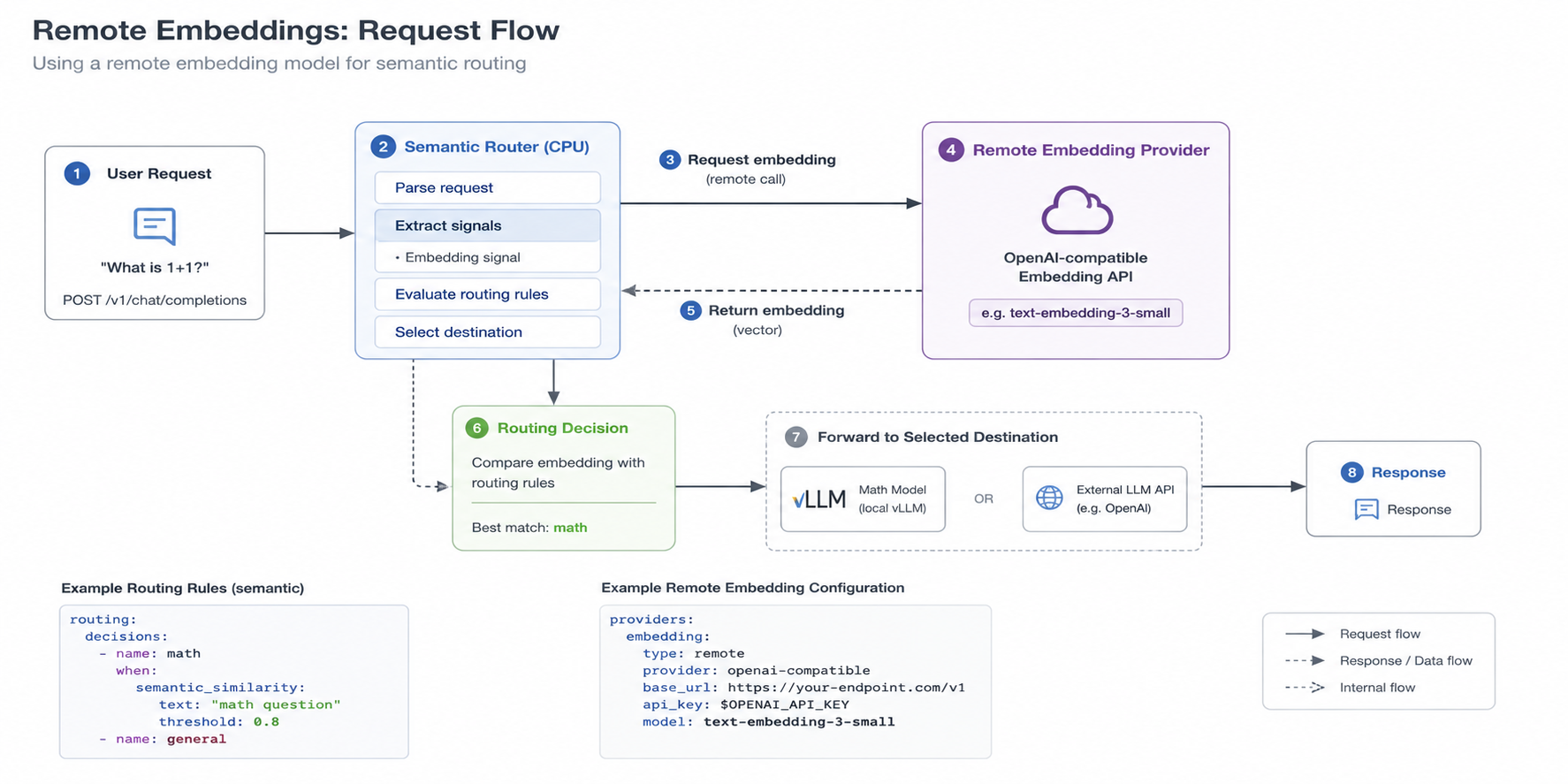
Semantic Router can send text embedding work to an external OpenAI-compatible endpoint instead of loading a local embedding model. The provider is configured once under global.model_catalog.embeddings.semantic; embedding-backed signals and model-selection consumers continue to use their existing configuration.
Two fields describe different parts of the setup:
embedding_config.model_type: remoteselects remote execution.embedding_config.backend: openai_compatibleselects the remote API protocol.
Keep both fields. remote is not an API protocol, and openai_compatible is not a model family.
Key Advantages
- Reuses an existing managed embedding service instead of loading another model into the Router.
- Shares one provider across embedding signals, knowledge bases, model selection, and other text embedding consumers.
- Preserves existing signal thresholds, decision conditions, and model references when changing execution providers.
- Reports redacted provider health through startup status without exposing credential values.
What Problem Does It Solve?
Local embedding execution requires the Router to download model assets and reserve compute and memory for inference. That can duplicate an embedding service already operated elsewhere and couple Router deployment size to the selected embedding model.
A remote provider moves text embedding execution behind an OpenAI-compatible endpoint while keeping routing configuration and decision behavior unchanged.
Supported Scope
The remote provider is shared by text embedding consumers, including:
routing.signals.embeddings- text-side knowledge-base and complexity embeddings
- contrastive jailbreak and preference embeddings
- reask embeddings
- model-selection embeddings
- semantic tool filtering
Signal thresholds, decision conditions, and model references do not change when switching from local to remote embeddings.
Current limitations:
- Remote multimodal image or audio embeddings are not supported.
- Semantic cache, memory, RAG, and vector-store index migration are separate storage concerns. Do not switch an existing persistent index to a different embedding dimension without rebuilding or migrating it.
- The
openai_compatibleadapter sendsAuthorization: Bearer <token>. Custom authentication headers and provider-specific request schemas are not supported yet.
When to Use
Use a remote embedding provider when:
- an OpenAI-compatible embedding service is already available
- embedding capacity should scale independently from the Router
- Router Pods should avoid downloading and loading a local text embedding model
- multiple Router consumers should share the same managed embedding space
Keep local execution when the deployment must operate without network access to an embedding service or requires multimodal image embeddings.
Configuration
Store the credential in an environment variable. Never put the key directly in YAML:
export OPENAI_API_KEY="<provider-key>"
Configure the shared provider:
global:
model_catalog:
embeddings:
semantic:
qwen3_model_path: ""
gemma_model_path: ""
mmbert_model_path: ""
multimodal_model_path: ""
bert_model_path: ""
embedding_config:
backend: openai_compatible
model_type: remote
preload_embeddings: false
target_dimension: 1536
top_k: 1
min_score_threshold: 0.5
endpoint:
base_url: https://api.openai.com/v1
model: text-embedding-3-small
api_key_env: OPENAI_API_KEY
timeout_seconds: 10
max_retries: 2
dimensions: 1536
The router appends /embeddings to base_url unless the path already ends in /embeddings. The example therefore calls https://api.openai.com/v1/embeddings.
endpoint.dimensions and embedding_config.target_dimension must match when both are set. The router validates returned vectors against that dimension.
Endpoint fields
| Field | Meaning |
|---|---|
base_url | Provider base URL, including scheme and host. Usually ends in /v1. |
model | Model name sent in the OpenAI-compatible request. |
api_key_env | Name of the environment variable containing the bearer token. Omit it for an unauthenticated in-cluster endpoint. |
timeout_seconds | Per-request timeout. 0 uses the provider default. |
max_retries | Retry count after the initial request for retryable failures. |
dimensions | Requested provider output dimension when the endpoint supports dimension selection. |
Use the Provider in Routing
Embedding signals and decisions are configured the same way as with local embeddings:
routing:
signals:
embeddings:
- name: billing_support
threshold: 0.72
aggregation_method: max
candidates:
- billing invoice payment subscription refund
- pricing renewal credit card receipt
decisions:
- name: billing-route
priority: 200
rules:
operator: AND
conditions:
- type: embedding
name: billing_support
modelRefs:
- model: billing-model
- name: default-route
priority: 10
rules:
operator: AND
conditions: []
modelRefs:
- model: default-model
Changing providers changes the embedding space and score distribution. Re-evaluate similarity thresholds before production rollout, even when the new provider uses the same vector dimension.
Configure Through the Dashboard
Open Global Config, then find Model Catalog > Embedding Models and select Edit Section.
- Set Provider Type to
remote. - Set API Protocol to
openai_compatible. - Enter the base URL, model, credential environment-variable name, timeout, retries, and dimensions.
- Set Embedding Optimization > Target Dimension to the same value as Remote Endpoint > Dimensions.
- Save the section.
The Dashboard writes the canonical pair:
embedding_config:
model_type: remote
backend: openai_compatible
The Status page displays provider backend, model, dimension, credential availability, health, last probe time, and the latest probe error. It exposes only the environment-variable name and whether it is set, never the credential value.
Run Locally
Build the local image so the running router contains the current source:
make vllm-sr-dev
Start Router and Envoy without a second Dashboard instance:
OPENAI_API_KEY="<provider-key>" \
vllm-sr serve \
--config e2e/config/config.remote-embedding-smoke.yaml \
--image-pull-policy never \
--minimal
The smoke config uses mock chat backends at host.docker.internal:18000 and host.docker.internal:18001. They are only required when sending chat requests through Envoy; provider startup status can be checked without them.
Verify startup status:
curl -fsS http://localhost:8080/startup-status \
| jq '.embedding_provider'
A healthy response resembles:
{
"mode": "remote",
"backend": "openai_compatible",
"model": "text-embedding-3-small",
"dimension": 1536,
"api_key_env": "OPENAI_API_KEY",
"api_key_env_set": true,
"healthy": true,
"last_checked_at": "2026-07-14T12:00:00Z"
}
Operator Configuration
Inject the secret into the Router Pod and reference its environment-variable name from the CR:
apiVersion: vllm.ai/v1alpha1
kind: SemanticRouter
metadata:
name: semantic-router
spec:
env:
- name: OPENAI_API_KEY
valueFrom:
secretKeyRef:
name: embedding-provider
key: api-key
config:
embedding_models:
embedding_config:
backend: openai_compatible
model_type: remote
preload_embeddings: false
target_dimension: 1536
endpoint:
base_url: https://api.openai.com/v1
model: text-embedding-3-small
api_key_env: OPENAI_API_KEY
timeout_seconds: 10
max_retries: 2
dimensions: 1536
For an Azure endpoint, use an OpenAI v1 endpoint that accepts bearer authentication, for example https://<resource>.openai.azure.com/openai/v1. Azure deployments that require the legacy api-key header are not compatible with the current adapter.
Troubleshooting
Provider does not appear in status
Confirm both fields are present and restart the Router after changing startup configuration:
backend: openai_compatible
model_type: remote
Then inspect the complete startup response:
curl -fsS http://localhost:8080/startup-status | jq
Credential is missing
If api_key_env_set is false, set the environment variable in the Router process or Pod. Setting it only in the Dashboard backend does not inject it into the Router.
Authentication fails
The adapter sends a bearer token. Verify that the endpoint accepts Authorization: Bearer and that base_url targets the OpenAI-compatible API root.
Dimension mismatch
Make these values equal and verify that the provider actually returns that dimension:
embedding_config:
target_dimension: 1536
endpoint:
dimensions: 1536
Local mode still appears in the Dashboard
Ensure the Dashboard backend was started with the same exact config path as the Router, then restart the Dashboard backend. Raw YAML and visual editing both use ROUTER_CONFIG_PATH.