Model Performance Evaluation
Why evaluate?
Evaluation makes routing data-driven. By measuring per-category accuracy on MMLU-Pro (and doing a quick sanity check with ARC), you can:
- Select the right model for each decision and configure them in decisions.modelRefs
- Pick a sensible default_model based on overall performance
- Decide when CoT prompting is worth the latency/cost tradeoff
- Catch regressions when models, prompts, or parameters change
- Keep changes reproducible and auditable for CI and releases
In short, evaluation converts anecdotes into measurable signals that improve quality, cost efficiency, and reliability of the router.
This guide documents the automated workflow to evaluate models (MMLU-Pro and ARC Challenge) via a vLLM-compatible OpenAI endpoint, generate a performance-based routing config, and update categories.model_scores in config.
see code in /src/training/model_eval
What you'll run end-to-end
1) Evaluate models
- per-category accuracies
- ARC Challenge: overall accuracy
2) Visualize results
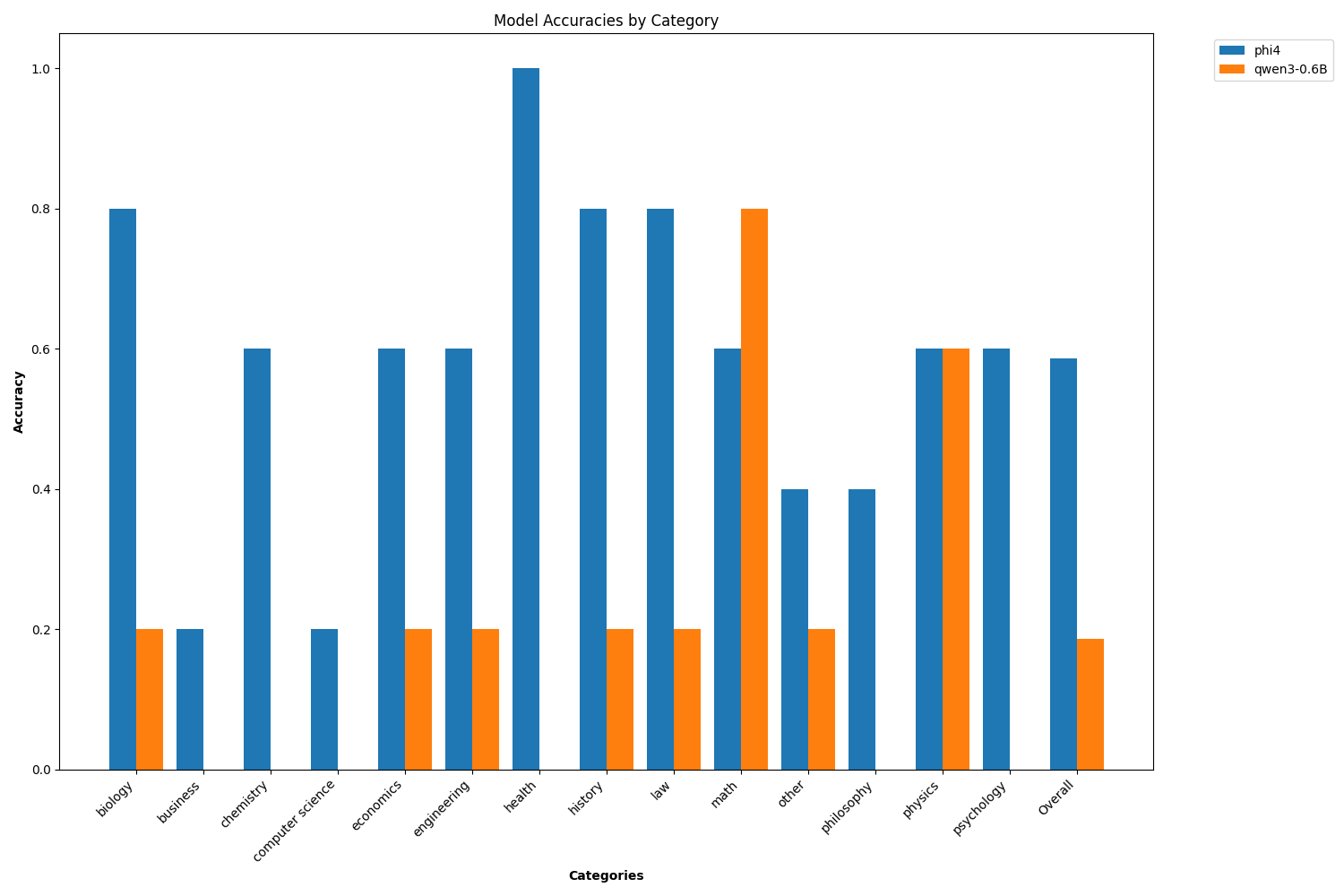
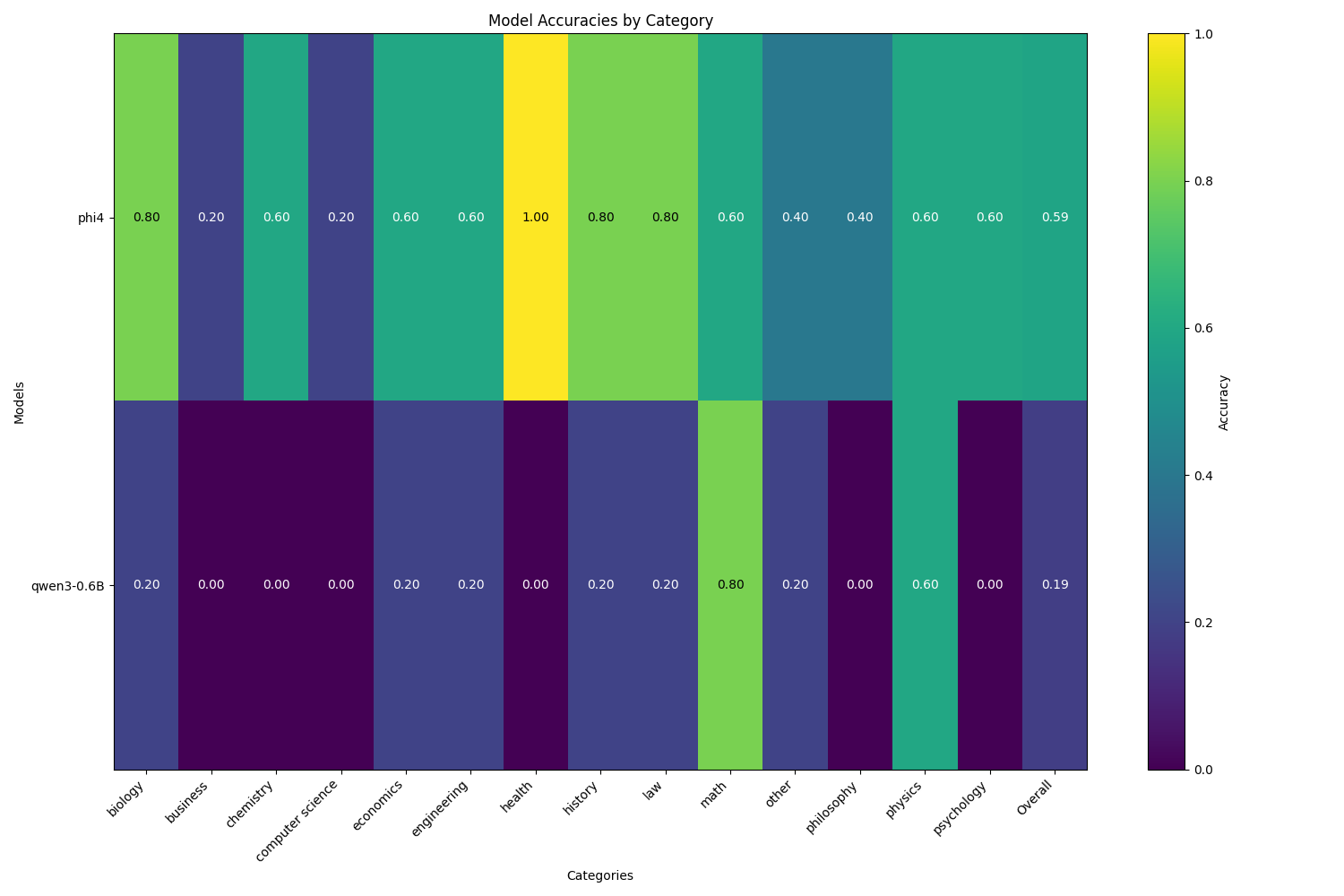
- bar/heatmap plot of per-category accuracies
3) Generate an updated config.yaml
- Create decisions for each category with modelRefs
- Set default_model to the best average performer
- Keep or apply decision-level reasoning settings
1.Prerequisites
-
A running vLLM-compatible OpenAI endpoint serving your models
- Endpoint URL like http://localhost:8000/v1
- Optional API key if your endpoint requires one
# Terminal 1vllm serve microsoft/phi-4 --port 11434 --served_model_name phi4# Terminal 2vllm serve Qwen/Qwen3-0.6B --port 11435 --served_model_name qwen3-0.6B -
Python packages for evaluation scripts:
- From the repo root: matplotlib in requirements.txt
- From
/src/training/model_eval: requirements.txt
# We will work at this dir in this guidecd /src/training/model_evalpip install -r requirements.txt
⚠️ Critical Configuration Requirement:
The --served-model-name parameter in your vLLM command must exactly match the model names in your config/config.yaml:
# config/config.yaml must match the --served-model-name values above
providers:
  models:
    - name: "phi4"            # ✅ Matches --served_model_name phi4
      provider_model_id: "phi4"
      backend_refs:
        - name: "endpoint1"
          endpoint: "127.0.0.1:11434"
          protocol: "http"
    - name: "qwen3-0.6B"      # ✅ Matches --served_model_name qwen3-0.6B
      provider_model_id: "qwen3-0.6B"
      backend_refs:
        - name: "endpoint2"
          endpoint: "127.0.0.1:11435"
          protocol: "http"
  defaults:
    default_model: "phi4"

routing:
  modelCards:
    - name: "phi4"
    - name: "qwen3-0.6B"
Optional tip:
- Ensure your
config/config.yamlincludes your deployed model names underproviders.models[]and the matching semantic catalog underrouting.modelCardsif you plan to use the generated config directly.
2.Evaluate on MMLU-Pro
see script in mmul_pro_vllm_eval.py
Example usage patterns
# Evaluate a few models, few samples per category, direct prompting
python mmlu_pro_vllm_eval.py \
  --endpoint http://localhost:11434/v1 \
  --models phi4 \
  --samples-per-category 10

python mmlu_pro_vllm_eval.py \
  --endpoint http://localhost:11435/v1 \
  --models qwen3-0.6B \
  --samples-per-category 10

# Evaluate with CoT (results saved under *_cot)
python mmlu_pro_vllm_eval.py \
  --endpoint http://localhost:11435/v1 \
  --models qwen3-0.6B \
  --samples-per-category 10
  --use-cot

# If you have set up Semantic Router properly, you can run in one go
python mmlu_pro_vllm_eval.py \
  --endpoint http://localhost:8801/v1 \
  --models qwen3-0.6B, phi4 \
  --samples-per-category
  # --use-cot # Uncomment this line if use CoT
Key flags
- --endpoint: vLLM OpenAI URL (default http://localhost:8000/v1)
- --models: space-separated list OR a single comma-separated string; if omitted, the script queries /models from the endpoint
- --categories: restrict evaluation to specific categories; if omitted, uses all categories in the dataset
- --samples-per-category: limit questions per category (useful for quick runs)
- --use-cot: enables Chain-of-Thought prompting variant; results are saved in a separate subfolder suffix (_cot vs _direct)
- --concurrent-requests: concurrency for throughput
- --output-dir: where results are saved (default results)
- --max-tokens, --temperature, --seed: generation and reproducibility knobs
What it outputs per model
- results/Model_Name_(direct|cot)/
- detailed_results.csv: one row per question with is_correct and category
- analysis.json: overall_accuracy, category_accuracy map, avg_response_time, counts
- summary.json: condensed metrics
- mmlu_pro_vllm_eval.txt: prompts and answers log (debug/inspection)
Note
- Model naming: slashes are replaced with underscores for folder names; e.g., gemma3:27b -> gemma3:27b_direct directory.
- Category accuracy is computed on successful queries only; failed requests are excluded.
3.Evaluate on ARC Challenge (optional, overall sanity check)
see script in arc_challenge_vllm_eval.py
Example usage patterns
python arc_challenge_vllm_eval.py \
  --endpoint http://localhost:8801/v1\
  --models qwen3-0.6B,phi4
  --output-dir arc_results
Key flags
- --samples: total questions to sample (default 20); ARC is not categorized in our script
- Other flags mirror the MMLU-Pro script
What it outputs per model
- results/Model_Name_(direct|cot)/
- detailed_results.csv: one row per question with is_correct and category
- analysis.json: overall_accuracy, avg_response_time
- summary.json: condensed metrics
- arc_challenge_vllm_eval.txt: prompts and answers log (debug/inspection)
Note
- ARC results do not feed
categories[].model_scoresdirectly, but they can help spot regressions.
4.Visualize per-category performance
see script in plot_category_accuracies.py
Example usage patterns:
# Use results/ to generate bar plot
python plot_category_accuracies.py \
  --results-dir results \
  --plot-type bar \
  --output-file results/bar.png

# Use results/ to generate heatmap plot
python plot_category_accuracies.py \
  --results-dir results \
  --plot-type heatmap \
  --output-file results/heatmap.png

# Use sample-data to generate example plot
python src/training/model_eval/plot_category_accuracies.py \
  --sample-data \
  --plot-type heatmap \
  --output-file results/category_accuracies.png
Key flags
- --results-dir: where analysis.json files are
- --plot-type: bar or heatmap
- --output-file: output image path (default model_eval/category_accuracies.png)
- --sample-data: if no results exist, generates fake data to preview the plot
What it does
- Finds all
results/**/analysis.json, aggregates analysis["category_accuracy"] per model - Adds an Overall column representing the average across categories
- Produces a figure to quickly compare model/category performance
Note
- It merges
directandcotas distinct model variants by appending:director:cotto the label; the legend hides:directfor brevity.
5.Generate performance-based routing config
see script in result_to_config.py
Example usage patterns
# Use results/ to generate a new config file (not overridden)
python src/training/model_eval/result_to_config.py \
  --results-dir results \
  --output-file config/config.eval.yaml

# Modify similarity-threshold
python src/training/model_eval/result_to_config.py \
  --results-dir results \
  --output-file config/config.eval.yaml \
  --similarity-threshold 0.85

# Generate from specific folder
python src/training/model_eval/result_to_config.py \
  --results-dir results/mmlu_run_2025_09_10 \
  --output-file config/config.eval.yaml
Key flags
- --results-dir: points to the folder where analysis.json files live
- --output-file: target config path (default
config/config.eval.yaml) - --similarity-threshold: semantic cache threshold to set in the generated config
- --backend-endpoint: endpoint used for generated
providers.models[].backend_refs[] - --backend-protocol: protocol used for generated
backend_refs - --backend-type: backend type used for generated
backend_refs - --api-format:
providers.models[].api_formatvalue for generated models - --provider-name: key used under
providers.models[].external_model_ids
What it does
- Reads all
analysis.jsonfiles, extracting analysis["category_accuracy"] - Collapses
directandcotvariants into one logical model catalog entry per base model - Constructs a canonical v0.3 scaffold:
- providers.defaults.default_model: the best average performer across categories
- providers.models[]: deployment bindings for each evaluated logical model
- routing.modelCards[]: the logical model catalog used by routing decisions
- routing.signals.domains[]: one domain signal per MMLU-Pro category, each with ranked
model_scores - routing.decisions: left empty so you can compose routing policy separately
- global: sparse overrides for semantic cache, tools, BERT embeddings, prompt guard, and classifier modules
- Leaves out any special
autoplaceholder models if present
Schema alignment
- providers.defaults.default_model: best average performer across categories
- providers.models[]: one generated backend binding per evaluated logical model
- routing.modelCards[]: one logical model entry per evaluated base model
- routing.signals.domains[].name: the MMLU-Pro category string
- routing.signals.domains[].model_scores: ranked models with score and
use_reasoning - global: sparse runtime override, not a full copy of router defaults
Note
- This script only works with results from MMLU_Pro Evaluation.
- The default output path is
config/config.eval.yamlso the exhaustive reference file atconfig/config.yamlis not overwritten. - The generated file is canonical, but it is still an evaluation scaffold. Review
listeners,providers.models[].backend_refs[], and any runtime overrides before serving it in production. - If your production config carries environment-specific settings (multi-endpoint weights, secrets, pricing, policies), merge the generated
providers/routing/globalsections into that deployment-specific config instead of replacing it wholesale.
Example config.eval.yaml
see more about config at configuration
version: v0.3
listeners: []

providers:
  defaults:
    default_reasoning_effort: medium
    default_model: phi4
  models:
    - name: phi4
      provider_model_id: phi4
      api_format: openai
      external_model_ids:
        openai: phi4
      backend_refs:
        - name: phi4-backend
          endpoint: 127.0.0.1:11434
          protocol: http
          type: chat
          weight: 1
    - name: qwen3-0.6B
      provider_model_id: qwen3-0.6B
      api_format: openai
      external_model_ids:
        openai: qwen3-0.6B
      backend_refs:
        - name: qwen3-0.6B-backend
          endpoint: 127.0.0.1:11435
          protocol: http
          type: chat
          weight: 1

routing:
  modelCards:
    - name: phi4
      description: Generated from MMLU-Pro evaluation results for category-aware routing.
      quality_score: 0.81
      capabilities: [chat]
      tags: [generated, mmlu-pro]
      modality: ar
    - name: qwen3-0.6B
      description: Generated from MMLU-Pro evaluation results for category-aware routing.
      quality_score: 0.77
      capabilities: [chat]
      tags: [generated, mmlu-pro]
      modality: ar
  signals:
    domains:
      - name: business
        description: MMLU-Pro category generated from evaluation results.
        mmlu_categories: [business]
        model_scores:
          - model: phi4
            score: 0.88
            use_reasoning: false
          - model: qwen3-0.6B
            score: 0.75
            use_reasoning: false
      - name: law
        description: MMLU-Pro category generated from evaluation results.
        mmlu_categories: [law]
        model_scores:
          - model: phi4
            score: 0.84
            use_reasoning: false
          - model: qwen3-0.6B
            score: 0.73
            use_reasoning: false
  decisions: []

global:
  stores:
    semantic_cache:
      enabled: true
      similarity_threshold: 0.85
      max_entries: 1000
      ttl_seconds: 3600
  integrations:
    tools:
      enabled: true
      top_k: 3
      similarity_threshold: 0.2
      tools_db_path: config/runtime/tools/tools_db.json
      fallback_to_empty: true
  model_catalog:
    embeddings:
      semantic:
        mmbert_model_path: models/mom-embedding-ultra
        use_cpu: true
        embedding_config:
          model_type: mmbert
          preload_embeddings: true
          target_dimension: 768
          target_layer: 22
          top_k: 1
          min_score_threshold: 0.5
    modules:
      prompt_guard:
        enabled: true
        model_id: models/mmbert32k-jailbreak-detector-merged
        threshold: 0.7
        use_cpu: true
        use_mmbert_32k: true
        jailbreak_mapping_path: models/mmbert32k-jailbreak-detector-merged/jailbreak_type_mapping.json
      classifier:
        domain:
          model_id: models/mmbert32k-intent-classifier-merged
          threshold: 0.5
          use_cpu: true
          use_mmbert_32k: true
          category_mapping_path: models/mmbert32k-intent-classifier-merged/category_mapping.json
          fallback_category: other
        pii:
          model_id: models/mmbert32k-pii-detector-merged
          threshold: 0.9
          use_cpu: true
          use_mmbert_32k: true
          pii_mapping_path: models/mmbert32k-pii-detector-merged/pii_type_mapping.json
This output is intentionally easy to diff and merge:
providers.models[]carries endpoint/protocol bindings so the file can be promoted into a runnable config.routing.modelCards[]androuting.signals.domains[]carry the evaluation-derived routing semantics.routing.decisionsstays empty because the evaluation step cannot infer your full production policy.